.svg)
The 2026 Chatbot Buyer's Guide: 10 Questions Every Business Should Ask

Most businesses end up buying the wrong chatbot for the exact same reason. They judge it based on a perfectly polished vendor demo. You know the one: the AI answers every question flawlessly, the integrations look completely seamless, and the pricing seems perfectly reasonable.
Then they actually launch it in the real world. Suddenly, they hit a hidden pricing tier cap by week three. That WhatsApp integration they assumed was part of the deal turns out to be an expensive premium add-on. When a customer actually needs to talk to a human, the escalation process forces them to start the entire conversation over from scratch. And that slick analytics dashboard? It shows you how many messages you got, but it completely hides your failure rate.
The truth is, the chatbot itself was never really the problem. The real issue was the questions the team forgot to ask before signing the contract.
If you are looking to buy a chatbot in 2026, you need to ask about channel coverage to see if it is native or just loosely integrated. You also need to calculate the pricing at three times your current volume, look into how specific the AI training gets, test the quality of the human escalation path, and verify their data compliance certifications. Those five areas alone account for 90% of buyer's remorse. We have laid out the full 10 questions you need to ask below.
Why Buying a Chatbot in 2026 Is Harder Than It Should Be
Businesses that deploy chatbots well commonly automate 40 to 70% of inbound conversations, according to Zoho's 2026 chatbot buying analysis. The market potential is real. The deployment reality is messier.
The category has exploded. Every software vendor has added "AI chatbot" to their product description. The chatbot market is growing at 23.3% annually toward a projected $27.3 billion by 2030, according to Master of Code's benchmark data. That growth has created a category where every tool looks similar on a feature comparison page and radically different in production.
The three patterns that consistently produce poor chatbot investments:
Choosing on features, not failure modes: Vendor demos show you what the AI does well. They do not show you what happens when it fails, how often it fails, or what the customer experience is at the moment of failure.
Evaluating starting price, not scaled price: A tool that costs $49 per month at 200 conversations per month may cost $490 per month at 2,000. Most buyers discover this after they have started growing.
Assuming the demo environment matches your real environment: The demo uses clean test data on a fast connection through a website chat widget. Your customers use fragmented questions, mixed languages, and WhatsApp at 11pm.
The questions below are designed to surface all three categories of risk before you commit.
Before You Start: The Two Things to Define First
Two decisions precede any vendor evaluation. Getting them wrong means evaluating the wrong tools.
Define the specific problem you are solving: The questions to ask before buying a chatbot only produce useful answers when they are asked in the context of a specific use case. A chatbot that handles WhatsApp lead qualification is not the same product as a chatbot that deflects support tickets on your website. A chatbot for onboarding HR questions is not the same product as a chatbot for real-time product recommendations in an e-commerce flow. The market uses one word (chatbot) for fundamentally different products. Define your use case before you evaluate anything.
Define what success looks like in 90 days: How to choose an AI chatbot starts with knowing what you are choosing it for. Name the specific metric that will tell you the investment was worth it: containment rate, response time reduction, conversion rate improvement, cost per resolved inquiry. A chatbot evaluated against a vague goal of "improving customer experience" cannot be declared successful or failed. Both outcomes are deniable.
With those two things defined, here are the ten questions.
Quick Reference: The 10 Questions at a Glance
Use this list as your demo checklist. Bring it to every vendor conversation.
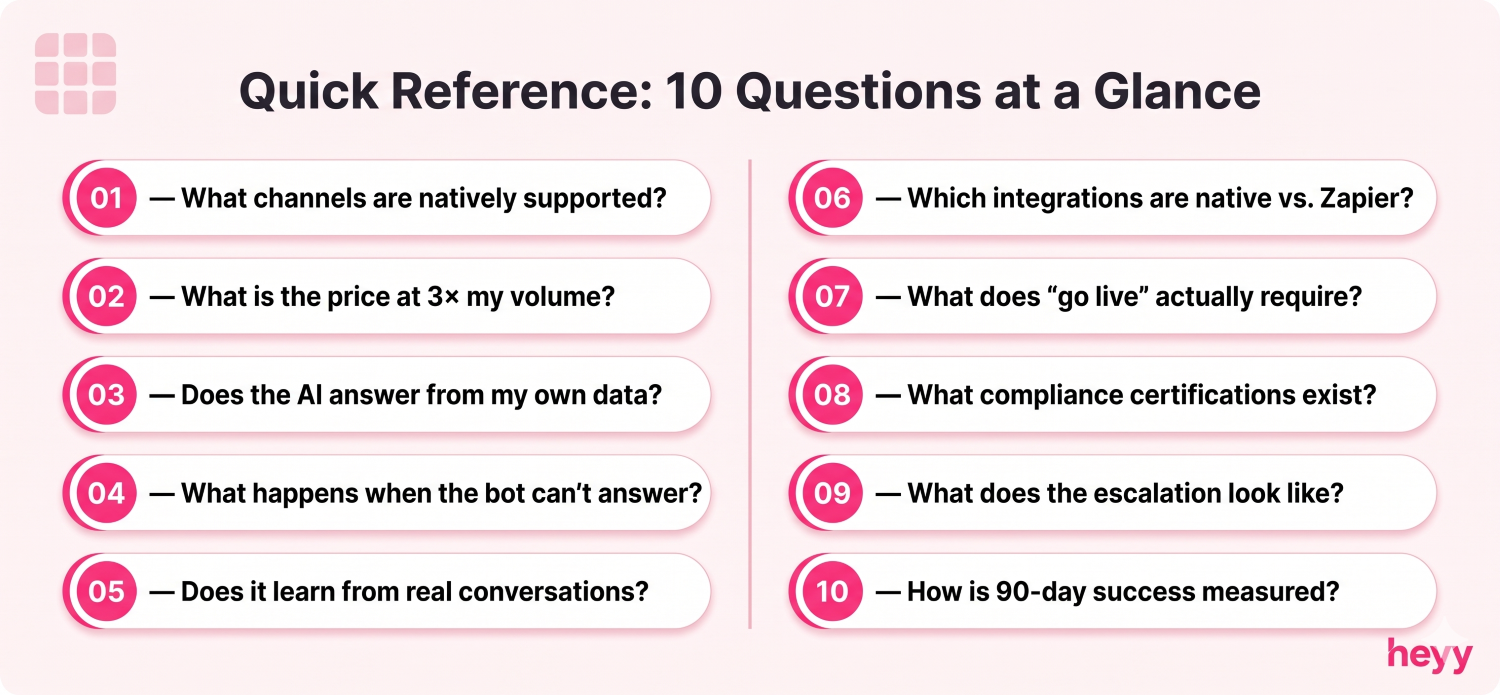
The 10 Questions Every Business Should Ask Before Buying a Chatbot
Q1: What is the difference between a native chatbot integration and a third-party connector?
The verdict: "Supports WhatsApp" on a feature list can mean three completely different things. Always ask whether the channel is native before evaluating anything else.
"Supports WhatsApp" can mean the platform was built for WhatsApp and the experience is first-class. It can mean there is a Zapier connector that routes messages through, with added latency and no rich message formatting. It can mean the integration is on the roadmap but not yet live.
A native channel integration means the chatbot platform connects directly to WhatsApp, Instagram, or another channel through its own maintained API. A third-party integration means the connection runs through a connector like Zapier, which adds latency, a cost, and a single point of failure.
Ask specifically: "Is WhatsApp [or Instagram, Facebook, SMS] a native channel in your platform or is it handled through a third-party connector?" Follow up: "Can I see a live demo of a WhatsApp conversation, not a website chat demo?"
For businesses where WhatsApp is the primary customer communication channel, this distinction is the entire purchase decision. A tool that handles website chat excellently and WhatsApp poorly is the wrong tool for half your customer base.
Q2: How does chatbot pricing change as my conversation volume grows?
The verdict: Every AI chatbot vendor leads with the entry-level price and the entry-level price is almost never what you will pay once the platform is working. Calculate your cost at 3x current volume before signing anything.
Chatbot pricing models fall into four categories: per-seat (fixed cost per agent or user), per-conversation (cost per AI-resolved interaction), usage-based (cost per message or token), and flat subscription (fixed monthly cost with conversation caps). Each model creates a different cost cliff when your volume grows.
Run this calculation before every evaluation: take your current monthly conversation volume, multiply by three, and ask the vendor for the exact cost at that volume. Then multiply by ten and ask again. The answer tells you more about the platform's fit for your growth trajectory than any feature comparison.
Ask specifically: "If I go from 500 conversations per month to 1,500, what changes on my invoice? If I go to 5,000?"
The pricing model that penalizes you for growth is not a pricing model built for growing businesses.
Q3: Does an AI chatbot answer from my own business data or from general knowledge?
The verdict: A chatbot that cannot answer with your specific data is not a business chatbot. It is a general-purpose AI with a chat interface. Test this with your own product questions in the demo.
A genuine AI chatbot trained on your specific product catalog, policies, and FAQs responds with information specific to your business. It knows your actual return policy, not a generic policy. It knows your product variants, not approximate descriptions. It knows your pricing, not industry averages.
A tool with AI-powered conversation but no specific training answers questions the way a helpful stranger who has never heard of your company would. Technically fluent. Factually unreliable for anything specific to your business.
Ask specifically: "How is the AI trained on my business data? What formats does it accept for knowledge base input? How quickly do updates to my knowledge base reflect in the chatbot's responses?"
Follow up: during the demo, ask a question about a specific product detail, a policy edge case, or a process unique to your business. A well-trained chatbot answers accurately. An untrained one gives a generic response or makes something up.
Q4: What happens when a chatbot cannot answer a customer's question?
The verdict: The escalation moment is where most chatbots fail. Test it live in the demo before you evaluate anything else.
Every chatbot vendor shows you the conversations that go well. Ask to see the conversations that do not.
The escalation moment, when the chatbot reaches a question it cannot handle, is where most chatbot deployments lose customer trust. A bot that says "I don't know, let me get someone" cleanly, with full context passed to the human agent, preserves the relationship. A bot that says "I'm sorry, I didn't understand that" four times before the customer gives up destroys it.
Ask specifically: "Can you show me what happens in the demo when I ask a question the bot cannot answer?" Then ask something it clearly should not know. Watch exactly what happens. Watch whether the escalation to a human agent carries the conversation history. Watch whether the customer has to explain themselves again.
This live test reveals more about production quality than any feature checklist. Governance beats buzzwords, and accuracy, confidence thresholds, and fallback logic matter more than which AI model a vendor claims to use, per Zoho's 2026 buyer analysis.
Q5: Do AI chatbots learn and improve from real customer conversations?
The verdict: Static chatbots deliver the same quality on day 300 as day one. Confirm exactly how and when the platform improves from production conversation data.
Static chatbots answer every question the same way on day one and on day three hundred. The responses do not improve. The failure patterns do not feed back into the training. The questions the bot could not answer yesterday remain unanswered tomorrow.
AI chatbots with active learning mechanisms improve over time. The conversations where the bot failed or escalated become training signals for the next iteration. The questions that appeared this month but were not in the original knowledge base get incorporated into the next update.
Ask specifically: "How does the platform use production conversation data to improve the chatbot's responses? Is this automatic, manual, or not included?"
Follow up: "If I want to update the chatbot's knowledge base myself, how do I do that? How long does an update take to go live?"
A chatbot that requires an engineering ticket to update a single FAQ answer is a chatbot that will fall behind your business in six months.
Q6: Which chatbot integrations are native versus requiring Zapier or custom code?
The verdict: "Integrates with everything" means nothing. Ask which integrations are first-party and what happens if the connector tool goes down.
The integration slide in a vendor deck lists every tool the platform "connects with." The asterisk on most of those connections is that they require Zapier, Make, or a custom webhook that your developer needs to build and maintain.
Native integrations connect directly through first-party APIs maintained by the vendor. They are faster, more reliable, and require no additional cost or maintenance. Third-party connector integrations add latency, can break when either system updates, and introduce an additional point of failure in your data flow.
For e-commerce businesses, the Shopify or WooCommerce integration being native versus connector-based determines whether the chatbot can check real-time order status or redirect the customer to their confirmation email.
Ask specifically: "Is the [Shopify / HubSpot / Calendly / specific tool you use] integration native or does it require a third-party connector?" Then ask: "What happens to that integration if Zapier has an outage?"
Q7: How long does it really take to deploy a chatbot?
The verdict: Most vendor timelines describe the installation time, not the go-live time. Ask for the median time from signing to first live customer conversation, not the minimum.
Most vendor timelines describe the technical setup time. They do not include the time required for you to prepare the knowledge base, configure the conversation flows, write the system prompt, test the escalation paths, and train the AI on your specific data.
Most enterprise brands go live within days, not months, on platforms designed for speed to deployment, per Alhena AI's implementation research. The variation is real. A website chat FAQ bot with a simple knowledge base can be live in a day. A fully configured omnichannel AI deployment with HRIS integration, custom escalation logic, and brand voice training may take three to four weeks.
Ask specifically: "What do I need to provide for the chatbot to go live? Walk me through the exact checklist." Then ask: "Of the businesses that have bought this platform, what is the median time from signing to first live conversation?"
The second question surfaces the honest answer, not the optimistic one.
Q8: What data privacy and compliance certifications should a chatbot platform have?
The verdict: Every conversation is a customer data event. Confirm compliance certifications before any technical evaluation begins, not after.
Every conversation your chatbot handles is a customer data event. Depending on your industry and geography, that data is subject to specific legal requirements.
For businesses in the EU: GDPR applies to every customer conversation. The platform must have a Data Processing Agreement and clear data residency policies for EU customer data.
For US healthcare businesses: HIPAA applies to any conversation involving patient information. The platform must provide a Business Associate Agreement.
For financial services: data residency, audit logs, and access controls are regulatory requirements, not optional configurations.
The key certifications to ask about are SOC 2 Type II, ISO 27001, GDPR compliance documentation, and HIPAA BAA availability. Each has a specific meaning and a specific business implication.
Ask specifically: "What compliance certifications do you hold? SOC 2, ISO 27001, GDPR, HIPAA?" Follow up: "Where is customer conversation data stored? Who can access it within your organization? How long is it retained?"
If the vendor cannot answer these questions quickly and specifically, the answer is that they have not thought through compliance carefully. That is a disqualifying signal for any regulated industry.
Q9: How should a chatbot escalation to a human agent work?
The verdict: A clean escalation with full conversation context passed to the agent is the most important quality signal in any chatbot evaluation. Test it before you trust anything else.
The moment of escalation from AI to human is the highest-stakes interaction in your entire chatbot deployment. It is also the moment most vendors bury in the demo.
A well-designed escalation carries the full conversation history to the human agent, sets an accurate expectation with the customer for when they will hear back, and routes to the right agent based on the nature of the issue. The customer does not explain themselves again. The agent does not start with a blank screen.
A poorly designed escalation drops the customer into a generic contact form, a new chat window, or a hold queue with no context. The customer's next message to your human team is: "I already explained this to your bot."
Ask specifically: "When the chatbot escalates to a human agent, what does the agent see? Can you show me what the agent view looks like during and after an escalation?" Then watch whether the human view includes the full prior conversation, the customer's contact information, and any structured data collected.
This single question has disqualified more tools than any other in real evaluations.
Q10: How do you measure chatbot success in the first 90 days?
The verdict: If the platform cannot show you success metrics in a live dashboard view during the demo, it cannot show you failure patterns either. Analytics are non-negotiable.
The final question to ask before buying a chatbot is the one most buyers forget to ask: how will you know if this worked?
Chatbot success is measured in specific metrics: containment rate (percentage of conversations fully resolved without human escalation), first response time, CSAT on chatbot interactions, conversation volume by channel, and escalation reason breakdown (which categories of question are still reaching humans). These numbers should be natively available in the platform's analytics without exporting data or building custom reports.
Ask specifically: "What metrics does your analytics dashboard show by default? Can you show me a sample analytics view?" Then ask: "What would a successful 90-day deployment look like for a business like ours, based on what you have seen with similar customers?"
The second question reveals whether the vendor has thought seriously about customer outcomes or whether they have thought primarily about features.
The Red Flags That Should End Any Evaluation
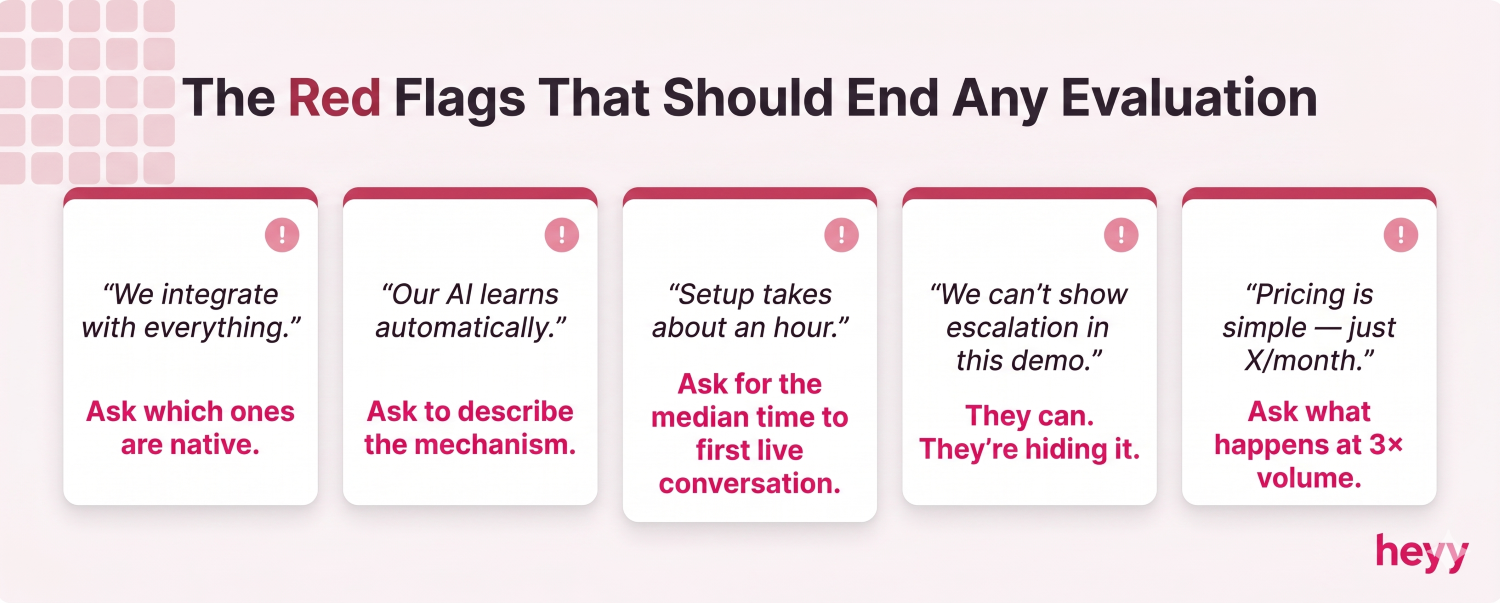
Beyond the ten questions, specific responses during a vendor evaluation should be disqualifying regardless of how good the demo looks.
"We integrate with everything." This means nothing. Everything integrates with Zapier. Ask which integrations are native.
"Our AI learns from every conversation automatically." Ask specifically what that means. A language model does not automatically retrain on your conversations. True learning requires a defined mechanism. If the vendor cannot describe the mechanism, the claim is marketing language.
"Setup takes about an hour." This is technically true for the platform installation. It is not true for knowledge base preparation, conversation flow design, brand voice configuration, testing, and go-live. Ask for the median time from signing to first live customer conversation.
"We cannot show you the escalation flow in this demo." They can. They choose not to because it is the weakest part of the product.
"Pricing is simple — just X per month." Ask what happens when you exceed the conversation limit, add a second channel, or want access to the analytics module. Simple pricing descriptions often contain complex exceptions.
The Criteria That Actually Matter
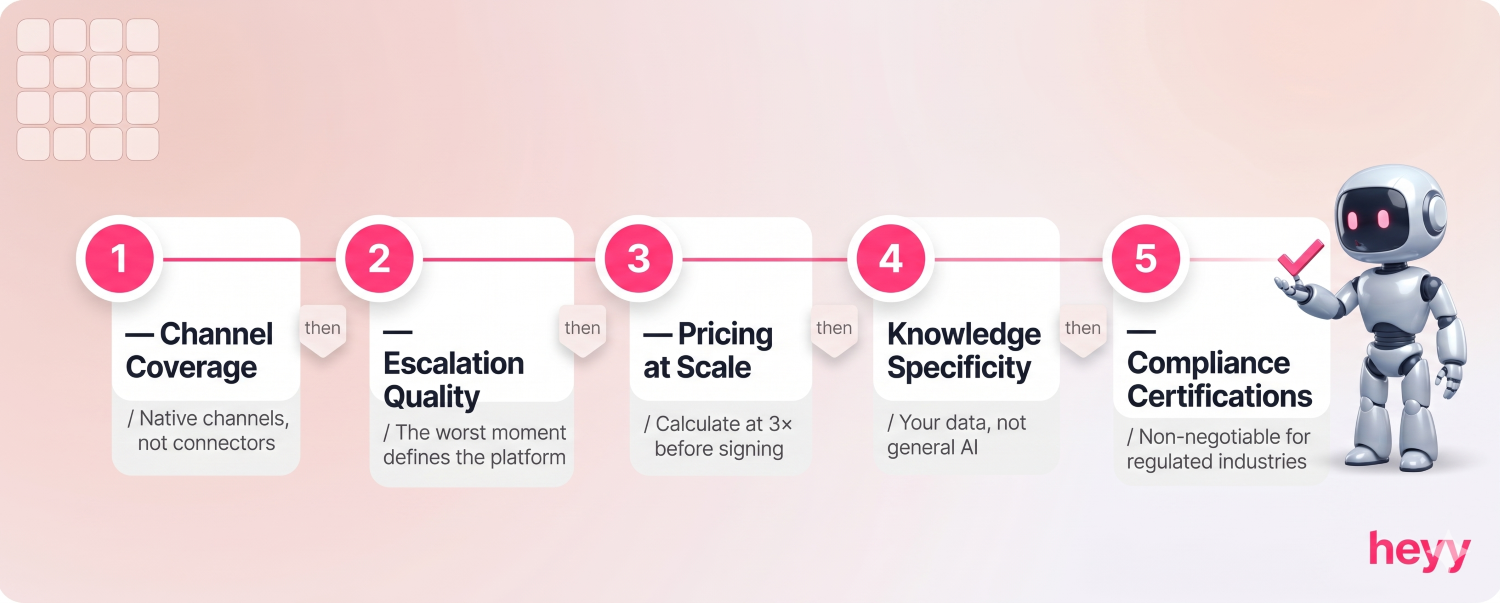
If you consolidate the ten questions into a single prioritized checklist for how to choose an AI chatbot, the order is this.
First, channel coverage. The channels your customers use must be covered natively, not through connectors.
Second, escalation quality. The worst moment in your deployment will be an escalation. Test it before you buy.
Third, pricing at scale. Calculate your cost at three times current volume before you sign anything.
Fourth, knowledge base specificity. The AI should answer with your data, not general knowledge.
Fifth, compliance certification. For any regulated industry, confirm the relevant certifications before any technical evaluation begins.
Everything else, including the AI model used, the dashboard design, the onboarding experience, and the account management, is secondary to these five. The best AI chatbots for small businesses and enterprise deployments alike succeed or fail on these five criteria, not on which AI model powers the back end.
If you are currently evaluating your options and want a platform that confidently checks all ten of these boxes, Heyy is built exactly for the type of business we wrote this guide for.
Instead of relying on awkward third-party integrations, channels like WhatsApp, Instagram, Facebook Messenger, and your website chat are all built right in natively. The AI is trained specifically on your own data, and if a customer ever needs human support, the escalation path hands over the complete conversation history so your team has full context and the customer never has to repeat themselves.
Plus, the pricing scales with your actual usage rather than charging you per seat, and getting everything set up takes days instead of weeks. You can start free and get your first automated conversation live before you even have to think about making a pricing decision.
FAQs
What is a chatbot buyer's guide and why does my business need one?
A chatbot buyer's guide is a framework for evaluating AI chatbot platforms before purchasing, structured around the questions to ask before buying a chatbot that reveal real-world performance rather than demo-environment performance. Your business needs one because the chatbot market in 2026 has more vendors than meaningful differentiation. Every platform claims to have AI, to integrate with everything, and to set up quickly. An AI chatbot buyer's guide gives you the specific questions that reveal which claims are accurate for your specific use case and business context. See chatbot automation basics for the use case foundation before starting any vendor evaluation.
How long should a chatbot evaluation process take?
For a standard business chatbot purchase, two to four weeks is appropriate. Week one: define your use case and success metrics. Week two: shortlist three to five vendors using the ten questions above, run live demos that include escalation testing, and request pricing at your projected conversation volume. Week three: run a pilot or proof of concept with your top one or two candidates using real customer questions. Week four: make the decision based on pilot performance against your defined success metrics.
What is the most important question to ask before buying a chatbot?
If you can only ask one: what happens when the bot cannot answer? The escalation moment reveals the most about platform quality, vendor priorities, and production behavior under real conditions. A vendor who shows you this confidently and whose escalation design is clean has built their product for actual use, not just demos. A vendor who avoids showing this is hiding their weakest point.
How do I evaluate AI chatbot quality without technical expertise?
Ask questions during the demo that the AI should not be able to answer from general knowledge. Use your specific product names, your specific policy edge cases, and your specific customer questions. If the chatbot answers accurately, the knowledge base is well-configured. If it responds generically or confidently with wrong information, the training is insufficient. Non-technical buyers can evaluate AI quality entirely through this behavioral testing approach without understanding the underlying technology. The Tidio vs Heyy comparison is an example of how to evaluate two specific platforms against real business criteria rather than technical specs.
What should I measure after deploying a chatbot?
Five metrics produce the clearest picture of deployment success. Containment rate: what percentage of conversations are fully resolved without human escalation. First response time: the average time from customer message to first AI response. CSAT on chatbot interactions: customer satisfaction scores segmented by AI-handled versus human-handled conversations. Escalation reason breakdown: which categories of question are still reaching human agents. And conversation volume by channel: where are customers reaching you and which channels the AI is handling most effectively. Review all five monthly for the first three months.
Does the size of my business affect which chatbot I should buy?
Significantly. Small businesses benefit most from platforms that deploy quickly without technical overhead, scale predictably without punishing per-seat or per-conversation pricing models, and cover the channels their specific customers use rather than offering comprehensive coverage of channels they do not need. Enterprise businesses need compliance certifications, HRIS or CRM integrations, advanced analytics, and organizational security controls that small business platforms do not provide. The best AI chatbots for small businesses list covers the specific tools sized for smaller teams.
More blog posts to read

Ready to Automate Support
Across Every Channel?
.svg)
.avif)