.svg)
12 Best AI Chatbots for Shopify in 2026 (Compared and Ranked)

Every Ecomm person knows that Shopify chatbots used to be nothing more than basic tools for ticket deflection. If a customer had a question, the bot was there to keep them away from your support team. But in 2026, everything has changed.
A customer visits your store at 11 PM making an enquiry. Nobody's there to answer. They close the tab and buy from your competitor who had a chatbot ready to help.
Another visitor adds products to cart, hesitates, and leaves. No follow-up. Just another abandoned cart in a sea of hundreds, and this isn't a small problem, according to the Baymard Institute, over 70% of all online shopping carts are abandoned before checkout. That translates to roughly $260 billion in recoverable revenue lost every year.
The shift in how customers shop is creating a massive channel opportunity. According to Master of Code, retail chatbot spending is set to skyrocket from $12 billion in 2023 to $72 billion by 2028, a 6x increase that makes e-commerce the top vertical for AI investment. Early adopters are already seeing the payoff: Facebook Messenger abandoned cart bots are boosting revenue by 7–25% per deployment.
For Shopify brands, the impact of AI is even more dramatic. Research shows that specialized bots now achieve 93% deflection rates for order-tracking, eliminating the #1 most common support ticket. Furthermore, 2026 industry analysis confirms that proactive AI product consultation can improve conversion rates by 30–67%. This shifts the technology from a simple support tool to a primary engine for increasing Shopify sales.
The problem isn't whether to add a chatbot to your store. It's finding the best chatbot for Shopify that actually fits your specific situation. This guide covers 10 tools with third-party ratings, sourced performance data, and honest tradeoffs, so you can match the right platform to your store. For a broader look at the category, this guide to the best ecommerce chatbots in 2026 covers the full landscape beyond Shopify specifically.
What the Data Says: ROI Benchmarks for Shopify Chatbots
Before comparing tools, here's what independent research shows the category is capable of when implemented well:
- 93% deflection on order-tracking queries: Wonderchat research shows Shopify chatbots resolve WISMO ("Where Is My Order?") questions at a 93% rate, your team's most repetitive time sink, almost entirely eliminated.
- 30–67% conversion improvement: A 2026 industry analysis found proactive AI product consultation boosts conversion rates by 30–67% compared to stores without chatbot engagement.
- 20–35% cart recovery improvement: Guided purchase automation research shows 20–30% increases in conversion rates and 35% improvements in cart recovery when chatbots proactively engage shoppers.
- Up to 80% support cost reduction: Well-configured Shopify store automation handles routine queries without human intervention, reducing support costs by up to 80% in optimized deployments.
- 88% customer satisfaction for bot-only chats: Industry benchmarks show average satisfaction for bot-only interactions sits at nearly 88%, two percentage points higher than human-assisted chats.
- 67% sales increase in ecommerce: Chatbot statistics compiled in 2026 show ecommerce businesses report an average 67% sales increase when chatbots are integrated into the full shopping journey.
Although these are ceiling numbers from well-optimized deployments, te wrong tool or a poorly trained bot will underperform all of them. Which is exactly why tool selection matters.
How We Selected These 12 Tools
We assessed each platform across five criteria:
- Depth of native Shopify integration (does it read live product and order data?),
- Published AI performance data (resolution rates, automation rates, conversion impact),
- Multi-channel coverage (website, WhatsApp, Instagram, email),
- Pricing transparency and,
- Independent third-party validation.
Tools included here have either a native Shopify app or a documented integration path, and each has meaningful external validation, a published rating, a third-party benchmark, or a recognized industry certification.
Quick Comparison: All 12 Tools at a Glance
The 12 Best AI Chatbots for Shopify, Ranked
1. Tidio — Highest AI Resolution Rate of Any Best Chatbot for Shopify
Source: Shopify App Store — 4.7/5 (1,138+ reviews) | Lyro AI resolution rate: 67% | 300,000+ businesses
.png)
Tidio is the most reviewed AI chatbot on the Shopify App Store, and its 67% AI resolution rate is the highest published figure of any platform on this list, meaning Lyro, Tidio's conversational AI agent, handles two out of every three customer conversations without any human input. That's the key metric that separates Tidio from most competitors: it's a number that's independently verifiable, sourced from Tidio's own published benchmarks and consistent with third-party reviews.
The Shopify integration is genuinely native. From inside Tidio, agents can view customer carts, check order history, issue refunds, and look up shipping details without ever opening Shopify admin. Lyro can check order status, recommend products based on browsing behavior, and qualify leads. When it reaches the edge of what it can handle, it transfers to a human agent with the full conversation context intact, no customer repeat required.
The multi-channel coverage (WhatsApp, Facebook Messenger, Instagram, email) in a unified inbox makes it one of the more complete options for stores wanting Shopify store automation across their whole channel mix, not just website chat. Setup takes most non-technical users under 30 minutes, and 30+ pre-built templates mean you're not starting from a blank canvas.
One cost note: Lyro AI is a separate add-on from the base live chat plan. The base plan starts at $29/mo, but Lyro is $39/mo on top of that. Calculate expected monthly conversation volume before choosing a tier.
Pros: Highest published AI resolution rate (67%), deepest Shopify integration, native multi-channel inbox, 30+ templates, mobile app for agents.
Cons: Lyro AI billed separately from base plan, conversation limits can scale expensively at high volume, occasional accuracy issues with highly complex queries.
Pricing: Free plan available. Starter $29/mo. Growth from $59/mo. Plus(for teams) from $749/mo. Lyro AI add-on from $39/mo.
Best for: Small to medium Shopify stores that want the highest independently verified AI resolution rate, fast setup, and the largest peer-reviewed track record on the App Store.
2. Getgabs — Best Shopify Chatbot for WhatsApp Automation and Marketing
Source: Shopify App Store — 5 (1,138+ reviews) | 70% automation rate | 10,000+ businesses
.jpg)
GetGabs is an AI-powered chatbot for Shopify built on the official WhatsApp Business API, helping merchants automate customer communication, recover abandoned carts, and drive more sales through personalized conversations. Unlike traditional website chatbots that focus only on on-site conversations, Getgabs helps Shopify merchants automate customer interactions directly through WhatsApp, where customers are already active and highly responsive.
The platform integrates with Shopify stores to automate order confirmations, shipping notifications, abandoned cart recovery campaigns, and customer support conversations. Merchants can engage customers throughout the entire buying journey without requiring manual follow-ups. This makes Getgabs particularly valuable for eCommerce brands that rely heavily on WhatsApp for communication and conversions.
One of Getgabs' biggest strengths is its automation capabilities. Businesses can create chatbot workflows to answer frequently asked questions, qualify leads, share product information, and route conversations to human agents when needed. The platform also supports bulk WhatsApp campaigns, allowing Shopify stores to re-engage customers, promote new products, and increase repeat purchases from a centralized dashboard.
The shared team inbox ensures multiple support agents can manage customer conversations efficiently, while analytics and campaign tracking help businesses measure engagement and optimize performance. Since the platform is designed for ease of use, most businesses can get started without requiring extensive technical expertise.
For growing Shopify stores, Getgabs offers a combination of WhatsApp automation, customer support tools, marketing capabilities, and conversational commerce features in a single platform.
Pros: Official WhatsApp Business API integration, Strong focus on conversions and abandoned cart recovery, AI-powered automation for customer engagement, Easy Shopify integration, zero setup fees, and no markup on Meta messaging costs.
Cons: New users may require a short learning period to fully understand and utilize all automation and WhatsApp marketing features effectively.
Pricing: Free to install, Basic $5/month. Plus $11/month. Pro $59/month
Best for: Shopify stores, DTC brands, SMBs and eCommerce businesses looking to automate customer communication, recover abandoned carts, increase sales through WhatsApp, and deliver personalized customer support at scale.
3. Gorgias — Deepest Shopify Integration, Built for Scale
Source: Shopify Premier CX Partner | 60% automation rate | 2.5x conversion boost from AI recommendations | 15,000+ brands
.png)
Gorgias is Shopify's only Premier Partner for customer experience, a designation that comes with the deepest level of platform integration available from any e-commerce AI assistant on this list. Agents can view full order histories, process refunds, edit order details, add notes, and apply discounts without ever leaving the Gorgias inbox. No tab switching, no copy-pasting between systems.
The AI works in two modes: a Shopping Assistant for pre-sale questions and a Support Agent for post-purchase queries. The Support Agent can take actions rather than just answering, it can initiate a return directly in Shopify admin, which removes the back-and-forth that costs time and tests customer patience. Third-party case studies from brands including Princess Polly and Steve Madden report the 60% automation rate and 2.5x conversion boost from AI recommendations.
Gorgias charges per-ticket on the base plan plus $0.90–$1.00 per AI-resolved conversation on top of that. During flash sales or Q4 peaks, invoices can jump significantly. This model works well for stores processing hundreds of support tickets weekly, for smaller stores, the per-resolution cost structure doesn't pencil out as cleanly.
Pros: Deepest Shopify integration available, AI can take actions (not just answer), 60% automation rate, Premier Shopify Partnership, strong for high-volume support workflows.
Cons: Per-ticket pricing becomes unpredictable at volume, AI Agent priced per resolution on top of base plan, AI features are Shopify-only (WooCommerce excluded).
Pricing: Starter $10/mo (50 tickets). Basic $50/mo. Pro $300/mo.
Best for: Mid-to-large Shopify stores with dedicated support teams, high ticket volumes, and a need for AI that takes action on orders rather than just answering questions.
4. Re:amaze — Best for Multi-Brand Shopify Operations
Source: Shopify App Store — 4.4/5 (173+ reviews) | G2 — 4.6/5 (169+ reviews) | Capterra — 4.8/5
.png)
Re:amaze consistently earns some of the strongest cross-platform ratings of any e-commerce AI assistant on this list , 4.4/5 on the Shopify App Store, 4.6+ on both G2 and Capterra. That consistency across independent review platforms reflects a product that delivers reliably for the stores it's designed for, particularly those running multiple Shopify storefronts under one brand umbrella.
Its multi-brand architecture lets you manage separate inboxes, chatbot identities, and reporting for each property from a single dashboard, a feature that competitors charge significantly more for or don't offer at all. Email, live chat, Facebook Messenger, Instagram, Twitter, WhatsApp, SMS, and voice calls all pull into one unified inbox. Agents can view order history, make order changes, and look up shipping directly from Re:amaze without opening Shopify admin.
The AI feature set is functional rather than cutting-edge, solid at FAQ responses and common query handling, less sophisticated than Tidio's Lyro or Gorgias's Shopping Assistant for proactive sales automation. Re:amaze's strength is support operations: organizing conversations, routing correctly, and giving agents the context they need to resolve efficiently. The per-seat pricing is predictable, which some teams prefer over usage-based models.
Pros: Best multi-brand architecture on the list, consistent 4.7–4.8 ratings across Shopify, G2, and Capterra, 8+ channel unified inbox, solid Shopify order actions in-tool, 14-day free trial.
Cons: AI capabilities less advanced than Tidio or Gorgias for sales automation, per-seat pricing scales with team size, search functionality noted as improvable in user reviews.
Pricing: Basic $26/user/mo. Pro $44/user/mo. Plus $62/user/mo. Free trial available.
Best for: Growing Shopify stores running multiple brands or storefronts, and teams wanting a reliable, well-rated multichannel inbox without enterprise-level pricing.
5. Heyy.io — Best for Shopify Stores Selling on WhatsApp and Instagram
Free plan available | WhatsApp + Instagram + Messenger + Website unified | 15-minute setup
.png)
Heyy.io is built around a problem that most traditional Shopify store automation tools don't solve: the customer who messages you on Instagram about a product on Monday, follows up on WhatsApp on Wednesday, and completes the purchase through your website on Friday. Most platforms treat those as three separate conversations from three different people. Heyy treats them as one customer journey, with conversation history carried across every channel.
The AI Employees concept is what makes Heyy genuinely different in positioning. Rather than a single generic chatbot, you set up role-specific agents, one for customer support, one for sales qualification, one for order tracking, each trained on different information and tone of voice. This gives you more control over how different conversation types are handled without building a single monolithic bot that tries to do everything.
Setup takes around 15 minutes. You upload your Shopify product catalog, inventory data, and order information, and the AI Employees begin answering product questions and order status queries immediately. WhatsApp automation in particular is one of Heyy's strongest use cases and this guide to WhatsApp automation covers how to set it up end-to-end with Heyy, from connecting your number to building your first automated flow.
Heyy works best for Shopify stores where a meaningful portion of customer conversation happens through social platforms before purchase, stores active on Instagram, running WhatsApp campaigns, or serving markets where WhatsApp is the primary customer communication channel. For website-only Shopify stores with a traditional support model, Tidio or Re:amaze will likely be a better match.
Pros: Unified cross-channel history (Instagram, WhatsApp, Messenger, website), AI Employees for role-specific automation, 15-minute setup, free plan available, purpose-built for social commerce.
Cons: Newer platform with a smaller independent review base than Tidio or Gorgias, less suited for pure website-only support workflows without social channel activity.
Best for: Shopify stores that actively sell through Instagram and WhatsApp alongside their website, and want one tool managing the full journey with unified customer history.
6. Intercom — Best for Enterprise Shopify Merchants
Source: Intercom published data | Fin AI resolution rate: ~67% | GPT-4 powered | Multi-store support available
.png)
Intercom is one of the most established customer engagement platforms in the world, and its AI agent Fin, powered by GPT-4, resolves around 67% of customer queries automatically by drawing from your help center articles and past conversations. The Shopify integration gives teams full visibility into orders, shipping details, and customer data, with actions available from the Intercom inbox without opening Shopify admin.
As an e-commerce AI assistant for large operations specifically, Intercom's recently launched multi-store support is a meaningful addition for brands running several Shopify properties under one roof. It consolidates messaging across live chat, WhatsApp, SMS, email, and social into a single inbox, and the reporting and analytics layer is more sophisticated than most platforms on this list.
The pricing model requires honest budgeting. Per-seat fees give you platform access; $0.99 per Fin-resolved conversation adds on top of that. During a flash sale or Q4 peak, costs can more than double in a single month, some merchants report invoices jumping 2x or more unexpectedly. Intercom was built primarily for SaaS companies, and its Shopify integration, while functional, isn't as deeply native as Gorgias or Tidio.
Pros: Fin AI resolves ~67% of conversations, all messaging channels consolidated, multi-store support, deep analytics and reporting, GPT-4 quality.
Cons: Pricing model is complicated and spikes at volume, Shopify integration less native than Gorgias, built for SaaS first (ecommerce second), overkill for smaller stores.
Best for: Large Shopify Plus merchants with significant revenue, dedicated engineering support, and the team bandwidth to manage implementation and ongoing cost monitoring.
7. eesel AI - Shopify support that handles orders, not just questions
.png)
eesel AI connects directly to your Shopify store and handles the full support loop, not just answering questions, but taking real actions. Customers can ask about their order status, request a refund, or update their details, and eesel resolves it straight from the chat bubble without a human stepping in.
Setup is fully no-code and takes minutes. You can build unlimited agents for different jobs: a chat widget on your storefront, a Slack agent that handles internal team questions, or a post-purchase bot that pushes order updates to your team automatically. Each agent learns from your website, past conversations, and any files you upload, and uses built-in AI skills to evaluate its own performance and improve over time.
Pricing is simple: flat 40c per conversation or ticket, with no platform fees and no per-agent charges. Native integrations cover Shopify, Zendesk, Intercom, Freshdesk, Gorgias, and Slack, with a custom API for anything else.
Pros:
- Handles real Shopify actions (refunds, WISMO, order updates) from the chat
- Unlimited agents across channels, storefront, Slack, internal
- Flat per-conversation pricing, no surprise fees
- No-code setup, live in minutes
- Self-improving via AI performance evaluation
Cons:
- Plain-text instructions -> less rigid workflow builder
- Native integrations don't cover all ecommerce platforms, available through Custom APIs instead
Best for: Shopify stores that want AI to actually resolve tickets end-to-end, not just deflect them.
8. Freshchat — Best for SMB Teams Already on Freshworks
Free plan for up to 10 agents | Freddy AI included | From $19/agent/mo
.png)
Freshchat is the messaging arm of the Freshworks ecosystem, and for teams already using Freshworks for CRM or ticketing, it's the most natural Shopify store automation extension. It pulls conversations from your website, WhatsApp, Facebook Messenger, Apple Business Chat, and SMS into a unified inbox, with Freddy AI handling automated responses on the front lines.
The free plan, available for up to 10 agents, is one of the most accessible entry points on this list for teams that need multi-channel coverage before they're ready to spend. The no-code drag-and-drop flow builder means non-technical team members can build standard customer journeys without developer involvement. If your business already uses Freshdesk for ticketing or Freshsales for CRM, the integration between the tools is seamless, one ecosystem, no data syncing required.
The things to factor in: the Shopify integration isn't as native as Tidio or Gorgias, and some deeper integrations are only available on higher-tier plans. Freddy AI features are add-ons rather than bundled, Freddy AI Agent sessions cost $100 per 1,000 sessions, which can accumulate quickly during busy periods. The headline pricing is lower than most competitors, but the full-feature cost is higher than it initially appears.
Pros: Generous free plan (up to 10 agents), omnichannel inbox, Freddy AI for automated responses, no-code flow builder, seamless within Freshworks ecosystem.
Cons: Shopify integration less native than Tidio or Gorgias, Freddy AI is a priced add-on, some features only on higher tiers, true cost higher than headline pricing suggests.
Best for: Small support teams in the Freshworks ecosystem, or stores needing multi-channel messaging at a low base price and comfortable building out Shopify specifics with some extra setup.
9. Chatbase — Best for Knowledge-Based Shopify Support
GPT-4 powered | Free plan available | 95+ languages | Train on your own content
.png)
Chatbase takes a distinct approach: you upload your product catalog, FAQ pages, help docs, and policy documents, and it trains a GPT-4-powered chatbot on that material specifically. The result is an e-commerce AI assistant that answers questions based exclusively on your content, no hallucinated information, no responses outside your knowledge base, which makes it reliable and brand-accurate for product-specific queries.
For Shopify stores, Chatbase connects directly to your product catalog for real-time product search and recommendations, and handles order tracking through Shopify data access. Deployment covers your website, WhatsApp, and Instagram DMs, giving cross-channel coverage without separate builds for each channel. Setup is fast, most stores are live within an hour, and the interface is built for non-technical teams who don't need a developer to get started.
Where Chatbase fits in the landscape: it's an excellent choice for stores that primarily need smart FAQ and product support rather than a full support operations platform. It doesn't have the ticket management depth of Gorgias or Re:amaze, or the live agent tooling of Tidio. But for stores with comprehensive product documentation wanting a smart, always-on chatbot trained on their content, it's one of the fastest paths to deployment.
Pros: Trains on your own content for accurate, on-brand answers, fast deployment, 95+ languages, GPT-4 quality responses, free plan available, Shopify product search and order tracking included.
Cons: Credit-based pricing less predictable at high volume, limited for complex ticket management, fewer live agent features compared to Tidio or Re:amaze.
Pricing: Free plan. Hobby $40/mo. Standard $150/mo. Pro $500/mo. Enterprise custom. 14-day free trial.
Best for: Shopify stores with comprehensive product documentation and FAQs that want a smart, content-trained support bot live within hours without building conversation flows from scratch.
10. ChatWILL — Best Free AI Chatbot for Early-stage & growing Shopify stores
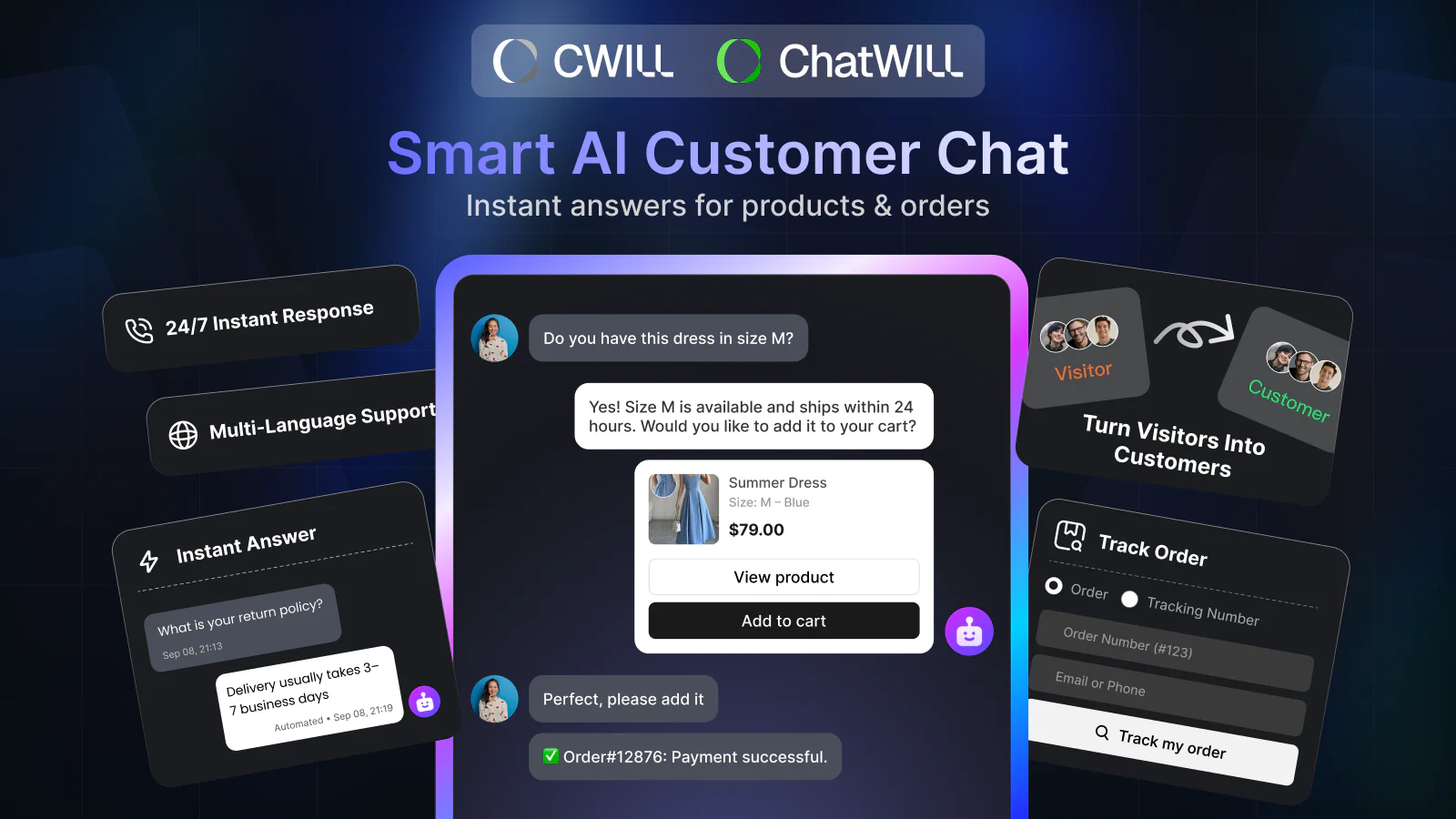
Source: Shopify App Store — 4.8/5 (65+ reviews) | Built for Shopify | Handles 80% of questions automatically | 100% Free
ChatWILL is the AI chatbot from CWILL, a Shopify-native suite trusted by 30,000+ merchants. The headline that separates it from every other option on this list: it’s completely free, and it’s genuinely capable. One verified merchant reported dropping a $89/month Gorgias subscription after ChatWILL handled 80% of customer questions automatically and lifted their conversion rate by 23%.
The Shopify integration is direct and automatic. ChatWILL connects to your live product catalog with no manual training required, answering product questions, recommending items, and guiding shoppers toward checkout from day one. Real-time order tracking is built in, it retrieves shipping status and answers WISMO queries instantly, deflecting the single highest-volume support request most Shopify stores receive.
Multilingual support is automatic. ChatWILL detects the customer’s language and replies with native-like clarity, making it a strong fit for international stores serving customers across multiple regions. Setup takes five minutes, and branding customization is available within the same session.
Pros: 100% free, handles 80% of questions automatically, direct Shopify catalog connection (no training needed), real-time order tracking built in, automatic multilingual detection, Built for Shopify badge, 5-minute setup.
Cons: Less suited for complex multi-agent helpdesk workflows, live agent routing less advanced than Tidio or Gorgias, smaller review base than top-ranked platforms.
Best for: Small to mid-size Shopify stores wanting 24/7 AI chat, order tracking deflection, and multilingual support without adding to their monthly software budget, especially stores outgrowing Shopify Inbox.
11. Botpress — Best for Technical Teams Building Custom Shopify Bots
Source: Botpress Shopify Integration Hub | Open-source, active developer community | Shopify API: products, orders, customers, events
.png)
Botpress is an open-source conversational AI platform built for technical teams that want to build highly customized chatbots with full control over logic, integrations, and deployment. Its drag-and-drop visual Studio makes it accessible for non-developers building straightforward flows, but its real power is in the ADK (Agent Development Kit): developers write the bot's instructions, connect to tools like Shopify via API, and make it behave exactly as the business requires.
The Shopify integration covers the essentials: product catalog queries (by ID, title, or type), product variant lookup, customer lists, customer order history by status, and real-time event triggers (order created, order updated, order cancelled, customer created, customer updated). That's enough to build a capable support and product discovery bot without custom API work, though anything more complex, like processing refunds or editing orders, requires developer involvement.
Where Botpress excels is scalability. As your Shopify store grows, more products, more channels, more complex workflows, the bot's capabilities can be expanded without rebuilding from scratch. For a technical team that needs a platform that scales with them rather than against them, Botpress offers that ceiling. The pricing model is usage-based (pay for what you use, LLM costs at provider price), which is cost-effective for variable volume but requires monitoring during peak periods.
Pros: Native Shopify API integration (products, orders, events), scalable architecture, open-source flexibility, visual builder for non-technical flows, LLM costs billed at-provider-cost with no markup.
Cons: Anything beyond basic flows requires developer involvement, usage-based pricing needs monitoring, no native Facebook/Instagram marketing features, Shopify integration maintained by community (not Botpress directly).
Best for: Technical Shopify teams that want a customizable, scalable chatbot foundation they can build on as the store grows, without being locked into a vendor's feature roadmap.
12. Zendesk — Best for Enterprise Shopify Stores Already Running a Help Desk
Source: Zendesk CX Trends Report| 30–50% Tier 1 auto-resolution rate | 100,000+ businesses including Uber, Instacart, and Zoom
.png)
Zendesk is the most established enterprise help desk platform in the world, and its Shopify integration brings that same enterprise-grade infrastructure directly into your store's support workflow. The Shopify for Zendesk app is free to install from the Shopify App Store and works as a sidebar inside your Zendesk agent view, when a support ticket opens, the agent immediately sees that customer's full Shopify order history, shipping status, and billing details without leaving their workspace.
Beyond simple visibility, agents can process refunds and cancellations directly from the Zendesk sidebar. For automated support, the built-in AI layer (available on Suite plans) is a massive efficiency driver. According to the Zendesk CX Trends Report, AI-powered self-service now resolves 30–50% of Tier 1 tickets automatically by leveraging help center content. This omnichannel approach unifies email, live chat, social media, WhatsApp, and phone into a single, high-velocity inbox.
Zendesk Suite starts at $25/agent/month, and AI capabilities beyond the basic tier require the Advanced AI add-on (pricing on request from sales). The Suite Professional plan at $149/agent/month with up to 5 help centers is suitable for large teams handling thousands of monthly tickets.
Pros: 30–50% Tier 1 auto-resolution, enterprise-grade security and compliance, full order actions in Shopify sidebar (refunds, cancellations), omnichannel inbox, free Shopify app installation, trusted by 100,000+ businesses.
Cons: Per-seat pricing scales quickly with team size, Advanced AI is a separate add-on cost, AI resolutions are capped per seat with overage charges, steeper learning curve than Gorgias or Tidio for Shopify-specific workflows.
Best for: Enterprise Shopify stores and Shopify Plus merchants already running a structured help desk operation that need omnichannel support, deep analytics, and enterprise-grade compliance, and have the team size to justify per-seat pricing.
What to Look For in a Shopify Store Automation Tool
With pricing and performance data in front of you, these are the criteria that separate chatbots that generate ROI from ones that just add cost to your monthly stack:
Native Shopify Data Access
The bot must read live product catalog data, order status, and customer history, not a cached snapshot updated once daily. Without real-time data access, it guesses at answers. According to Statista research, consumers primarily use chatbots for order tracking, product discovery, and sizing guidance, all of which require actual live Shopify data to answer accurately.
AI Resolution Rate vs. CSAT — You Need Both
A high AI resolution rate sounds impressive until it means the bot is 'resolving' conversations by frustrating customers into giving up. The platforms that publish resolution rates alongside CSAT scores are the ones worth trusting. Look for both metrics in the same sentence before accepting any vendor claim.
Multi-Channel Coverage That Matches Where Your Customers Are
Customers who message you on Instagram don't want to be redirected to your website chat. If a meaningful portion of your audience is on WhatsApp or Instagram, which is true for most stores serving consumers under 35, a website-only tool misses the majority of your conversational commerce opportunity.
Escalation That Preserves Context
When the AI hands off to a human agent, the agent needs the full conversation history. Customers who have to repeat themselves to a human after being transferred have a worse experience than if no chatbot had been there at all. Ask specifically how each platform handles escalation context before making a decision.
Analytics That Show Business Impact
Conversation volume is a vanity metric. The numbers that matter: resolution rate, customer satisfaction score, conversion rate from bot interactions, and cart recovery rate. Platforms that surface these help you improve. Platforms that only show conversation counts don't.
How to Set Up Your Shopify Chatbot Properly
Step 1: Install and Connect
Install from the Shopify App Store or follow your platform's integration path. Authorize data access so the bot can read your product catalog, orders, and customer history in real time.
Step 2: Train Before You Launch
Upload your FAQ content, shipping and return policies, product catalog details, and brand voice guidelines. Review the auto-generated initial responses carefully before going live. A wrong or outdated answer is worse than no answer.
Step 3: Set Up Automation Triggers
Define when the bot proactively engages: after a visitor spends 20 seconds on a product page, when someone stalls at checkout for 60 seconds, when a returning customer arrives. Proactive engagement at the right moment is what separates bots that increase Shopify sales from bots that just answer when asked.
Step 4: Configure Escalation
Define exactly when conversations go to a human: frustration language, complex product customization, high-value purchase consultation, or anything the bot explicitly can't handle. Escalation should be invisible and context-preserving, the agent gets the full conversation when they take over.
Step 5: Test Thoroughly
Spend a week testing before going public. Ask questions your actual customers ask, including the unexpected ones. Test order tracking flows, try to confuse the bot, test cart recovery sequences. Get multiple team members testing from different angles. Most post-launch failures are problems that testing would have caught.
Step 6: Monitor and Iterate
Check resolution rate, CSAT, and conversion impact weekly for the first 90 days. Where does the bot struggle? What questions does it answer incorrectly? Use that data to refine training. Most stores reach full optimization at 60–90 days, not day one.
Why Most Shopify Store Owners Choose the Wrong Chatbot
Mistake #1: Evaluating on price, not ROI.
The cheapest option usually can't access your live Shopify data or integrate with your existing tools. You save $20/month and lose thousands in unrecovered carts and missed conversions. Evaluate on what the tool can actually do for your specific situation.
Mistake #2: Taking 'AI-powered' at face value.
Every chatbot claims to be AI-powered in 2026. What matters is whether it can take actions in your Shopify store, process returns, check live inventory, edit orders, or just generate text responses. Demand proof through free trials with your actual product catalog before committing.
Mistake #3: Ignoring where your customers actually are.
If your customers message you on Instagram or WhatsApp before buying, which is true for most stores selling to consumers under 35, a website-only chatbot misses the majority of your conversational commerce opportunity. Match the platform to your actual channel mix.
Mistake #4: Skipping the testing phase.
Most platforms offer free trials. Most businesses skip thorough testing and discover after committing that the bot doesn't handle their specific product catalog or customer journey well. Always test with real customer questions first.
Mistake #5: Expecting results without training.
Even the best e-commerce AI assistant needs proper setup. Feed it your policies, FAQs, product details, and brand voice. A poorly trained bot damages customer trust more than having no bot at all.
Does Your Chatbot Actually Increase Shopify Sales?
These are the numbers that tell you whether your Shopify store automation investment is working:
- AI Resolution Rate (target: 50–70%): What percentage of conversations complete without human help?
- CSAT (target: 80%+): Are customers satisfied? Resolution rate without satisfaction data is meaningless.
- Conversion Rate from Bot Interactions (target: 5–15%): What percentage of bot conversations result in purchases?
- Cart Recovery Rate (target: 15–25% of abandonments): How many carts does the bot recover?
- Support Ticket Deflection (target: 40–60% reduction): How many fewer tickets reach your team?
- Conversation Volume (target: 100+ daily for growing stores): Is the bot handling meaningful volume?
Most stores see measurable ROI within 30–60 days when the right tool is implemented properly. If you're not seeing improvement by day 60, the problem is usually training quality or channel coverage, not the tool itself. For a broader look at small business chatbot options beyond Shopify specifically, this guide to the best AI chatbots for small business in 2026 covers the full decision framework with store-size context and budget guidance.
Bottom Line: Finding the Best Chatbot for Shopify Is About Matching Your Situation
The best chatbot for Shopify isn't the most expensive one or the one with the best brand recognition. It's the one that fits your specific store, team, and channel mix:
- Highest AI resolution rate and Shopify App Store validation: Tidio (67% resolution, 4.7/5 from 1,138+ reviews)
- Deepest Shopify integration, enterprise support operations: Gorgias (Premier Shopify CX Partner, 60% automation rate)
- Best multi-brand and multichannel inbox: Re:amaze (4.8/5 Shopify, 4.7/5 G2, 4.7/5 Capterra)
- Social commerce across WhatsApp and Instagram: Heyy.io (unified cross-channel, AI Employees, free plan available)
- Enterprise-grade Fin AI: Intercom (~67% resolution, multi-store support, GPT-4)
- SMBs in the Freshworks ecosystem: Freshchat (free for up to 10 agents)
- Knowledge-base chatbot trained on your content: Chatbase (GPT-4, 95+ languages, free plan)
- Social DM sales automation: TailorTalk (orders and payments via WhatsApp and Instagram)
- Custom builds for technical Shopify teams: Botpress (open-source, Shopify API, scalable)
- Enterprise help desk with Shopify integration: Zendesk (30–50% Tier 1 auto-resolution, 100,000+ businesses, free Shopify app)
When you're ready to see how multi-channel Shopify store automation works in practice, see what Heyy.io's AI Employees can do, free plan available, 15-minute onboarding, no setup fees required.
Frequently Asked Questions (FAQs)
Q: Do I need coding skills to set up a Shopify chatbot?
A: No.Platforms like Heyy.io, Tidio, and Gorgias offer no-code setup. You install from Shopify App Store, configure settings through visual interfaces, and go live without touching code. Setup typically takes a few minutes to an hour for basic implementation.
Q: How much does the best chatbot for Shopify cost?
A: Pricing varies widely. Budget options like Tidio start at $0-$29/month. Mid-tier platforms like Heyy.io run $50-$200/month. Enterprise solutions like Gorgias and Intercom cost $500-$1,500+/month. Choose based on your store volume and feature needs, not just price.
Q: Can chatbots actually increase Shopify sales?
A: Yes. Properly implemented chatbots increase conversions by 15-25% through instant product recommendations, cart recovery, and 24/7 availability. They answer pre-purchase questions immediately, reducing hesitation and abandoned carts. Stores typically see ROI within 30-60 days.
Q: What's the difference between a basic chatbot and an e-commerce AI assistant?
A: Basic chatbots follow scripts and can't access your store data. An e-commerce AI assistant connects to your Shopify store, understands natural language, pulls real-time product and order data, and can process transactions.
Q: Can one chatbot handle website, WhatsApp, and Instagram?
A: Yes, but only if you choose a multi-channel platform like Heyy.io. Most Shopify chatbots only work on your website. For Instagram, WhatsApp, and Facebook Messenger support, you need a platform specifically built for omnichannel communication with unified conversation tracking.
Q: How long does it take to see results from Shopify store automation?
A: Most stores see immediate impact on response times (from hours to seconds). Conversion improvements typically appear within 2-4 weeks as the bot handles more conversations and learns your customer patterns. Full optimization with refined training and workflows takes 60-90 days.
More blog posts to read


Ready to Automate Support
Across Every Channel?
.svg)
.avif)