.svg)
8 Customer Self-Service Examples That Reduce Ticket Volume

What's your support team doing right now? Hopefully not answering the exact same questions they answered last Tuesday, last month, and six months ago. You know the ones: "Where is my order?", "How do I reset my password?", and "What is your return policy?"
If they are, you cannot blame your team for it. It is a system design problem. When customers have no reliable way to find answers on their own, they contact you. Every single time.
The truth is that 81% of customers attempt to resolve their issues independently before contacting support. They actually want to self-serve. The real question is whether your system allows them to do it.
Right now, 60% of customer support teams report an increase in ticket volumes with no sign of it slowing. The businesses successfully solving this problem are not just hiring more agents to keep up. They are building self-service infrastructure that catches those repetitive tickets before they ever hit the queue.
This guide covers 8 specific customer self-service examples that actively reduce ticket volume. We will look at what makes each one work and how you can tell the difference between simply deflecting customers versus genuinely resolving their problems.
What Is Customer Self-Service?
Customer self-service is any mechanism that enables customers to find answers, resolve issues, and complete support tasks independently without direct interaction with a human agent.
It includes AI chatbots, knowledge bases, community forums, self-service portals, automated account management flows, video tutorials, and interactive product guides. The common thread is that the customer resolves their own issue in the channel they are already in, without waiting for a human to become available.
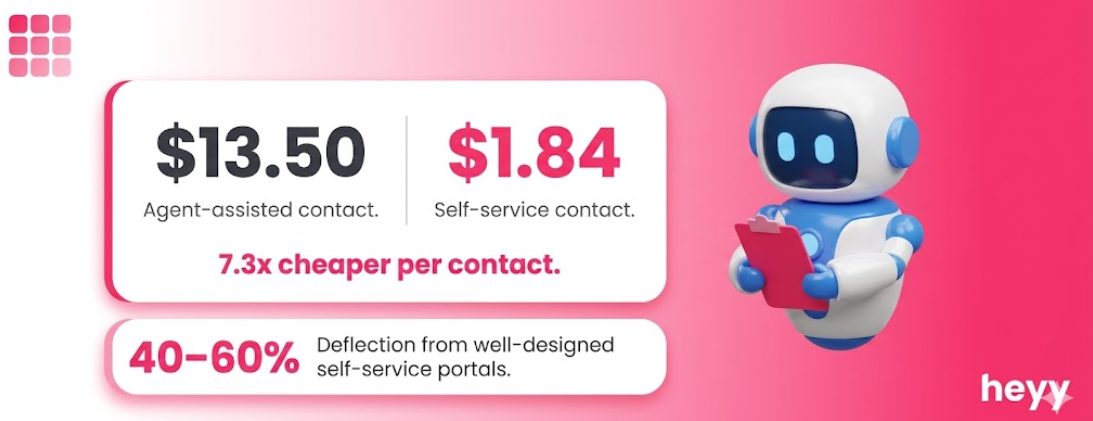
The economics are compelling. Self-service channels cost $1.84 per contact compared to $13.50 for agent-assisted channels, according to Fullview's 2025 support cost data. Well-designed self-service deflects 40 to 60% of incoming queries, per Kayako's 2026 analysis. That deflection rate transforms the cost structure of a support operation at scale.
The critical distinction between self-service done well and self-service done poorly is resolution versus deflection. Deflection pushes customers away from the queue. Resolution answers their question completely. A self-service experience that deflects but does not resolve produces a frustrated customer who contacts support anyway, now with an additional complaint about the failed self-service attempt.
Before You Build: Categorize Your Tickets First
Every effective customer self-service strategy starts with ticket categorization, not tool selection.
60 to 70% of support tickets fall into 3 to 4 categories, per Guideflow's 2026 analysis of support operations. Within those categories, certain types have high self-service eligibility (how-to questions, order status, policy queries, password resets) and others have low eligibility (billing disputes, complex technical issues, emotional complaints).
The right starting point is to pull your last 90 days of support tickets and categorize them by question type and volume. Your highest-volume, highest-eligibility categories are where your first self-service investment should go. Building a video tutorial library when your top ticket category is order status inquiries is not a self-service strategy. It is a mismatch.
Up to 60% of support tickets could be resolved with self-service options, yet only 36% currently are, according to Technology Services Industry Association data cited in Salesmate's 2026 benchmark report. The gap between what is possible and what has been built is the opportunity.
The Benefits of Self-Service Options for Customers
Customers Get Answers at Any Hour
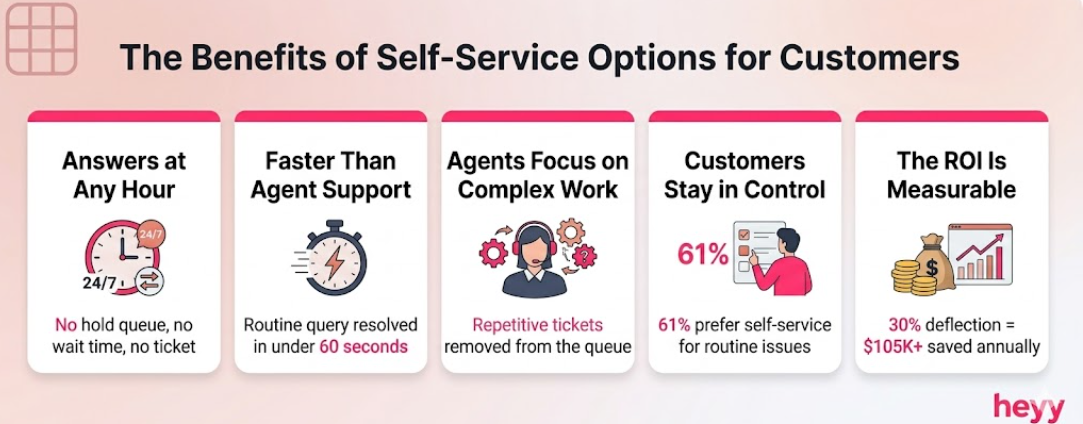
A customer with a question at 9pm on a Sunday does not want to wait until Monday morning. Self-service resolves the issue now, in the channel they are already in, without a hold queue, a ticket number, or a wait time estimate.
Resolution Is Faster Than Agent-Assisted Support
A well-designed knowledge base entry or chatbot response resolves a routine question in under 60 seconds. The average agent-assisted resolution for the same question takes several minutes including queue time, greeting, and resolution. For high-frequency, low-complexity queries, self-service is not just cheaper. It is faster.
Agent Capacity Goes Toward Complex Issues
Every "how do I reset my password" ticket takes time away from nuanced problems that require human judgment, per Guideflow's 2026 support strategy guide. When self-service handles the predictable volume, agents concentrate on the 20% of interactions that genuinely need their skills: emotional escalations, billing disputes, edge cases, and high-value account management.
The Benefits of Self-Service Options for Customers Include Control
61% of customers would rather find their own answer than speak to a live agent, according to Pylon's customer support statistics. This preference is not about avoiding human interaction. It is about control: resolving an issue on the customer's schedule, in a channel they choose, without having to explain themselves to someone who has no prior context.
The Business Case Is Direct and Measurable
Self-service implementation reduces ticket volume by 20 to 40%, according to Technology Services Industry Association research. For a team handling 500 tickets per week at an average cost of $13.50 per ticket, a 30% reduction eliminates $2,025 in weekly support cost. That is $105,300 per year recovered from ticket volume alone, before accounting for the agent time redirected to higher-value work.
8 Customer Self-Service Examples That Reduce Ticket Volume
1. AI-Powered FAQ Chatbot
What it is: An AI chatbot trained on your knowledge base that answers frequently asked questions conversationally, without requiring a customer to navigate a help center or search for the right article.
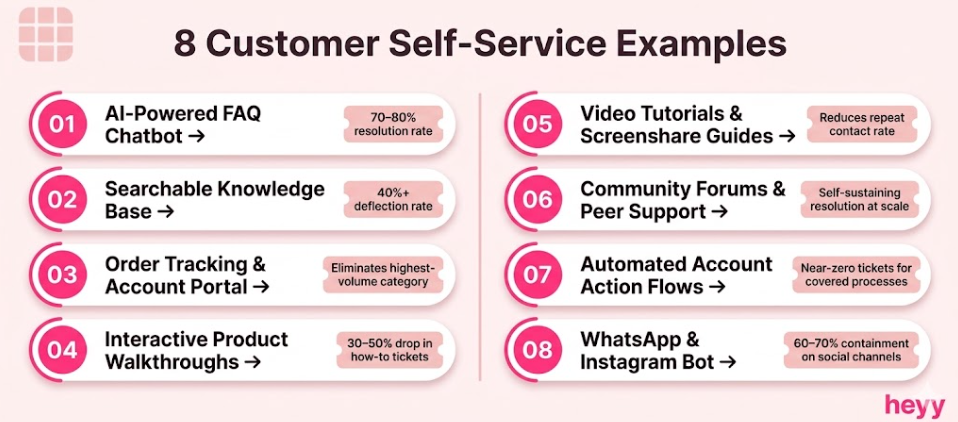
Why it reduces ticket volume: The FAQ chatbot intercepts the question before the customer decides to file a ticket. A FAQ chatbot resolves 70 to 80% of routine inquiries without human involvement, according to IBM's AI customer service benchmarks, compared to the 9% self-service success rate of static FAQ pages, per Conferbot's research. The difference is the active versus passive model: the chatbot meets the customer with their question rather than waiting for them to find the answer.
The WhatsApp dimension: For businesses whose customers primarily use WhatsApp and Instagram, a website FAQ chatbot misses a significant portion of the audience. A WhatsApp-native FAQ bot answers the same questions in the same channel the customer was already in, with no redirection to a website required. This is the customer self-service example most businesses in consumer-facing markets have not yet built.
What good looks like: The chatbot resolves the question completely in the first response. It does not redirect to a help article unless the article contains information that is genuinely better consumed in full. When it cannot resolve, it escalates with the conversation history intact.
The metric to track: Resolution rate (percentage of chatbot conversations that end without a support ticket being created). Target above 70% after the first 60 days of optimization.
2. Searchable Knowledge Base
What it is: A structured repository of help articles, how-to guides, troubleshooting steps, and policy explanations, organized by topic and searchable by keyword or natural language query.
Why it reduces ticket volume: 81% of customers attempt self-service first before contacting support. A knowledge base that is well-organized, well-written, and genuinely findable intercepts a meaningful portion of that 81% before they escalate to a ticket. The word genuinely is doing important work. A knowledge base that exists but cannot be found, or exists but is outdated, produces a failed self-service attempt and a more frustrated ticket than if the customer had just contacted support directly.
What makes it work: Search relevance is the primary determinant of knowledge base effectiveness. Articles indexed for the keywords and natural language phrases customers actually use perform significantly better than articles titled in internal terminology. "How do I return a product?" outperforms "Reverse Logistics Process" as a title for the same content.
What good looks like: Articles are updated within 24 hours of any policy, product, or process change. Each article ends with a one-click escalation path. Search analytics are reviewed monthly to identify queries that produced zero results, which are the gaps in your self-service coverage.
The metric to track: Knowledge base deflection rate, the percentage of visitors who resolve their query without opening a support ticket. Any rate above 40% is strong performance.
3. Order Tracking and Account Self-Management Portal
What it is: A customer-facing portal (or chatbot flow) where customers can check their order status, update their account details, manage their subscription, download their invoice, or process a return without contacting an agent.
Why it reduces ticket volume: Order status is the highest-volume inquiry category for most e-commerce businesses. In 2026, the customer self-service examples driving the most ticket reduction for e-commerce teams are order tracking and return initiation, two processes that are entirely predictable and require no human judgment. Automating both eliminates the single largest category of repetitive tickets.
What makes it work: Live data integration. A self-management portal that shows yesterday's inventory or last week's order status is worse than no portal at all because it provides incorrect information confidently. The portal must connect to your live order management system, billing platform, and account database.
What good looks like: A customer can check order status, initiate a return, update their billing details, and download their invoice in under 2 minutes without any agent involvement. The portal is accessible via WhatsApp bot command ("check my order"), website chat, and the account portal simultaneously.
The metric to track: Portal usage rate for order status and return queries versus equivalent ticket volume. The goal is a declining ticket volume in these categories as portal usage grows.
4. Interactive Product Walkthroughs and In-App Guidance
What it is: Contextual, step-by-step guidance that appears within your product or app at the moment a customer encounters a task they do not know how to complete. Includes interactive demos, tooltip tours, and in-context help overlays.
Why it reduces ticket volume: "How-to" and setup questions have the highest self-service eligibility of any ticket category, according to Guideflow's 2026 ticket deflection analysis. These questions arise not because customers are confused about the product's value but because they hit a specific step in a process they have not completed before. In-app guidance answers the question at the exact moment it arises, before the customer decides to open a support channel.
What good looks like: The guidance is contextual (it appears where the customer is, not on a separate help page), step-by-step (it completes the task with the customer rather than describing what to do), and dismissible (it does not obstruct experienced users).
The metric to track: Ticket volume for the specific how-to categories the walkthroughs address. A 30 to 50% reduction in "how do I..." tickets for those categories within 60 days of deployment indicates effective guidance.
5. Video Tutorials and Screenshare Guides
What it is: Short (2 to 5 minute) video walkthroughs of common tasks, troubleshooting processes, feature explanations, and setup sequences. Embedded in the knowledge base, linked from chatbot responses, and surfaced in email support responses.
Why it reduces ticket volume: Some questions are better answered visually than textually. A customer trying to configure a setting while reading a written tutorial has to switch attention repeatedly between the article and the task. A video demonstrating the exact process alongside narrated explanation reduces the cognitive load and the failure rate. Lower failure rate means fewer repeat contacts for the same issue.
What makes it work: Video length discipline. A 12-minute tutorial covering everything about a feature is a documentation resource. A 2-minute video answering one specific question is a self-service asset. The distinction matters because customers watching tutorials are trying to accomplish a task, not learn the product comprehensively.
What good looks like: Every video addresses one specific question. Titles match the natural language query ("how to change your billing date" not "Billing Date Configuration"). Videos are updated when the relevant feature changes, with a timestamp showing when each was last updated.
The metric to track: Video view completion rate for knowledge base embedded tutorials, alongside the ticket volume trend for the covered topics.
6. Community Forums and Peer Support
What it is: A moderated online community where customers can ask questions, share solutions, and help each other resolve issues. Common formats include product forums, subreddits, Slack communities, and branded community platforms.
Why it reduces ticket volume: Community forums create a self-sustaining self-service resource that grows without proportional editorial investment. Every answer posted in the forum is an answer available to the next customer with the same question. Salesforce's Trailblazer Community, Atlassian's community forums, and HubSpot's community are among the customer self-service examples that have deflected millions of support tickets at scale.
The caveat: Community forums only deflect tickets if the community is active, searchable, and monitored for accuracy. A forum with outdated answers or no moderator response creates a worse experience than no community at all. This option is highest-value for businesses with established user bases and lower-value for early-stage businesses still building their customer community.
What good looks like: Every unanswered question receives either a community response or an official team response within 48 hours. Answers marked as verified by the product team are clearly distinguished from peer suggestions. The forum's search is optimized to surface community answers alongside knowledge base articles.
The metric to track: Community resolution rate, the percentage of forum questions that receive a satisfactory answer (marked as resolved or voted up) without opening a support ticket.
7. Automated Password Reset and Account Action Flows
What it is: Fully automated flows for predictable, high-frequency account management tasks: password resets, account verification, subscription upgrades and downgrades, billing plan changes, and notification preference updates.
Why it reduces ticket volume: Password reset is the single highest-volume, zero-judgment-required support request across almost every digital product category. It requires no information that an automated system cannot handle. Every password reset handled by an agent is a resource allocation failure. The same applies to subscription changes, billing updates, and any other process that follows a fixed, security-compliant sequence.
What makes it work: The automated flow must be accessible from every channel the customer uses. A customer who contacts support on WhatsApp because they cannot find the password reset flow is a customer your self-service system has not served. The flow should be triggerable via chatbot command ("reset my password"), email link, account page, and WhatsApp bot.
What good looks like: A customer completing a password reset, subscription change, or billing update without any agent interaction in under 90 seconds. The automated flow sends a confirmation immediately and logs the action in the customer's account history.
The metric to track: Volume of password reset, subscription change, and account update tickets before and after automation deployment. These categories should reach near zero after deployment.
8. WhatsApp and Instagram Automated Response Bot
What it is: An AI-powered automated response system deployed natively on WhatsApp and Instagram DMs that handles customer service inquiries through conversational flows, without requiring customers to visit a website or portal.
Why it reduces ticket volume: Most customer self-service examples in existing guides focus on website portals and knowledge bases. This is where a significant channel gap exists. For businesses where customers primarily reach out on WhatsApp or Instagram, a website self-service portal requires the customer to leave the channel they initiated contact in, a friction point that most customers will not complete. A WhatsApp or Instagram native bot answers the question in the channel, with the channel's conversational format, without redirection.
How to reduce ticket volume with self service in social messaging channels requires treating WhatsApp and Instagram as first-class self-service channels with trained AI, not as escalation paths to redirect to a website. The bot handles order status, FAQ responses, appointment booking, return initiation, and any other structured process that does not require human judgment. When it cannot resolve, it escalates within WhatsApp with the full conversation context attached.
What good looks like: A customer who messages your WhatsApp number at 10pm receives an instant response, gets their question answered or their request processed, and ends the conversation without a ticket being created. The interaction is logged in your support system alongside all other channel interactions.
The metric to track: WhatsApp and Instagram conversation containment rate, the percentage of inbound social messages fully resolved without ticket creation or human agent escalation. For well-trained bots, this should reach 60 to 70% within 90 days of deployment.
How to Reduce Ticket Volume With Self-Service: The Sequenced Approach
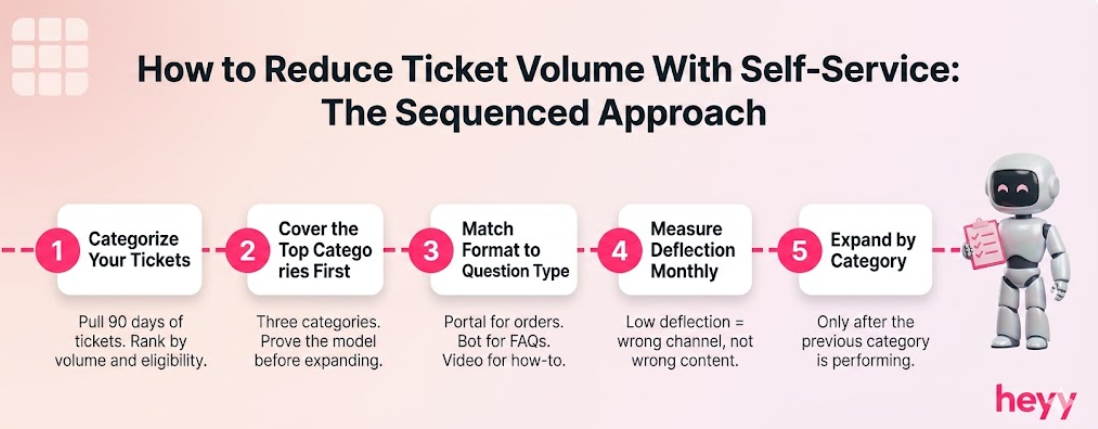
The businesses that fail at self-service typically build in the wrong order. They launch a knowledge base before categorizing their tickets, or deploy a chatbot before the knowledge base is complete, or invest in community forums before they have enough customers to sustain one.
The right sequence is this.
First: Categorize your last 90 days of tickets by question type and volume. Identify the top 3 to 5 categories that are high-volume and self-service eligible.
Second: Build self-service coverage for those specific categories, in priority order, starting with the highest volume. Knowing how to reduce ticket volume with self service means knowing which categories to address first, not building comprehensive coverage from the start. Do not attempt comprehensive coverage before proving the model works.
Third: For each category, choose the self-service format that matches how customers encounter the issue. Order status questions match a portal or chatbot. How-to questions match video tutorials or in-app guidance. Policy questions match a knowledge base or FAQ chatbot. The format should match the question type, not your preference.
Fourth: Measure deflection rate for each category monthly. A category with low deflection despite self-service coverage means the self-service asset is not being found, is not answering the question completely, or is not in the right channel. Fix the specific failure rather than adding more content.
Fifth: Expand to the next ticket category only after the first one is performing. The AI chatbot ticket backlog reduction approach applies directly here: systematic by category, measured by outcome, expanded only when the model is validated.
Measuring Self-Service Success: The 4 Metrics That Matter
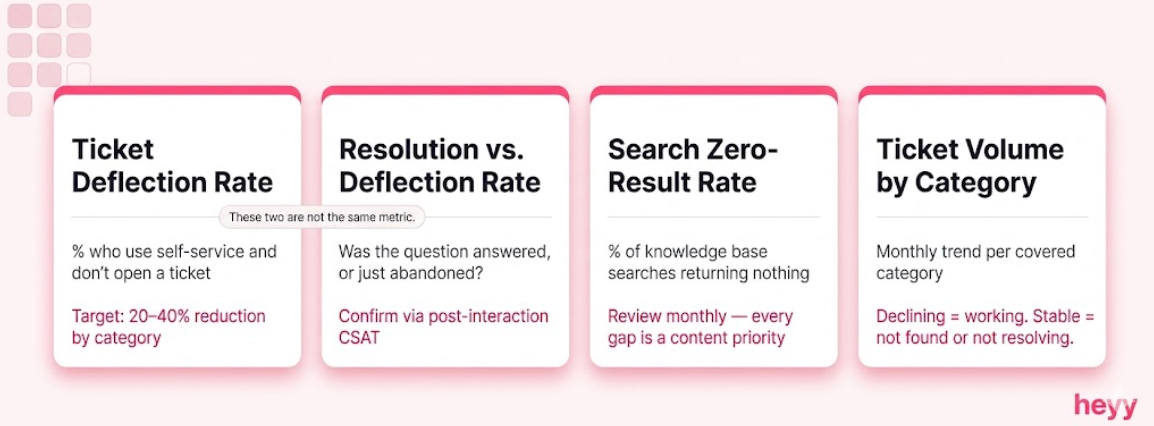
Ticket deflection rate: The percentage of customers who use a self-service resource and do not go on to open a support ticket. This is the primary measure of self-service effectiveness. TSIA research indicates effective self-service implementation reduces ticket volume by 20 to 40%. Measure it by category, not in aggregate.
Resolution rate vs. deflection rate: Resolution rate measures customers who found their answer. Deflection rate measures customers who stopped asking. These are different things. A chatbot that ends conversations without resolution is deflecting, not resolving. Resolution rate should be confirmed through post-interaction CSAT (was your question answered?) rather than assumed from containment alone.
Search zero-result rate: For knowledge bases: what percentage of searches return no useful result? Every zero-result search is a gap in your self-service coverage. Review monthly and add content for the top-volume gaps.
Ticket volume trend by category: For each ticket category covered by a self-service resource, track the ticket volume month-over-month. Declining volume in a covered category confirms the self-service is working. Stable or rising volume despite coverage confirms the self-service is not being found or not fully resolving.
The self-service gap for most businesses is not in the knowledge base or the help center. It is in the channels where customers actually reach out, WhatsApp, Instagram DMs, Facebook Messenger, where there is no self-service infrastructure at all, just a human inbox that never fully empties. Heyy deploys AI-powered self-service across all those channels from one platform. Train it on your FAQs, policies, and order workflows. It handles the repetitive volume automatically. Your team handles what requires them. Start free and close the channel gap before your ticket volume grows another week.
FAQs
What is customer self-service?
Customer self-service is any mechanism that allows customers to resolve their own issues, find answers, or complete support tasks without direct agent involvement. It includes AI chatbots, knowledge bases, order tracking portals, community forums, video tutorials, interactive product guides, automated account management flows, and social messaging bots. The defining characteristic is that the customer achieves resolution independently, in their preferred channel, without waiting for a human agent to become available.
What are the most effective customer self-service examples for reducing ticket volume?
The most effective customer self-service examples for ticket reduction, ranked by typical impact, are: AI FAQ chatbots (resolve 70 to 80% of routine inquiries autonomously), order tracking and account management portals (eliminate the highest-volume ticket category for most e-commerce businesses), knowledge bases with strong search functionality (intercept the 81% of customers who attempt self-service first), and automated account action flows for password resets and subscription changes (remove zero-judgment tasks from the agent queue entirely). The right choice for your business depends on which ticket categories dominate your current volume.
How do I reduce ticket volume with self-service without frustrating customers?
How to reduce ticket volume with self service without frustrating customers comes down to one principle: resolution, not deflection. Every self-service experience must fully answer the customer's question. If it pushes them away from the queue without resolving the underlying need, they contact support anyway, now more frustrated. Maintain clear escalation paths within every self-service resource, update content within 24 hours of any change, and measure resolution rate (was the question answered?) separately from deflection rate (did the customer stop contacting?). The AI chatbot best practices guide covers the escalation design in detail.
What are the benefits of self-service options for customers specifically?
The benefits of self-service options for customers are: 24/7 availability for resolution without wait times, faster resolution than agent-assisted support for routine issues, control over the resolution process on their own schedule, access to answers in the channel they are already in (WhatsApp, Instagram, website), and no need to repeat their situation to an agent who has no prior context. These benefits are why 61% of customers prefer self-service over speaking to an agent for routine inquiries.
How long does it take to see ticket volume reduction from self-service?
For AI FAQ chatbots on high-volume inquiry categories, ticket volume reduction in those categories is visible within 30 days of deployment. For knowledge bases, the reduction builds over 60 to 90 days as search indexing matures and content gaps are filled. For automated account action flows, the reduction is immediate and category-specific, tickets for the automated process drop to near zero within the first week. The full 20 to 40% ticket volume reduction cited by TSIA typically takes three to six months of systematic category-by-category deployment to achieve.
What is the difference between ticket deflection and ticket avoidance?
Ticket deflection redirects a customer who was about to contact support toward a self-service resource instead. Ticket avoidance prevents the question from arising at all, through better product design, clearer onboarding, and proactive communication. Both reduce ticket volume, but avoidance is more sustainable because it improves the underlying product experience rather than catching failures after they occur. Understanding the full AI customer service landscape helps distinguish which problems are self-service candidates and which require upstream product improvements.
More blog posts to read

Ready to Automate Support
Across Every Channel?
.svg)
.avif)