.svg)
50+ Chat Scripts for Customer Support Teams


Ever noticed how the first 30 seconds of a support chat completely set the tone? Most conversations stumble right at the start. It is usually not because your team lacks knowledge, it is just that they are stuck staring at a blank text box, overthinking how to phrase a message instead of focusing on the actual human on the other end.
That awkward delay between deciding what to write and actually typing it out costs businesses way more than they realize and there’s data that backs this up: Pre-written templates reduce response times by up to 50%, according to HubSpot's customer service benchmarks. 41% of consumers prefer live chat over every other support channel precisely because of its speed. And 80% of customers will switch brands after a single poor experience, according to Forrester. The compounding math on all three of those figures is simple: slow responses, written inconsistently, in a channel customers already prefer, destroy retention faster than almost any other operational failure.
Chat scripts fix the speed and consistency problem. AI bots take it further by running those scripts automatically, across every channel, without a human in the loop.
This post gives you 55 ready-to-use customer support chat scripts examples organized by scenario, more than the 50+ promised in the title. For each category, there is a note on which scripts AI can handle autonomously and which ones need a human agent. Copy them, adapt them to your brand voice, and deploy them.
Why Chat Scripts Are Not Optional in 2026

The case against scripts is usually framed as a personalization argument. Scripts make interactions feel robotic. Customers can tell when they are reading a template.
That argument misunderstands what scripts are for. A script is not a word-for-word prison. It is the first sentence an agent does not have to invent under pressure. It handles the opening, the acknowledgment, the information-gathering question, and the closing. Everything in between is still the agent's judgment and personality. The script handles the hard part: what do I say first?
Research from Nicereply shows that 72% of customers cite having to explain their problem to multiple people as their single biggest frustration with support. Scripts eliminate one cause of that: an agent who handles the first message so poorly that the customer has to reframe their issue twice before the real conversation starts.
For AI bots, scripts are not optional at all. They are the AI's operating instructions. A bot without a tested, refined script library is a bot that makes things up. The businesses winning with AI customer support are the ones who treat script development as a product function, not an afterthought.
The customer support chat scripts examples in this guide are built for both use cases: human agents reaching for a reliable first response, and AI bots that run the entire conversation.
The AI Automation Layer: Which Scripts Need a Human?
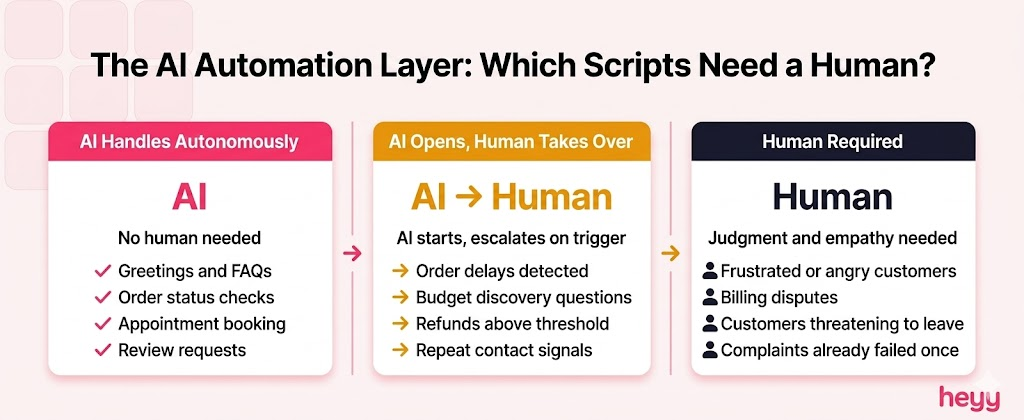
Before the scripts, one framework worth having:
AI can handle autonomously: Greetings, general FAQs, order status checks, hours and location questions, appointment booking, basic troubleshooting steps, hold messages, closing scripts, and review requests.
AI should flag for human escalation: Complaints involving significant frustration or anger, billing disputes above a defined threshold, anything requiring clinical or legal judgment, situations where the customer has already been failed once, and any conversation where the customer explicitly requests a human.
The scripts below are tagged accordingly. [AI] means the script is deployable by an AI bot without human involvement. [Human] means a human agent should handle it. [AI → Human] means AI handles the opening and escalates when the scenario triggers.
1. Opening and Greeting Scripts
The first message sets everything. Speed matters more here than anywhere else. The average wait time for a live chat response is 2 minutes and 40 seconds. A bot that responds in under 10 seconds with a warm, clear greeting has already beaten the industry average before it has said a single useful thing.
Script 1 — Standard Greeting [AI]
Hi [Name]! Welcome to [Business]. I'm here to help — what can I do for you today?
Script 2 — After-Hours Greeting [AI]
Hi there! Our team is currently offline, but I'm handling things in the meantime. Ask me anything and I'll either answer now or make sure the right person follows up with you first thing in the morning.
Script 3 — Returning Customer Greeting [AI]
Welcome back, [Name]! Great to hear from you again. What can I help you with today?
Script 4 — Proactive Website Greeting (Triggered by Time-on-Page) [AI]
Hi! Looks like you've been exploring — can I help you find what you're looking for?
Script 5 — Pricing Page Proactive Greeting [AI]
Hi [Name]! Checking out our plans? Happy to walk you through the differences or answer any questions before you decide.
Script 6 — WhatsApp First Contact [AI]
Hey! Thanks for reaching out to [Business] on WhatsApp. I'm here to help, what do you need?
AI automation note: All six are safe for full AI deployment. The greeting is the highest-volume, lowest-complexity interaction in any support queue. An AI bot that cannot handle greetings reliably is misconfigured.
2. General Inquiry Scripts
Most inbound messages are variations of the same five or six questions. These scripts handle them consistently without the agent reinventing the answer each time.
Script 7 — Hours and Location [AI]
We're open [days] from [time] to [time]. You can find us at [address] — [nearest landmark or parking note if relevant]. Is there anything else I can help with?
Script 8 — Pricing Question (Range Available) [AI]
Our pricing starts at [price] for [package/tier]. The full breakdown is at [link]. Happy to walk you through which option fits your situation best — what are you looking to do?
Script 9 — Pricing Question (Custom Quote Required) [AI → Human]
Pricing for this depends on a few specifics. Let me ask a couple of quick questions so I can get you an accurate number. How many [users/seats/locations] are you working with?
Script 10 — Product Availability [AI]
[Product] is currently [in stock / available for [timeframe] / out of stock with restock expected around [date]]. Want me to notify you when it's available, or is there an alternative I can help with?
Script 11 — Service Coverage Area [AI]
We currently serve [regions/cities/countries]. If you're outside that area, [alternative option or waitlist information]. Still want to share your details in case that changes?
AI automation note: General inquiries represent up to 60% of all inbound support volume. An AI bot trained on your specific pricing, hours, and service area handles every one of these without human involvement.
3. Order Status and Tracking Scripts
Order status is the single highest-volume inquiry category for e-commerce businesses. Live chat responses examples for order tracking need to be fast, specific, and actionable.
Script 12 — Order Status Request [AI]
Happy to check that for you. Could you share your order number? You'll find it in your confirmation email with the subject line "[Order Confirmation — Business Name]."
Script 13 — Order Found, In Transit [AI]
Your order #[number] is on its way. Last update shows it's [location/status] and estimated to arrive by [date]. You can track it in real time here: [link].
Script 14 — Order Delayed [AI → Human]
Your order #[number] has been delayed — the new estimated arrival is [date]. I apologize for the inconvenience. If you'd like to speak with someone about this directly, I'll connect you now. Otherwise, I'll send you a tracking update as soon as anything changes.
Script 15 — Order Not Received (Past Expected Date) [Human]
I'm sorry your order hasn't arrived yet. That is not acceptable and I want to fix it immediately. I'm pulling up your details now — order #[number], expected by [date]. Give me a moment to find out exactly where this is and what we can do.
Script 16 — Order Modification Request [AI → Human]
Modifications are possible if the order has not yet shipped. Let me check the status. Could you share your order number and what you'd like to change?
Script 17 — Order Cancellation Request [AI → Human]
I can help with that. If the order is still being processed, cancellation is straightforward. If it has already shipped, we will need to arrange a return once it arrives. Can I have your order number?
AI automation note: Scripts 12, 13, and 16 (status check, in-transit, modification inquiry) are fully AI-automatable with a live integration to your order management system. Scripts 14, 15, and 17 should trigger human review at the escalation point.
4. Complaint and Frustrated Customer Scripts
This is the category where most support conversations break down. Customers who have to repeat their problem to multiple agents are the most likely to churn permanently. The first response to a complaint must do two things before anything else: acknowledge the frustration, and make the customer feel heard. Resolution comes second.
Script 18 — Opening Response to Complaint [Human]
I hear you, and I'm sorry this happened. That is not the experience we want you to have, and I'm going to make sure it gets fixed. Can you tell me a bit more about what happened so I can find the right solution?
Script 19 — Frustrated Customer Who Has Contacted Before [Human]
I can see you've already reached out about this. I'm sorry you've had to come back — that should not have happened. I'm reading through the previous conversation now so you do not have to repeat yourself. Give me a moment.
Script 20 — Customer Threatening to Leave [Human]
I don't want to lose you, and more than that, I don't want you to leave feeling like we let you down. Can you tell me what needs to change for this to be worth staying? I want to understand.
Script 21 — Public Complaint (Coming From Social Media) [Human]
Hi [Name], I saw your message and I'm sorry this happened. Can you DM us so we can sort this out properly? I want to make sure you get an actual resolution, not a public response.
Script 22 — Angry Customer, No Resolution Yet Found [Human]
You are right to be frustrated. I want to be honest with you: I do not have the answer in front of me right now, but I am not going to guess or give you a generic response. I'll investigate this properly and come back to you with a real update within [timeframe]. Is that okay?
Script 23 — Customer Upset About Wait Time [Human]
I'm sorry for the wait. Your time matters and you should not have had to wait this long. I'm fully focused on your issue now — let's get this sorted.
AI automation note: Complaints require human handling. An AI that attempts to resolve a frustrated customer complaint without escalation risks making the situation worse. The AI's role here is Script 18's opening acknowledgment only, followed by immediate human routing.
5. Apology and Service Recovery Scripts
Apologies delivered poorly damage trust more than the original error did. These scripts are built to acknowledge specifically, not generically.
Script 24 — Service Outage Apology [AI → Human]
We're aware that [service/feature] is currently down and we sincerely apologize for the disruption. Our team is working on a fix and the current estimated resolution time is [timeframe]. We'll send an update here as soon as it's resolved.
Script 25 — Wrong Item Sent [Human]
That is completely our mistake and I am sorry. You should not have to deal with this. Here is what I can do right now: [option 1 — resend correct item] or [option 2 — full refund]. Which would you prefer? You do not need to return the wrong item.
Script 26 — Billing Error Apology [Human]
You are right, there is a discrepancy here and it should not have happened. I am processing [the correction/refund] now. You will see the adjustment within [timeframe]. Is there anything else I can do to make this right?
Script 27 — Feature/Product Not Working as Described [Human]
I hear you and I understand why that is frustrating. What was described should match what you received. Let me look into what happened on our end — this is on us, not you.
Script 28 — Late Response Apology [Human]
I apologize for the delay in getting back to you. You should not have had to wait this long. I'm here now and fully focused on resolving this.
AI automation note: Apology scripts for outages (Script 24) can be AI-deployed from a triggered broadcast. All others require human delivery to carry the necessary authenticity.
6. Technical Support Scripts
Technical support conversations fail when agents ask for information they should have already gathered, or when the troubleshooting steps are vague. These scripts are built to be specific and sequential.
Script 29 — First Contact Technical Issue [AI → Human]
I'm sorry you're running into this. To help you fastest, I need a couple of details: what device and browser are you using, and can you describe exactly what happens when the issue occurs?
Script 30 — Basic Troubleshooting (Refresh/Clear Cache) [AI]
Let's start with the simplest fix. Please try clearing your browser cache and doing a hard refresh (Ctrl+Shift+R on Windows, Cmd+Shift+R on Mac), then check if the issue persists. Let me know what you see.
Script 31 — Issue Requires Screen Recording or Screenshot [Human]
To understand exactly what's happening on your end, it would help to see it. Could you share a screenshot or a short screen recording of the issue? Even a quick photo from your phone works.
Script 32 — Escalation to Technical Team [Human]
This requires someone from our technical team to take a closer look. I'm passing everything you've shared to them directly — you will not need to repeat yourself. They will follow up within [timeframe].
Script 33 — Known Bug Acknowledgment [AI → Human]
This is a known issue our team is currently working on. I apologize for the inconvenience. I'm adding you to the notification list so you'll hear from us directly when the fix is live.
AI automation note: Scripts 29 and 30 are AI-automatable for first-response technical triage. Scripts 31, 32, and 33 require human judgment at key moments, though 33 can have an AI-triggered component for known-issue broadcasting.
7. Billing and Refund Scripts
Billing conversations have higher emotional stakes than most support interactions. The money is already gone from the customer's perspective. These scripts acknowledge that reality directly.
Script 34 — Refund Request Received [AI → Human]
I've received your refund request for [order/product]. Our refund policy covers [conditions]. Based on what you've described, this looks like it qualifies. Let me confirm the details and get this processed.
Script 35 — Refund Approved [Human]
Your refund of [amount] has been approved and is being processed now. You will see it back in your [payment method] within [timeframe]. I'm sorry you had this experience.
Script 36 — Refund Outside Policy Window [Human]
Your request falls outside our standard [X]-day refund window. I understand that's frustrating. Let me see what options we have — I want to find something that works for you rather than just saying no.
Script 37 — Unexpected Charge [Human]
I can see why that charge raised a concern. Let me pull up your account and find out exactly what triggered it. Give me a moment.
Script 38 — Subscription Cancellation Request [Human]
I've received your cancellation request. Before I process it, can I ask what led to this decision? I want to understand, and if there's something we can address, I'd like the chance to do that.
Script 39 — Invoice or Receipt Request [AI]
I can resend that for you. Could you confirm the email address you'd like it sent to, or the order number you need the receipt for?
AI automation note: Script 39 is fully AI-automatable. Scripts 34 and 37 benefit from AI-led information gathering before human handoff. Scripts 35, 36, 38 require human judgment and relationship sensitivity.
8. Hold and Transfer Scripts
Customers who wait without explanation are significantly more likely to abandon the conversation. These scripts make holds feel like active progress rather than dead air.
Script 40 — Brief Hold Request [AI or Human]
I'm looking into this now — give me just 2 to 3 minutes and I'll come back with a real answer rather than a guess. Still with me?
Script 41 — Longer Hold Required [Human]
This needs a bit more investigation than I expected. I do not want to rush it. Can I follow up via [email/WhatsApp] within the next [timeframe] with the full answer? That way you're not waiting on the chat.
Script 42 — Transfer to Another Department [Human]
I'm going to connect you with [department/colleague], who handles this specifically. I'll give them the full context so you do not have to explain everything again. One moment.
Script 43 — Transfer with Introduction [Human]
Hi [Name], I'm passing you to [colleague name] now. I've shared everything you've told me, so pick up right where we left off.
Script 44 — Returning from Hold [Human]
Thanks for waiting. I have the information you need — here's what I found.
AI automation note: Scripts 40 and 44 are AI-automatable. Scripts 41, 42, and 43 require human context and judgment to execute without creating more frustration.
9. Lead Qualification Scripts
Support conversations are the most underused sales channel in most businesses. A customer asking a detailed product question is a warm lead. These scripts gather the information needed to route that lead correctly without making the customer feel interrogated.
Script 45 — Qualification Opener [AI]
To make sure I give you the most relevant information, can I ask a couple of quick questions? What's your main goal with [product/service], and how many [people/locations/seats] are you working with?
Script 46 — Budget Discovery [AI → Human]
Do you have a budget range in mind, or would it help to see the options first and work from there?
Script 47 — Decision Timeline [AI]
Are you looking to get started soon, or still in the research phase? Knowing the timeline helps me point you to the right next step.
Script 48 — Routing Hot Lead to Sales [AI → Human]
Based on what you've described, I'd like to connect you with someone from our team who can give you a tailored recommendation and answer the more specific questions. Are you available for a quick call this week?
Script 49 — Follow-Up After No Response [AI]
Hi [Name], just following up on our conversation from [date]. Did you get the chance to look over [the information/quote] we sent? Happy to answer any questions.
AI automation note: Scripts 45, 46, 47, and 49 are fully AI-automatable for lead qualification workflows. Script 48 triggers the human handoff and should route to a human or schedule an automated booking flow.
10. Closing and Post-Conversation Scripts
Most support conversations end with either an abrupt close or a hollow "Is there anything else I can help you with?" These scripts close conversations in a way that leaves the customer feeling genuinely looked after rather than processed.
Script 50 — Standard Closing [AI or Human]
Glad we got that sorted. Is there anything else before I close the chat, or are you all set?
Script 51 — Closing After a Complaint Resolution [Human]
I'm glad we could resolve this, and I genuinely apologize again for the experience that brought you here. You should not have had to deal with this. If anything else comes up, please reach out directly.
Script 52 — Review Request (Post-Conversation) [AI]
Thanks for chatting with us, [Name]. If you have 30 seconds, we'd really appreciate a quick review — it helps us a lot. [Review link]. No pressure either way.
Script 53 — WhatsApp Follow-Up After Chat Closure [AI]
Hi [Name], just checking in to make sure everything is still working smoothly after our conversation earlier. Let us know if anything comes up.
Script 54 — Feedback Request [AI]
Before you go — how would you rate the support you received today? Your feedback helps us improve. [Rating link or emoji scale]
Script 55 — Re-Engagement After Extended Silence [AI]
Hi [Name], it has been a while. We just wanted to check in and see if there is anything you need from us. We're here whenever you are.
AI automation note: Scripts 50, 52, 53, 54, and 55 are all AI-automatable. Script 51 requires human delivery to be credible.
How AI Bots Run These Scripts Automatically
The scripts above exist in two operating modes. In mode one, an agent pulls them from a saved response library and sends them with personal adjustments. In mode two, an AI bot detects the customer's intent from their first message and executes the relevant script automatically, across any channel, without human involvement.
Here is what that looks like in practice.
A customer sends a WhatsApp message: "Hey, what happened to my order? I was supposed to get it three days ago." The AI detects an order status inquiry with an overdue signal. It pulls the customer's contact record, pulls the order status from your system integration, and sends Script 14 (order delayed) automatically, with the real order number, real estimated date, and a real tracking link. The customer receives a specific, accurate response in under 10 seconds. No agent touched it.
A customer types on your website chat: "I'm so frustrated. I've contacted you twice about this and nothing has been fixed." The AI detects repeat-contact frustration and escalation signals. Rather than attempting a resolution it is not configured to deliver, it executes Script 19, acknowledges the prior contact without requiring the customer to repeat themselves, and routes the conversation to a human agent with the full chat history attached. The agent picks up with full context. The customer does not start over.
This is what customer support chat scripts AI bots templates look like when they are deployed correctly. Not a bot that makes up responses. A system that runs tested, refined scripts automatically on the right trigger, at the right moment, in the right channel.
The distinction between chatbot and live chat matters here: a good AI deployment is not replacing live chat. It is handling the predictable 70% so your live agents focus entirely on the 30% that requires human judgment.
The Benefits of Using Chat Scripts in Your Support Operation

Response Time Drops Immediately
The time between receiving a message and sending a reply decreases the moment agents stop composing first responses from scratch. Scripts make the first message instant. Everything after that is faster too because the conversation is on a structured path rather than improvised.
Brand Voice Stays Consistent Regardless of Who Is Responding
A business with three support agents and no scripts has three different voices speaking to customers. With scripts, every agent's first response sounds like the same brand. That consistency builds customer confidence even before the issue is resolved.
New Agents Onboard Faster
A script library is a training document that also works in live production. New agents use scripts with confidence from day one while they are still learning the product. Script quality does not depend on experience level.
Your AI Bot Has Reliable Operating Instructions
A bot without scripts guesses. A bot trained on tested scripts performs. The script library you build for your human agents is the same library that trains and operates your AI chatbot. Both improve from the same source.
You Stop Losing Customers at the First Message
Research consistently shows that first contact resolution is the strongest predictor of customer satisfaction. Scripts increase first contact resolution by giving agents the right starting point for every scenario. They cannot guarantee a resolution but they reliably prevent a first message so poor that the customer gives up before giving you a chance.
Customer Support Data Becomes Analyzable
When agents improvise, the data is noise. When agents use scripts, the patterns become visible. You can see which scripts produce the fastest resolutions, which ones generate escalations, and which closing scripts drive the most reviews. That data tells you where to improve, which is something improvised support conversations cannot give you.
How to Write Scripts That Do Not Sound Like Scripts

The complaint that scripts make interactions feel robotic is a complaint about poorly written scripts, not about scripts as a category.
Use first-person singular, not corporate plural. "I'm looking into this now" reads as human. "We are investigating your concern" reads as a press release.
Acknowledge before answering. A customer who reports a problem wants to feel heard before they want to hear the solution. One sentence of acknowledgment before the fix makes the fix land better.
Keep sentences short. Long sentences in chat are hard to read. One idea per message. Two ideas if they are tightly related.
Leave room for the customer's name. Every script that addresses the customer directly should have a [Name] variable. Personalization at this minimal level makes the script feel like it was written for this person specifically.
Write how a person talks, not how a company types. "Glad we got that sorted" is how a person talks. "We are pleased that your matter has been resolved" is how a company types. Only one of those builds a relationship.
Test every script before you lock it. Run it by someone who does not work in support and ask if it sounds like a real person said it. If they hesitate, rewrite it.
Common Mistakes That Undermine a Script Library
Not customizing to brand voice: A script that sounds like it came from a different company's support team is worse than no script at all. Every script in this guide should be run through your brand voice filter before it goes live.
Building the library and never updating it: Customer questions evolve. Products change. Policies update. A script library that is not reviewed quarterly will contain outdated, inaccurate, or irrelevant scripts within six months. Schedule the review or the library becomes liability.
Using the same greeting across every channel: A WhatsApp greeting and a website chat greeting should feel different because the contexts are different. A customer who sends a WhatsApp message is in a messaging mindset. A customer on your website chat is in a browsing mindset. Reviewing live chat responses examples from your own transcripts by channel quickly reveals where your current scripts are mismatched to the channel they are deployed on. The same customer support chat scripts AI bots templates logic applies: configure separate intent triggers for each channel rather than deploying one universal flow.
Not training agents to personalize: A script is a starting point. An agent who sends every script verbatim, without personalizing the name, the specific issue, or the tone, is using the script as a crutch rather than a foundation. Train agents to treat scripts as structure, not as the final product.
Deploying AI without testing the escalation paths: An AI bot that runs scripts correctly but escalates poorly is a half-built system. Test every escalation scenario before go-live. The moment a customer triggers a human escalation and the handoff is awkward or context-free, the trust the script built in the first message is gone.
How to Organize and Deploy Your Script Library
The scripts you save never get used if they cannot be found in under five seconds. Here is the deployment structure that makes scripts accessible in real production.
Category tagging: Every script belongs to a category: greetings, orders, complaints, billing, technical, closing. Agents filter by category and select the relevant script without scrolling through a single flat list.
Shortcode access: Assign each script a short abbreviation. An agent types "/greet" and the greeting script appears. This is how modern support platforms implement canned responses and it eliminates the hunting problem entirely.
AI trigger mapping: For every script you want an AI bot to run autonomously, define the intent triggers that activate it. "Where is my order" and "I haven't received my package" and "my delivery hasn't arrived" should all trigger the same order status script. Map the variations before deployment.
Version control: When a script is updated, the old version should be replaced everywhere simultaneously. A script library with multiple versions of the same script in different places is an accuracy risk.
The customer communication tools that handle script deployment best are the ones where the library is accessible inside the chat interface without switching windows. When evaluating any platform, check whether it supports customer support chat scripts examples natively as canned responses, and whether the customer support chat scripts AI bots templates layer is built into the same system or requires a separate integration.
If you want to put these scripts on autopilot across WhatsApp, Instagram, Facebook Messenger, and your website chat all at the same time, that is exactly why we built Heyy. You just feed the AI your product details, your store policies, and your brand's natural voice, match your scripts to the right customer questions, and let it take over. Your customers get instant, accurate answers around the clock, and your team never has to type out the same repetitive reply ever again. You can start free and have your first automated script live before you finish your workday.
FAQs
What is a chat script and why do support teams use them?
A chat script is a pre-written message that a support agent or AI bot uses as a starting point for common customer interactions. Support teams use them to reduce response time, maintain brand consistency, improve first-contact resolution rates, and reduce the cognitive load on agents who would otherwise have to compose every response from scratch. They are not rigid word-for-word templates. They are structured starting points that agents personalize for each customer and situation.
Can chat scripts be used by AI bots as well as human agents?
Yes, and this dual-use is one of the primary reasons to invest in building a quality script library. Human agents use scripts as canned responses they pull from a saved library. AI bots use those same scripts as training data and automated responses triggered by customer intent detection. A well-built script library powers both use cases from a single source. The scripts you refine with your human agents directly improve the quality of your AI bot's responses.
How many chat scripts does a support team actually need?
Most businesses can cover 80% of their support volume with 20 to 30 high-quality scripts. The scenarios that generate the most inbound volume, greetings, order status, refunds, basic technical issues, and closing scripts, should be the first you build. The remaining long-tail scenarios can be added over time as you pull patterns from your chat transcripts. Quality and accuracy matter more than volume. A library of 30 excellent scripts outperforms a library of 200 mediocre ones.
How do I make sure my chat scripts do not sound robotic?
Write in first-person singular ("I'm looking into this") rather than corporate plural ("We are reviewing your concern"). Acknowledge the customer's situation before attempting a solution. Keep sentences short, as they are in actual chat messages. Include the customer's name as a variable. And test every script with someone who did not write it. If they read it and think "this sounds like a person," it passes. If they read it and think "this sounds like a bot," rewrite it.
How often should chat scripts be reviewed and updated?
Quarterly at minimum. Monthly if your product, pricing, or policies change frequently. Pull your chat transcripts before each review and look for questions your scripts did not handle well, scenarios that generated escalations they should not have, and any scripts that are no longer accurate given current policies. Scripts that consistently perform well stay in. Scripts that trigger escalations or produce customer frustration get rewritten.
Can the same scripts work across WhatsApp, Instagram, and website chat?
The same core scripts work, but the channel context should influence tone and length. Website chat tends toward slightly more formal, structured language. WhatsApp and Instagram messaging is more conversational and slightly shorter. Adapt the base script for each channel rather than deploying it identically. The substance stays the same. The framing adjusts. See the live chat responses examples for channel-specific guidance on response structure.
How does an AI bot know which script to run?
Through intent detection. The AI reads the customer's message and classifies it against a set of intent categories you define: order status, complaint, billing inquiry, general FAQ, and so on. When the intent matches a category, the AI runs the corresponding script, substituting variables like the customer's name, order number, and specific details from your connected systems. The quality of this matching depends on how well the intent categories are defined and how many variations of each customer phrase are accounted for in training. See AI chatbot best practices for how to configure intent detection correctly.
More blog posts to read



Ready to Automate Support
Across Every Channel?
.svg)
.avif)