.svg)
How to Train Your AI Chatbot: A Step-by-Step Guide to Getting Smarter Responses


Your chatbot just told a customer that their question was "a great question" before giving them the wrong refund policy.
That is not an AI problem but a clear training problem.
Out of the box, every AI chatbot is a general-purpose language model. It knows how to form sentences. It does not know your return window is 14 days, not 30. It does not know your premium tier customers get free shipping. It does not know your brand voice is direct and friendly, not corporate and hedging. Until you train it on your specific business, it will respond with confidence and be wrong.
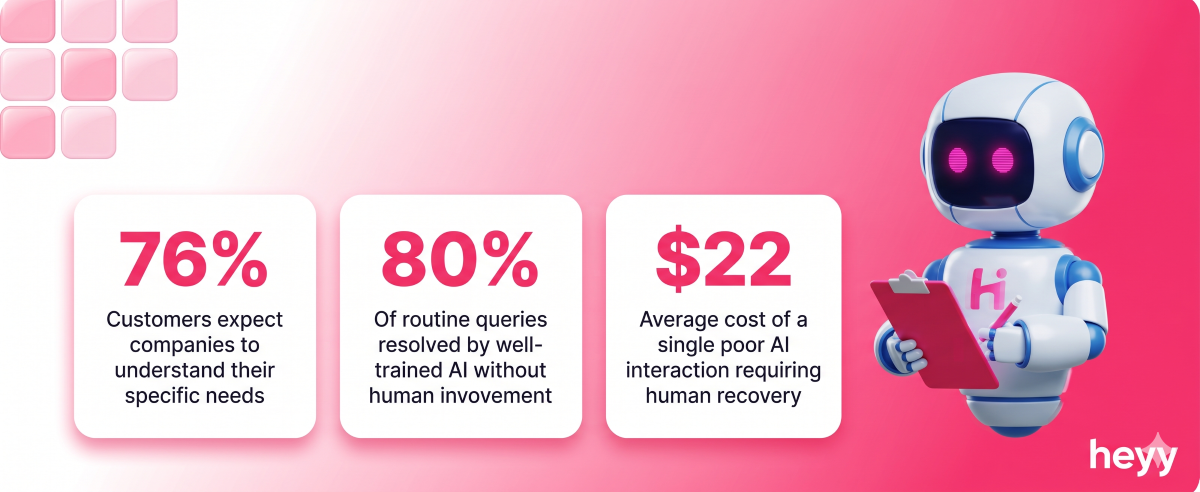
A well-trained AI chatbot resolves up to 80% of customer queries without human involvement, according to IBM's customer service research. An untrained one creates more work for your team than it saves. The difference between those two outcomes is entirely in the quality of the training.
The steps to train your AI chatbot outlined below apply regardless of which platform you use. Following them in sequence is what produces the compounding performance improvement that separates the best-performing chatbot deployments from the ones that plateau after the first month.
When you train AI chatbot for smarter responses methodically, the results show up in your deflection rate, your CSAT, and your team's workload within 60 days. That includes the part most guides skip: how to remove the robotic, formulaic language that makes customers feel like they are talking to software rather than a business that knows them.
What Training an AI Chatbot Actually Means
Training is a word that means different things in different contexts. In the context of a business deploying a chatbot, it does not mean feeding the AI millions of data points and rerunning a machine learning model. It means giving the AI the right knowledge, the right structure, and the right behavioral guidelines so it can represent your business accurately.
There are three layers to this.
Knowledge training is giving the AI access to your specific information: your products, your policies, your pricing, your FAQs, your procedures. Without this layer, the AI draws on its general training, which does not include anything specific to your business.
Intent training is teaching the AI how to recognize what a customer is actually asking, regardless of how they phrase it. A customer who types "where's my stuff" and a customer who types "order status inquiry" are asking the same question. Intent training maps the variations to the same resolution path.
Tone and voice training is the layer most businesses skip entirely. A text humanizer can help refine AI-assisted responses so they sound more natural and remain consistent with the brand's communication style. It determines whether your chatbot sounds like your brand or like a generic AI assistant that opens every response with "Certainly! I'd be happy to help you with that today!" Both layers above can be perfect and the chatbot still damages your brand if the tone is wrong.
All three layers require active configuration. None of them happen automatically just because you have deployed a chatbot.
Why Proper Training Determines Everything
An untrained or poorly trained chatbot does not fail quietly. It fails in front of your customers.
67% of customers have had a negative experience with a chatbot due to incorrect or unhelpful responses, according to Tidio's chatbot research. That statistic is not an argument against chatbots. It is an argument against deploying chatbots without properly learning the steps to train your AI chatbot first.
The businesses reporting the strongest chatbot performance, high deflection rates, strong CSAT scores, reduced support volume, are not using better AI models than anyone else. They are using the same underlying models with significantly better training. Properly trained chatbots achieve customer satisfaction scores 20 to 30% higher than untrained equivalents on the same platform, according to Intercom's AI customer service data.
The gap between a chatbot that helps your business and one that embarrasses it is not the platform. It is the work you put into training it.
Benefits of Training Your AI Chatbot With Your Own Data
It Gives Accurate Answers Instead of Plausible-Sounding Wrong Ones
An untrained AI does not know when it does not know something. It generates the most statistically likely response, which is often wrong in ways that are hard to detect. A trained AI draws from your actual knowledge base and either gives the correct answer or acknowledges it cannot answer rather than fabricating one.
It Handles Your Edge Cases, Not Just the Generic Ones
Generic training handles generic questions. Your business has specific edge cases: the product that has a different return policy, the service tier with a different response SLA, the market where a different pricing structure applies. When you train chatbot with your own data, you cover your specific situations accurately rather than defaulting to generic approximations.
It Sounds Like Your Business, Not Like a Bot
Brand voice is not decoration. It is how customers recognize and trust you. A chatbot that sounds like your brand builds on the relationship your marketing and product have created. A chatbot that sounds like a corporate FAQ document undercuts it. Training the tone is what determines which outcome you get.
It Reduces Hallucination
AI hallucination is when the model generates confident-sounding information that is factually incorrect. In a business context, this means a chatbot telling a customer they can return a product in 60 days when your policy is 30, or quoting a price that is no longer current. Training with accurate, current source material anchors the AI's responses and reduces hallucination significantly.
It Improves Over Time Without Starting From Scratch
A trained chatbot that is monitored and updated after launch gets progressively better. Each week of production data reveals new questions, new phrasings, and new topics that need to be added. The training investment compounds. See how this connects to building a reliable AI customer service operation.
The 8 Types of Data That Train Your Chatbot Best
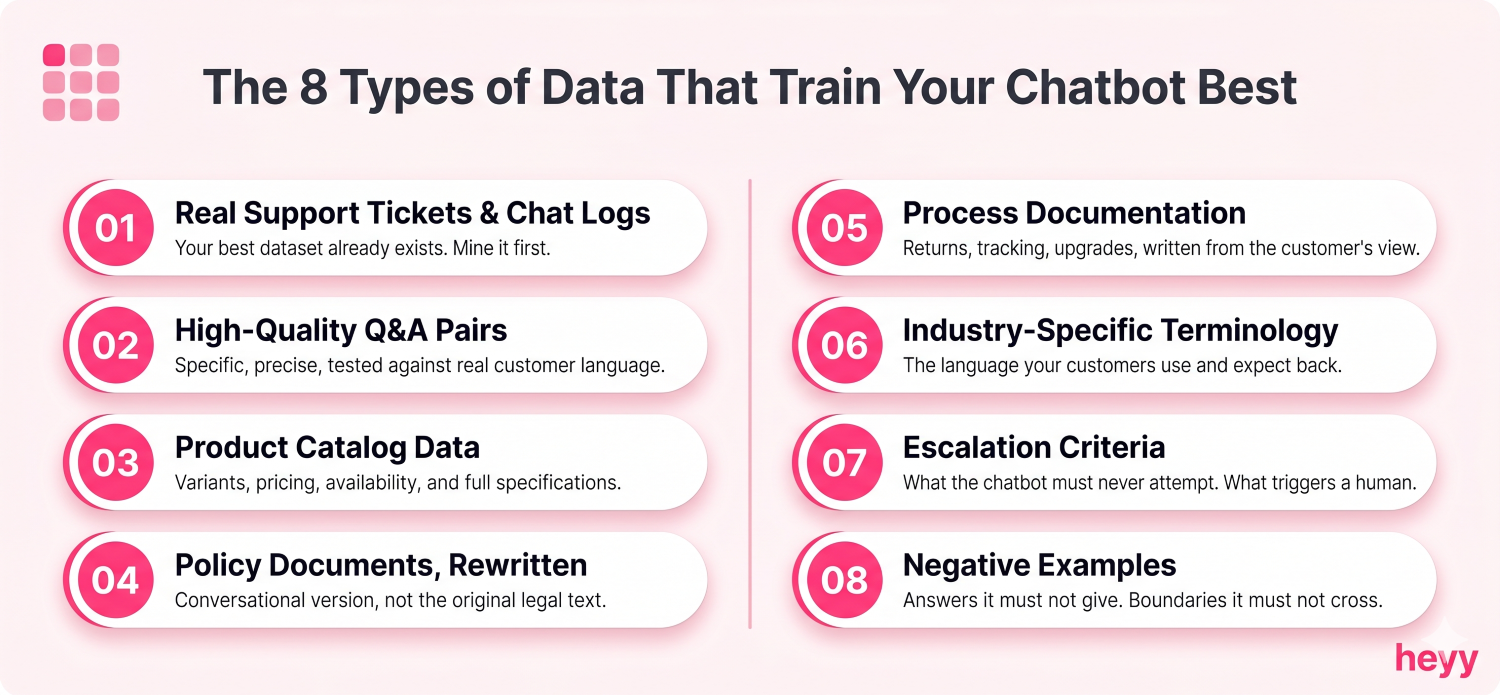
Not all training data delivers equal value. These are the eight content types ranked by impact.
1. Real support tickets and chat logs. Your best dataset already exists. It contains the exact language your customers use, the exact questions they ask, and the exact resolutions they accept. Mine it before building anything else.
2. High-quality Q&A pairs. Specific, precise, tested against real customer language. These are the highest-return training investment per hour of effort.
3. Product catalog data. For any business selling products, accurate product information including variants, pricing, availability, and specifications is foundational.
4. Policy documents, rewritten for conversational use. Not the original policy text. The conversational version that answers the question a customer would actually ask.
5. Process documentation. How to return something. How to track an order. How to upgrade an account. Step-by-step, written from the customer's perspective.
6. Industry-specific terminology. Your customers use specific language. Your chatbot should understand it and use it correctly.
7. Escalation criteria. Explicit rules about what the chatbot should not attempt to answer and what triggers immediate human escalation.
8. Negative examples. Answers the chatbot should never give. Competitor comparisons it should not make. Commitments it is not authorized to make. Boundary training prevents the chatbot from overreaching.
How to Train Your AI Chatbot: Step by Step
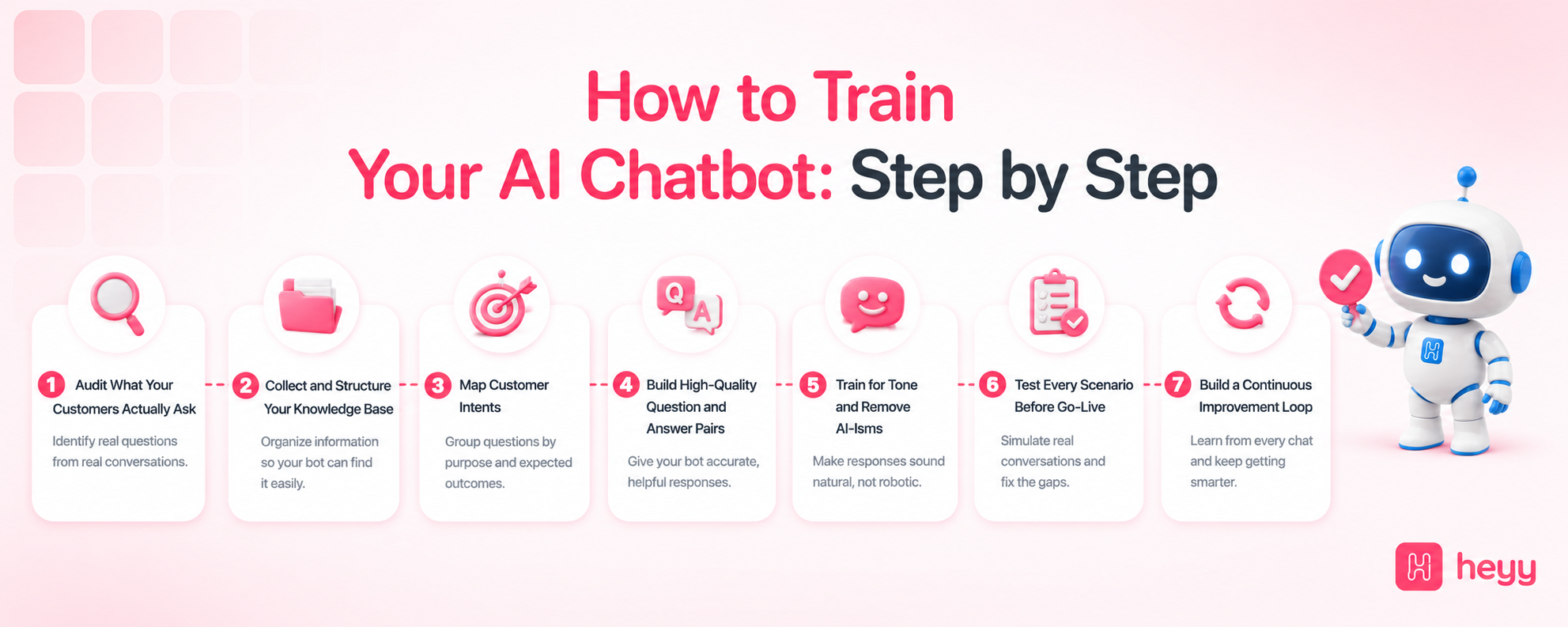
Step 1: Audit What Your Customers Actually Ask
Before you build anything, understand what you are training for.
Pull the last 90 days of your customer support conversations. Count by question type. The questions that appear more than ten times a week are your core training targets. These are the interactions where a chatbot delivers the clearest ROI.
Look for patterns beyond the obvious. The most frequent questions are easy to identify. The most damaging gaps are in the edge cases: the questions your team handles correctly but inconsistently, the scenarios that require checking with a manager, the situations where different agents give different answers. Document the top 50 questions with the exact language customers use, not the formal language you wish they used.
Step 2: Collect and Structure Your Knowledge Base
The knowledge base is the AI's source of truth. Its quality directly determines the quality of every response. Every shortcut you take here shows up in production.
What to include: Your FAQ content in plain language. Your product catalog with accurate descriptions, variants, pricing, and availability. Your shipping, delivery, returns, and refund policies with exact timeframes. Your contact information and escalation procedures.
How to structure it: Do not structure the knowledge base like an internal document. Structure it like the questions that will trigger it. A policy document that reads "Section 4.2: All items are eligible for return within the return window as specified in applicable terms" is technically accurate and practically useless as chatbot training material.
Rewrite it as the answer to the question a customer would actually ask: "You can return any item within 14 days of delivery. Items must be unused and in original packaging. Email returns@[business].com to start the process and we will send a prepaid label within 24 hours."
Clean the data before uploading: Remove outdated pricing and policies. Remove duplicate content. Remove internal jargon customers would not recognize. Every piece of content you upload becomes something the AI can cite. If it is wrong, the AI will cite it confidently.
Step 3: Map Customer Intents
Intent mapping is the translation layer between what a customer types and what your chatbot retrieves and responds with.
A single underlying question has dozens of surface variations. "Where is my order?" is also: "my order hasn't arrived," "tracking number not working," "package delayed," "when does my shipment arrive," and fifty other phrasings. Your intent mapping connects all of these to the same resolution path.
The practical method: take each core training topic and generate 15 to 20 variations of the question. Include formal phrasings, casual phrasings, fragmented messages, and frustrated versions. The variations train the intent matching to be robust rather than brittle.
Organize intents into categories that reflect your business structure: order management, product information, policy, pre-sale, and escalation. This taxonomy makes it easier to audit gaps and update content systematically.
Step 4: Build High-Quality Question and Answer Pairs
Q&A pairs are the highest-impact training investment you will make. Where documents give the AI general context, Q&A pairs give it specific, precise response patterns for the exact situations you anticipate.
Examples of high-quality pairs:
Q: How long does delivery take? A: Standard delivery takes 3 to 5 business days. Express delivery takes 1 to 2 business days and is available for an additional $8. Both options are available at checkout.
Q: Can I return something I have already used? A: Returns are accepted within 14 days of delivery for unused items in original packaging. If you received a faulty or damaged item, that policy is different. Reach out and we will sort it regardless of condition.
Q: Do you ship internationally? A: We currently ship to [list of countries/regions]. International delivery takes 7 to 14 business days and customs fees may apply depending on your location.
Build at least 3 to 5 question variations per core topic. The more variations you provide, the more robustly the chatbot matches real customer phrasing.
Step 5: Train for Tone and Remove AI-Isms
This is the step that determines whether your chatbot sounds like your brand or like a bot. It is also the step most training guides omit entirely.
AI-isms are verbal patterns that signal to customers they are talking to software rather than a business. They make customers feel processed rather than helped. And because they are baked into the underlying model's default behavior, they require deliberate countertraining to remove.
The most common AI-isms to eliminate:
"Certainly!" as a response opener. Replace it with a direct answer.
"Great question!" before answering. This is hollow flattery no human support agent would actually say. Remove it entirely.
"I'd be happy to help you with that today!" Start with the answer, not your happiness about providing it.
"Please note that..." State the information directly.
"I apologize for any inconvenience this may have caused." This phrasing is so generic it conveys nothing. Replace it with a specific acknowledgment: "I'm sorry your order arrived late. Let's fix it."
"As an AI language model, I..." Never. Not once.
How to encode brand voice:
Write a one-page voice guide for your chatbot. Include: the tone your brand uses (formal, conversational, warm, direct, playful), phrases your brand actively uses, phrases your brand would never use, and five to ten example responses that reflect the voice correctly. Feed this as a system instruction. Test every response in pre-launch for AI-isms and add explicit prohibitions for any pattern you find.
Step 6: Test Every Scenario Before Go-Live
Testing is not a quick exercise. It is where you find out what the training missed before real customers do.
Test the core scenarios: ask every question in your top-50 training targets and verify accuracy. Test the edge cases: ask adjacent questions that are not directly in your training data. Test the failure modes: ask questions the bot has no training for and verify it escalates gracefully rather than fabricating an answer. Test the tone: read every response aloud and check for AI-isms and brand alignment.
Have someone unfamiliar with your product test it cold. Their confusion shows you exactly what real customers will experience.
Step 7: Build a Continuous Improvement Loop
A chatbot trained once and never updated gets progressively worse as your business changes. Products launch. Policies update. Pricing changes. Training data goes stale.
Weekly: Review escalated conversations. Every escalation is a training gap. Add the question and correct answer to your knowledge base.
Monthly: Pull analytics. Identify questions with the lowest confidence scores and highest drop-off rates. Prioritize them for the next training update.
Quarterly: Full knowledge base audit. Check every policy, price point, and procedure for accuracy.
After every significant business change: New product launch, pricing update, policy change. Each requires an immediate training update. Training ChatGPT on your own data follows the same cycle regardless of the underlying model.
Common Training Mistakes That Undermine Everything
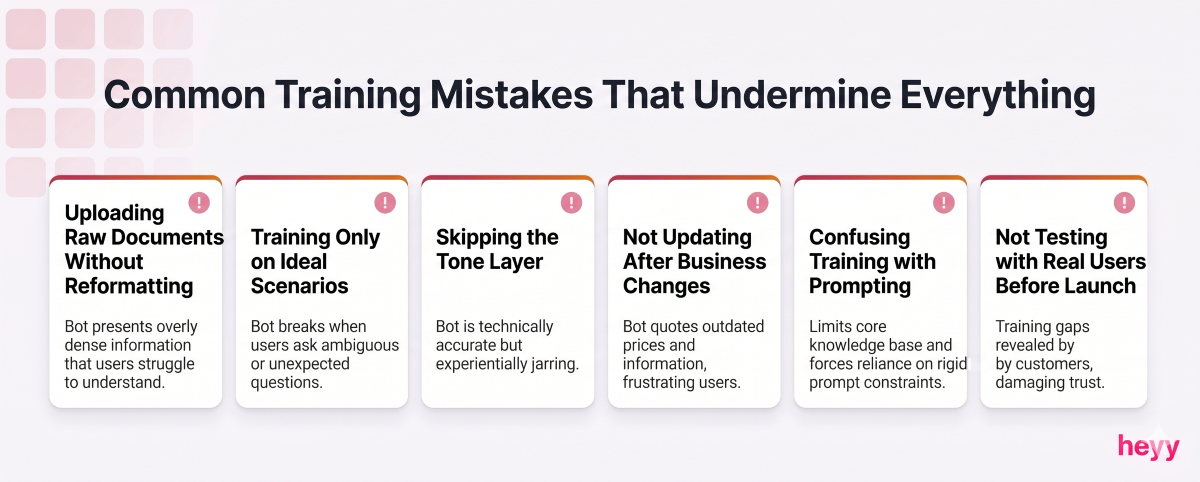
Uploading raw policy documents without reformatting. Policy documents are written for legal clarity, not conversational retrieval. They produce poor chatbot responses without significant rewriting.
Training only on ideal scenarios. Real customers abbreviate, misspell, and express frustration within the same message. Training only on clean, well-formed questions produces a chatbot that works in demos and fails in production.
Skipping the tone layer. Knowledge accuracy without voice alignment produces a bot that is technically correct and experientially jarring. Both matter. Neither compensates for the absence of the other.
Not updating after business changes. A chatbot trained on your pricing before a price change will quote the old prices until someone updates the training data. This happens routinely in businesses that treat the decision to train chatbot with your own data as a one-time event rather than an ongoing operational practice.
Confusing training with prompting. System prompts influence behavior in the current session. Training data influences the knowledge the AI can draw on across all sessions. Both are necessary. Neither replaces the other. The AI chatbot vs ChatGPT comparison covers how these interact in different deployment models.
Not testing with real users before launch. You know what your chatbot is supposed to know. The test of whether training worked is whether people who do not know what it knows can get the answers they need. Test with strangers to your product, not just your team.
How to Measure Whether Your Training Is Working
Deflection rate. The percentage of conversations the chatbot resolves without human escalation. Below 40% means significant knowledge base gaps. Above 70% is strong performance. Track monthly.
Response accuracy rate. Sample 50 chatbot responses per week and check for factual accuracy. If more than 10% contain errors, your knowledge base needs an update.
Escalation pattern analysis. Which topics escalate most frequently? Each one is a training gap with a clear ROI: add the training, reduce the escalation rate, reduce human support cost.
CSAT on chatbot interactions. Track satisfaction separately for bot-handled versus human-handled conversations. The gap tells you how much work the tone and knowledge training still needs.
Response tone audits. Monthly, pull 20 random chatbot responses and check each one for AI-isms, brand voice alignment, and appropriate length. This catches drift that happens when training data ages without maintenance. It is also the check that confirms your efforts to train AI chatbot for smarter responses are holding over time, not just at launch.
Upload your knowledge base, build your Q&A pairs, configure your brand voice, and deploy across WhatsApp, Instagram, Facebook Messenger, and your website chat simultaneously. The AI handles the conversations. You handle the training and the business. Start free and have your first trained chatbot responding to real customers today.
FAQs
What is the difference between training a chatbot and using a system prompt?
A system prompt gives the AI behavioral instructions for a session: how to respond, what tone to use, what it should and should not say. Training data gives the AI knowledge: what your products are, what your policies are, what your business actually does. You need both. A well-prompted AI without training data gives responses in exactly the right tone that are factually wrong about your business. A well-trained AI without tone guidance gives accurate answers that sound like a generic bot. The combination is what produces a chatbot that genuinely represents your business. How ChatGPT accuracy affects business outcomes explains where each layer is most critical.
Do I need coding skills to train AI chatbot for smarter responses?
Not on modern no-code platforms. Most AI customer service platforms allow you to upload documents, build Q&A pairs, and configure system instructions through a graphical interface. The steps to train your AI chatbot require content preparation and judgment, not technical skills. Custom API-based implementations require development resources, but most business-facing chatbot deployments do not.
How long does it take to properly train a chatbot?
Initial training for a focused knowledge base covering core FAQ topics typically takes two to five business days. This includes data collection, knowledge base structuring, Q&A pair development, tone configuration, and pre-launch testing. The post-launch continuous improvement loop adds approximately two to four hours per week ongoing.
What happens when my chatbot does not know the answer?
A properly trained chatbot handles ignorance gracefully. When a question falls outside its knowledge base, it acknowledges this clearly, does not attempt a fabricated answer, and routes to a human agent with full conversation context attached. Configuring this escalation behavior explicitly is part of the training process. If your chatbot attempts to answer questions it does not know, your escalation rules need strengthening.
How often should I update my chatbot's training data?
Every time something changes that customers might ask about. Practically: immediately after any pricing, policy, or product change; weekly review of escalated conversations; monthly analytics review to prioritize accuracy gaps; quarterly full knowledge base audit. When you train chatbot with your own data on an ongoing basis rather than treating it as a one-time setup, the performance improvement compounds noticeably over the first six months.
What are AI-isms and why do they matter?
AI-isms are the formulaic verbal patterns that signal to customers they are talking to software: "Certainly!", "Great question!", "I'd be happy to help", "Please note that." They make interactions feel mechanical and reduce trust even when the underlying information is accurate. Removing them through explicit tone training and system instructions is what makes a chatbot feel like a natural extension of your brand rather than a bot with your logo on it. This is one of the most impactful and most neglected parts of the training process.
Can I train my chatbot to avoid giving wrong information entirely?
You can significantly reduce it but not eliminate it entirely. The most effective approach combines accurate and current knowledge base training, explicit escalation rules for high-risk question categories, and regular accuracy auditing to catch and correct errors quickly. The goal is not perfection. It is a trained system that fails gracefully and improves systematically.
More blog posts to read

Ready to Automate Support
Across Every Channel?
.svg)
.avif)