.svg)
8 Proven Ways to Reduce Response Time in Customer Support

Every support team that comes to me with a slow response time problem says the same thing. "We need to hire more people."
They do not need to hire more people. They have a process problem dressed up as a headcount problem.
I worked with a mid-market SaaS company whose average first response time was 7.4 hours. Their CSAT score sat at 3.6 out of 5. They had a team of nine support agents. When I looked at the setup, three things were immediately visible: agents were switching between four different inboxes, there were no routing rules, and the top 12 query types had no automation behind them.
The same nine people, the same volume, the same cost. After fixing those three things, their average response time dropped to 52 minutes. CSAT went to 4.4. No new hires. Just a different setup.
This guide covers 8 things you can do to reduce response time in customer support. Starting today. Without new headcount.
Why Response Time Is the Metric That Changes Everything Else
Before the 8 ways. You need to understand why this specific metric is worth the focused effort.
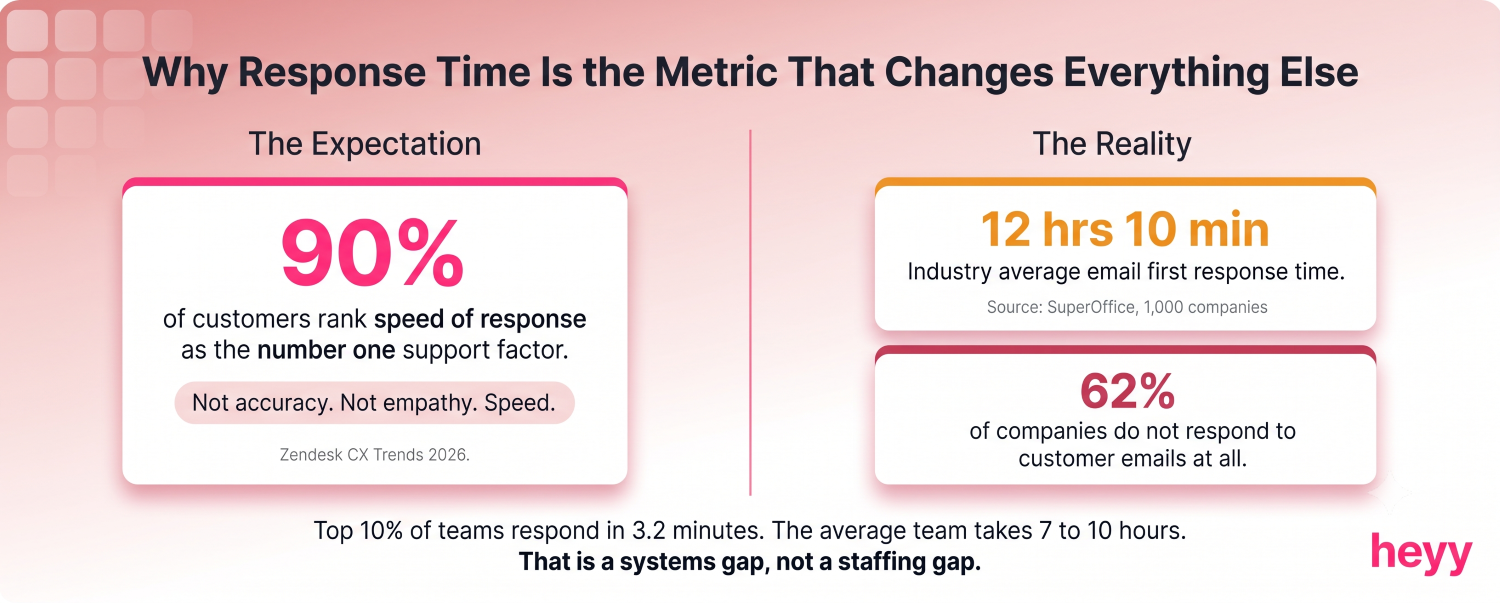
90% of customers rank speed of response as the single most important factor in a support experience, ahead of resolution quality and channel availability, per Zendesk CX Trends 2026. Not accuracy. Not empathy. Speed.
The industry average email first response time is 12 hours and 10 minutes, based on a SuperOffice study of 1,000 companies. 62% of companies do not respond to customer service emails at all. This means your baseline for looking good is extraordinarily low. Getting to a 1-hour average puts you in the top tier of your competitive set by definition.
Top-performing support teams achieve average response times of 3.2 minutes. The average company takes 7 to 10 hours. That gap does not represent a staffing ratio difference. It represents a systems difference. The first response time guide covers the full measurement framework for benchmarking where you actually stand before you start optimizing.
8 Ways to Reduce Response Time in Customer Support
1. Deploy an Automated First Response Within 30 Seconds
The fastest improvement with the lowest implementation cost on this list.
An automated acknowledgment that fires within 30 seconds of a ticket arriving does two things. It stops the response time clock for the customer. And it sets a specific expectation: "We received your message and we will reply by [time]."
62% of companies do not even acknowledge receiving an email. A simple auto-acknowledgment puts you ahead of 9 out of 10 competitors before a single agent responds.
This is not the same as a resolution. Do not confuse the two. The auto-response is not solving the problem. It is preventing the customer from feeling ignored while the queue processes. The average handling time for the actual resolution is separate. But the first response time clock stops the moment the acknowledgment arrives.
Write the auto-response to be specific. Not "We received your request and will respond soon." Say: "We got your message about [inquiry type]. Our team responds to [channel] within [specific window]. You will hear from us by [time]." Specific commitments outperform vague reassurances. Every time.
2. Consolidate All Channels Into One Inbox
This is the single most common structural problem I find.
A support team switching between a WhatsApp Business app, an Instagram DM tab, a live chat platform, and an email inbox is not handling four channels. They are handling four separate jobs, each requiring a context switch that costs time and focus.
The math is straightforward. A conversation that comes in on Instagram while an agent is mid-reply on WhatsApp either waits or gets a worse response. Usually both.
A unified inbox means every conversation, regardless of channel, appears in one place with the same tools around it. Assignment, status, context, history. One tab. No switching. This structural change alone reduces average response time because agents stop losing conversations between channels.
Omnichannel support lifts CSAT to 67% versus 28% for disconnected multichannel setups, per Salesmate's 2026 customer service benchmarks. The CSAT gap comes from context continuity, not channel coverage. Customers who do not have to repeat themselves score their experience higher. Always.
The new inbox guide covers exactly what to look for in a unified inbox setup and the specific features that reduce response time in practice.
3. Replace Queue Scanning With Saved Views
Here is something no one measures but everyone does: time spent finding the right conversation to answer.
A support agent who opens a 200-conversation inbox every morning and visually scans it to find their assignments is wasting 15 to 20 minutes per day on triage before they answer a single message. Multiply that across a team of eight agents. That is 160 minutes of daily labor that produces zero customer value.
Saved views are pre-filtered slices of the queue. "Assigned to me, status open." "WhatsApp conversations waiting over an hour." "VIP accounts, any status." An agent who opens a saved view starts the day looking at exactly the conversations they are responsible for, sorted by urgency.
This is not a minor efficiency gain. It is the difference between reactive scanning and proactive management.
4. Train Automated Customer Support Responses on Your Top Query Types
You do not need to automate everything. You need to automate the 10 things that represent 60% of your volume.
Pull your ticket data for the last 90 days. Sort by query category. The top 10 categories almost always represent 55 to 70% of total ticket volume. For most businesses, these include: order status, return policy, product availability, shipping timelines, password reset, and billing questions.
Every one of those categories is automatable. An AI trained on your policies, your product catalog, and your order data can answer them accurately without a human involved.
The reduction in average handling time comes from removing the query types that consume the most repetitive human effort. What remains is the complex work that actually requires judgment. Your agents are better at that work when they are not exhausted from answering "what is your return policy" for the 40th time this week.
Companies using AI automation report a 38.7% improvement in resolution time and a 42.4% improvement in CSAT, based on Freshworks 2024 data across 17,170 businesses and 37 million conversations, per Stealth Agents' benchmark compilation. Resolution times that averaged 32 hours are now averaging 32 minutes in real deployments, per the same benchmark. That is an 87% reduction. Not an incremental improvement.
The AI customer service guide covers how to implement this correctly, including which query types to automate first and how to handle the handoff when AI reaches its limits.
5. Set SLA Timers With Visible Escalation Warnings
A conversation without a deadline ages invisibly.
If your inbox has no SLA timers, conversations that arrive at 9am and sit unanswered until 3pm are invisible problems until a customer complains. By then, the response time damage is done.
SLA timers attach a clock to every conversation the moment it arrives. When the conversation reaches 30 minutes without a response, it turns amber. At 60 minutes, it turns red and triggers an escalation notification to the supervisor. The agent sees the urgency before the customer feels it.
The operational effect is significant. Teams that implement visible SLA timers typically reduce their average response time by 25 to 40% within two weeks, because the visibility creates accountability that passive queues do not. The agent who sees a red countdown at 45 minutes will prioritize that conversation over a newer one with no timer.
Set your SLA windows based on channel benchmarks. Email: 4 hours for standard, 1 hour for premium. Live chat: 2 minutes. WhatsApp and social DMs: 30 minutes. Do not use the same SLA across all channels. A 4-hour SLA for live chat is not acceptable. A 30-minute SLA for email is unnecessarily aggressive.
6. Build Canned Responses That Inject Context, Not Filler
Most canned responses are garbage. They save five seconds and damage trust.
"Thank you for contacting us. We are sorry for the inconvenience. We will look into this and get back to you." That response communicates nothing. It takes the customer no closer to resolution. And it reads exactly like what it is: a placeholder while someone figures out what to say.
A canned response that actually reduces average handling time includes dynamic fields that inject the specific context. The customer's name. The product they asked about. The specific policy relevant to their question. The time frame for resolution.
Example of a canned response that works: "Hi [Name], I can see you ordered [Product] on [Date]. Our return window for that item is [X days], so you have until [Date] to start the process. Here is the direct link to do it: [Link]. Reply here if you need anything else."
That response is faster to send than a custom reply and more useful than a generic acknowledgment. Build 20 of these for your top query types. Train every agent to use them. Watch average handling time drop.
7. Route Tickets by Intent, Not by Arrival Order
First-in, first-out queue management is the default. It is also wrong.
A billing dispute and a product question should not wait in the same line. The billing dispute has higher stakes, higher urgency, and requires a different skill set. When both tickets sit in the same first-in, first-out queue, one of three things happens: the wrong agent picks up the billing dispute, the billing dispute waits while the wrong agent answers product questions, or both get delayed because the queue has no priority logic.
Intent-based routing matches the conversation to the right agent category based on what the customer actually asked. A returns question routes to the returns team. A technical question routes to tier-2 support. An order modification routes to the team with access to change orders.
This reduces response time in two ways. The right agent handles the conversation immediately instead of after reassignment. And the agent who picks it up does not need time to research a topic they handle every day.
Configure routing rules based on: the channel the customer used, keywords in the opening message, the customer's account tier, and the product they are asking about. Four variables. They cover the majority of routing decisions without manual triage.
8. Run a Weekly Response Time Audit by Channel
The teams that keep response times fast are the ones that look at the numbers weekly, not quarterly.
Most support teams review response time in monthly reports. By the time the monthly report shows a problem, the problem has been running for three to four weeks. Weekly audits catch it in the first seven days.
The weekly audit is not complicated. Pull three numbers for each channel: average first response time, percentage of conversations answered within your SLA window, and CSAT for that channel. Compare against the prior week. Compare against your target benchmark. Automated customer support responses will show near-zero FRT in your data. Track them separately from human-handled tickets so the blended number does not hide where your team actually needs to reduce customer service response times.
Responses within one hour achieve 71% customer retention. Responses at 24 hours achieve 48% retention. That 23-percentage-point gap compounds over a year. Every week you let response time drift is a week of churn accumulating in your customer base.
The channel-level breakdown matters because blended averages hide the problem. Your email average response time might look acceptable while your WhatsApp response time is running at six hours. A blended number would obscure that. Break it down by channel every week. Fix the channel that is furthest from benchmark first.
The Root Cause Framework
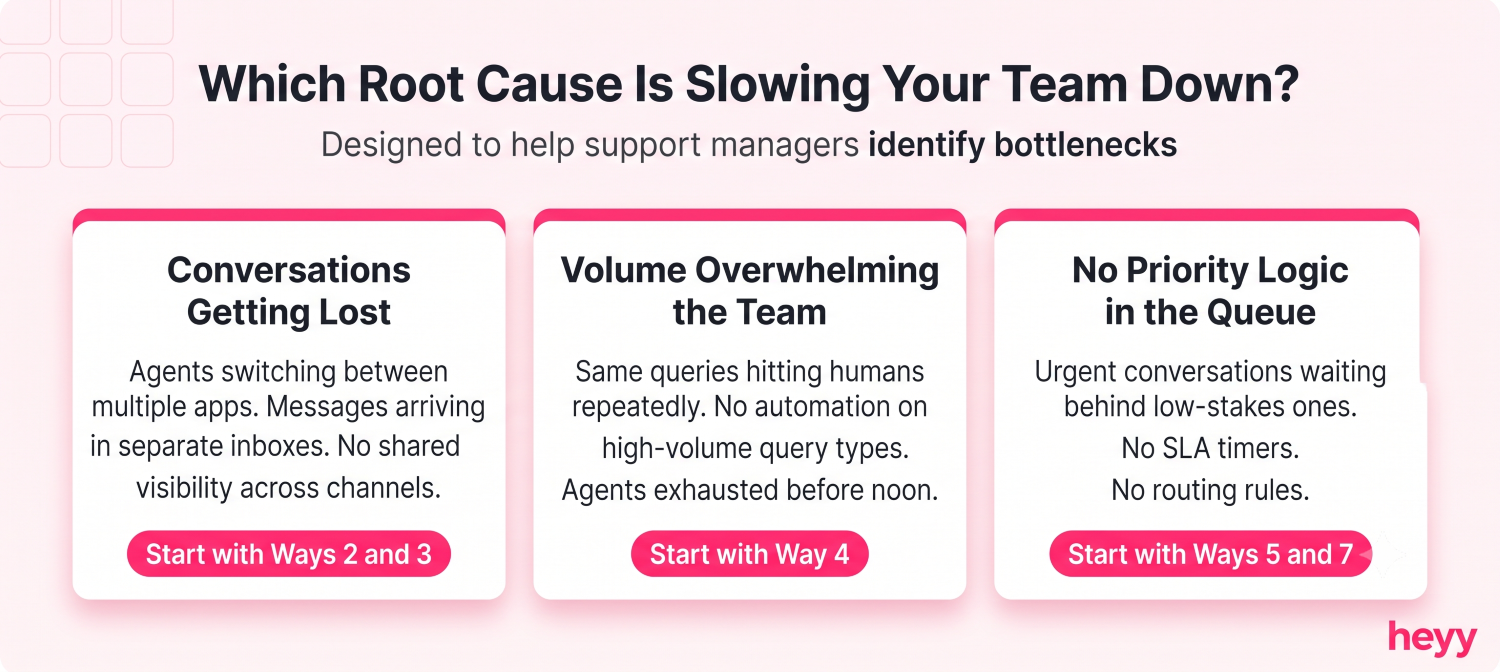
These 8 strategies each target one of three structural problems. Before you implement all eight, diagnose which one is your primary constraint.
If conversations are getting lost between channels: Start with ways 2 and 3. Consolidate the inbox, build saved views. Everything else depends on this foundation.
If volume is overwhelming the team: Start with way 4. Build automated customer support responses for your top query types and reduce customer service response times by deflecting volume before it reaches humans.
If the queue has no priority logic: Start with ways 5 and 7. SLA timers and intent-based routing. Both create urgency signals and matching logic that first-in first-out queues cannot.
After the foundation is in place, implement the remaining strategies in order. The compounding effect matters. A team running all eight strategies typically achieves response times that no individual change could produce alone.
Your response time problem is a systems problem. Not a people problem. The nine agents who went from 7.4 hours to 52 minutes did not work harder. Their inbox stopped fighting against them.
For teams managing support across WhatsApp, Instagram, and website chat simultaneously, Heyy puts all three in one inbox with AI that handles your top query types automatically, SLA timers on every conversation, and saved views so your agents open to exactly the work that is theirs. The structural fixes described above are all built in. Start free and run your first week with a setup that actually works.
FAQs
What is a realistic target for first response time across channels?
The benchmarks are specific. For email: top performers respond under 1 hour; anything under 4 hours puts you ahead of 64% of companies. For live chat: under 40 seconds for strong performance; the average is 2 minutes. For WhatsApp and social DMs: under 30 minutes. Set a separate SLA for each channel and track them separately. A blended average obscures which channel is failing.
Does reducing response time require more headcount?
Not in the first phase. The nine-agent SaaS team I described at the top of this post improved from 7.4 hours to 52 minutes without adding a person. The first 60 to 80% of response time reduction typically comes from structural changes: consolidated inbox, saved views, automated deflection on high-volume queries, and SLA visibility. Headcount becomes relevant after these foundations are in place, when actual conversation volume exceeds what the team can handle with optimal routing and deflection.
What is the difference between first response time and average handling time?
First response time measures how long before the customer gets any reply. Average handling time measures the total duration of a support interaction from first contact to resolution. Reducing FRT is about reducing queue wait time. Reducing AHT is about reducing the work per interaction, which comes from better canned responses, agent tools, and AI assistance. Both matter, but FRT has stronger direct impact on CSAT. Optimize FRT first.
Should I track response time differently for AI-handled conversations versus human-handled ones?
Yes. AI responses are effectively instantaneous, so blending them with human-handled tickets will artificially inflate your blended average and mask human-handled FRT performance. Track three numbers: AI FRT (typically under 5 seconds), human FRT, and blended FRT. Report all three. If AI is deflecting 45% of your volume at near-zero FRT and human agents are handling the remaining 55% in 4 hours, your blended average looks acceptable even though 55% of your customers are waiting too long.
What query types should I automate first to get the fastest response time improvement?
Automate the queries that are highest in volume and lowest in complexity. Order status and tracking questions are typically number one. Return and refund policy questions number two. Product availability questions number three. These three categories represent 30 to 50% of total support volume for most ecommerce and SMB businesses. Automating them removes the most repetitive load from your human agents without requiring the AI to handle anything complex. Improve average handling time on the remaining human interactions after this layer is in place.
More blog posts to read


Ready to Automate Support
Across Every Channel?
.svg)
.avif)