.svg)
What Is a Chatbot FAQ? Why It Beats a Static FAQ Page (and How to Build One)

Picture a customer landing on your website at 8:00 PM with just one quick question. They want to know if you ship to their country before they drop $200 on an order.
They click your FAQ link and start scanning. They hit Ctrl+F, but your page has fifty different entries buried under various topics, and nothing matches the exact words they are searching for. They scroll a little more, cannot find a clear answer, and simply close the tab.
The worst part is that you never even knew they were there. There is no missed support ticket and no unanswered message in your inbox. It is just a lost sale that slipped away as quietly as it arrived.
This is the static FAQ page failure mode, and it is far more common than most businesses realize. According to Zendesk's Customer Experience Trends report, static FAQ pages have an average self-service success rate of just 9%. That means 91 out of every 100 customers who visit your FAQ page leave without finding the answer they came for.
A chatbot FAQ closes that gap. It meets the customer with their actual question, in their own words, and gives them the answer they need in seconds. The FAQ chatbot vs static FAQ difference is not a matter of preference, it is a self-service success rate gap of 9% versus 70–80%. This guide explains what a FAQ chatbot is, why it outperforms a static page on every relevant metric, and how to build one that actually works.
What Is a FAQ Chatbot?
What is a FAQ chatbot? It is an AI-powered conversational interface that answers frequently asked questions through natural language interaction rather than requiring a customer to search, scroll, or navigate a static list.
Instead of publishing your answers on a page and waiting for customers to find them, a FAQ chatbot brings the answers to the customer. The customer types or messages their question in natural language. The chatbot identifies the intent behind the question, matches it to the correct answer from your knowledge base, and responds immediately.
The structural difference from a static FAQ page is fundamental. A static page is a library. The customer has to find the book. A FAQ chatbot is a librarian. The customer describes what they need and the librarian finds it for them.
Modern FAQ chatbots go beyond simple question-and-answer retrieval. They handle follow-up questions within the same conversation. They escalate to a human when the question falls outside their scope. They collect contact information when a customer needs a more detailed response. And they operate across every channel your customers use: your website, WhatsApp, Instagram DMs, and Facebook Messenger simultaneously.
The Problem With Static FAQ Pages
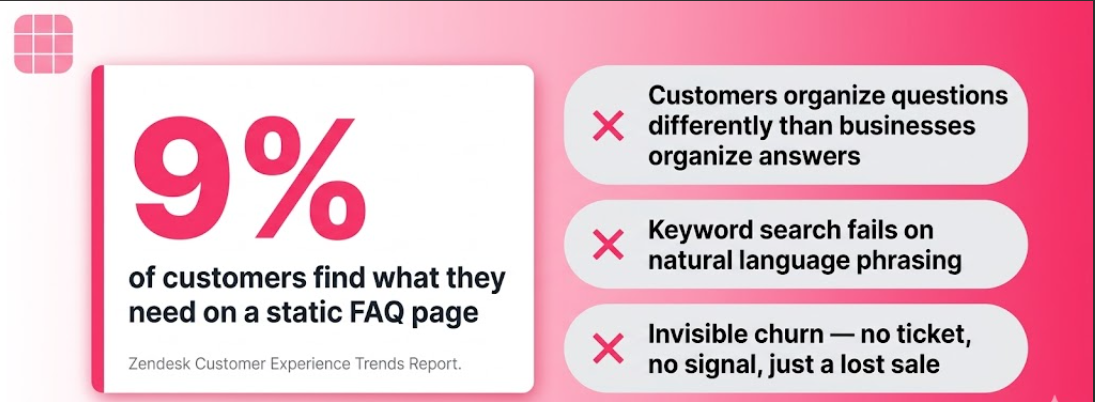
The 9% self-service success rate is the number that makes the case for a FAQ chatbot immediately. But it is worth understanding why static FAQ pages fail so consistently, because the failure is structural, not fixable with a better design.
Customers do not organize their questions the way businesses organize their answers. Your FAQ page is organized by topic: Shipping, Returns, Payment, Account. Your customers do not categorize their questions before asking them. They type "can I return this if it doesn't fit" or "how do I get my money back" and expect to find an answer immediately. When the page does not surface the answer in the first few seconds of searching, they leave.
The search problem is real. Most FAQ pages do not have search functionality. Those that do rely on keyword matching that fails when the customer's phrasing differs from the FAQ heading. The customer who types "cancel subscription" does not find the entry titled "How to Terminate Your Membership."
Static pages create invisible churn. When a customer cannot find an answer on your FAQ page, they do not always contact support. Often they simply leave. That departure is invisible in your support metrics because no ticket was created. No email was sent. The customer just did not buy. This invisible friction is one of the primary causes of website abandonment, and static FAQ pages generate it consistently.
Pages go stale. A static FAQ page requires a human to update it every time a product, policy, or process changes. Most businesses fall behind on this. Customers receive outdated answers. Trust erodes.
A FAQ chatbot solves all four of these problems simultaneously.
FAQ Chatbot Benefits: What Changes When You Deploy One
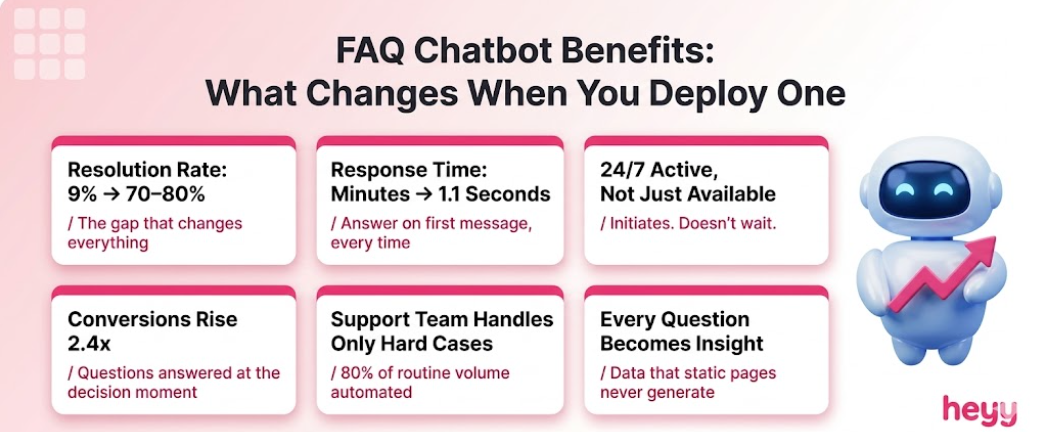
Resolution Rate Goes From 9% to Over 70%
This is the headline number. Static FAQ pages achieve a 9% self-service success rate. Well-configured FAQ chatbots resolve 70 to 80% of routine inquiries without human involvement, according to IBM's AI customer service benchmarks. The gap between those two numbers represents the customers who were looking for answers and finding them versus the ones who were leaving without resolution.
Response Time Drops to Seconds
Chatbots reduce FAQ resolution times by up to 38% compared to other self-service methods, per Jotform's 2026 chatbot data. The average chatbot response time is 1.1 seconds. A customer who previously spent several minutes scanning a static page and still did not find their answer now receives it in under two seconds.
24/7 Availability Without Staffing Cost
61% of users say 24/7 availability is the top benefit of chatbots, per Marketing LTB's benchmark data. Your FAQ chatbot answers questions at 2am on a Sunday with the same speed and accuracy as at 11am on a Tuesday. No additional staffing cost. No response delay.
Conversion Rates Improve Directly
A customer with an unanswered question before purchase does not buy. A customer whose question is answered in seconds does. Chatbot-powered funnels convert 2.4x more customers than static forms, per Azumo's 2026 analysis. Website conversions increase by up to 38% with proactive chatbots. These are not general "chatbots are good" statistics. They are the direct result of removing information friction at the moment of purchase decision.
Support Team Handles Only What Requires Them
Chatbots handle up to 80% of routine questions without human help. The remaining 20% that reaches your support team is the 20% that genuinely requires human judgment. The team that previously answered the same fifteen questions fifty times per day now answers the complex, high-stakes inquiries that actually benefit from human attention.
Every Question Becomes a Business Insight
A static FAQ page does not tell you what customers are searching for. A FAQ chatbot records every question asked, every escalation triggered, and every point where the conversation ended without resolution. That data shows you exactly where customers are confused, what your knowledge base is missing, and which parts of your product or service generate the most friction. FAQ chatbots turn customer questions into a continuous feedback loop that improves your entire customer experience operation over time.
FAQ Chatbot vs Static FAQ Page: The Direct Comparison
The FAQ chatbot vs static FAQ comparison is not close on any dimension. The static FAQ page was the right solution before conversational AI was accessible to businesses of all sizes. In 2026, it is not.
How to Build an FAQ Chatbot That Actually Works
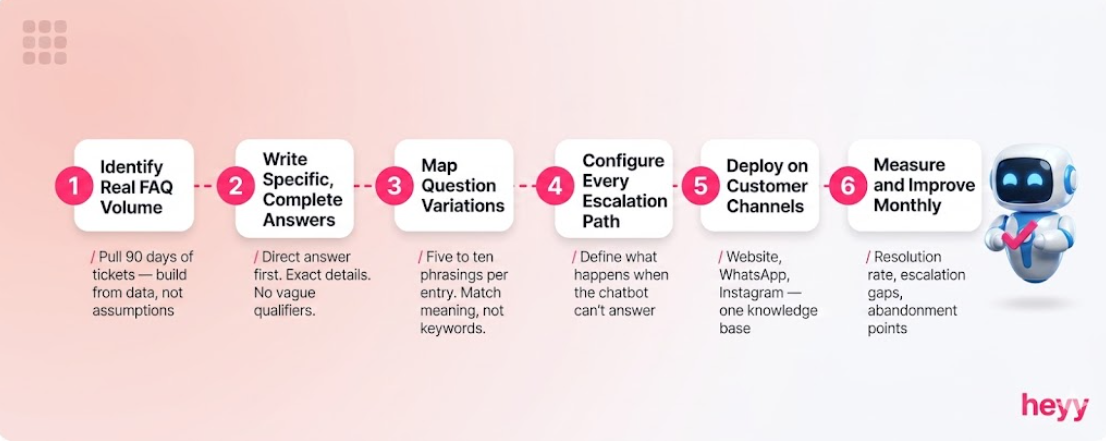
Step 1: Identify Your Real FAQ Volume
Do not build an FAQ chatbot based on what you think customers ask. Build it based on what they actually ask.
Pull your last 90 days of support tickets, chat logs, and email inquiries. Group them by question type. Count the frequency of each category. Your FAQ chatbot should cover the top 20 to 30 question categories that account for 80% of your inbound volume. Everything else can be handled through escalation.
This audit takes a few hours and is the most valuable preparation step you can do. The FAQ chatbot built on actual customer question data outperforms the one built on assumptions every time.
Step 2: Write Answers That Are Specific and Complete
The quality of a FAQ chatbot is determined by the quality of its answers. A vague answer produces a vague response. A specific answer produces a specific response.
For each question category, write an answer that:
- Gives the direct answer in the first sentence, not after context-setting
- Includes the specific detail the customer is looking for (the exact timeframe, the exact amount, the exact process)
- Covers the most common follow-up within the same answer so the customer does not need to ask again
- Uses language at the same register as your brand voice
"Delivery typically takes a few business days" is a bad answer. "Standard delivery takes 3 to 5 business days for orders placed before 2pm Monday through Friday. Express delivery (next-day) is available for an additional $8.99" is a good answer.
Step 3: Map Your Questions to How Customers Actually Ask Them
Your FAQ heading says "Cancellation Policy." Your customer types "how do I cancel my subscription," "I want to stop my plan," "cancel account," and "how do I get out of my contract." All of these mean the same thing.
For each FAQ entry, write five to ten variations of how customers phrase the question. These variations tell the chatbot to match all of them to the same answer. Without this mapping, the chatbot achieves high accuracy on the questions phrased exactly like your FAQ headings and poor accuracy on natural language variations, which is most of what real customers send.
Step 4: Configure Escalation Paths for Every Scenario
A FAQ chatbot that hits a question it cannot answer has two options: confabulate an answer or escalate gracefully. It should always escalate gracefully.
Define what happens when:
- The customer's question is outside the knowledge base
- The customer is expressing frustration or distress
- The customer explicitly requests a human agent
- The question requires account-specific information the chatbot does not have access to
Each of these should have a scripted escalation response that acknowledges the limitation honestly, sets an expectation for human follow-up, and where possible collects the customer's contact information so the follow-up can happen proactively.
Step 5: Deploy on the Channels Your Customers Use
A FAQ chatbot that only lives on your website solves for the customers who visit your website. For most consumer-facing businesses, a meaningful portion of customer questions arrive via WhatsApp, Instagram DMs, and Facebook Messenger.
46% of consumers prefer messaging apps over websites for support. Deploying your FAQ chatbot across social channels is not a nice-to-have extension. It is how you serve the half of your customer base that is not coming to your website to ask questions.
The same knowledge base and the same conversation flows should power the chatbot on every channel. One training effort, consistent answers everywhere.
Step 6: Measure and Improve Monthly
A FAQ chatbot deployed without measurement is a FAQ chatbot that stops improving. Track these five numbers monthly:
Resolution rate: What percentage of FAQ conversations reached a complete answer without escalation? Target above 70% after the first 60 days.
Escalation rate by question category: Which categories are generating the most escalations? These are your retraining priorities.
Conversation abandonment rate: Where in the conversation flow are customers leaving? Drop-offs at specific points indicate friction in the conversation design, not just missing information.
CSAT on chatbot interactions: Customer satisfaction scores segmented by chatbot vs. human interactions tell you whether the chatbot experience is meeting expectations.
Questions with no matched answer: Every question the chatbot fails to match is a knowledge base gap. Pull this list monthly. Add the missing answers. The chatbot that handles 200 conversations in month one handles 300 confidently in month three if you act on this data.
How to Write FAQ Pairs That AI Can Match Reliably
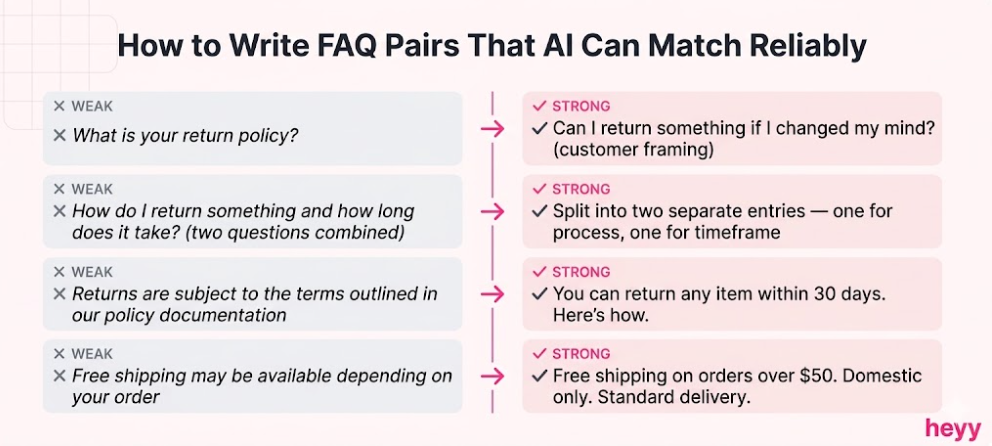
This is the step most FAQ chatbot guides underexplain. The quality of AI question-matching depends heavily on how your FAQ pairs are written.
Write the question from the customer's perspective, not the business's. "What is your return policy?" is a business-framing question. "Can I return something if I changed my mind?" is a customer-framing question. Both belong in your FAQ database. Neither alone is sufficient.
One question, one answer. Do not combine related questions into multi-part FAQ entries. "How do I return something and how long does it take?" is two questions. The chatbot that matches one half of the question retrieves a combined answer that partially addresses the query. Separate them.
Use plain language for both Q and A. Industry jargon, internal terminology, and formal policy language all reduce matching accuracy and reduce answer clarity simultaneously. Rewrite FAQ answers the way a knowledgeable colleague would explain them verbally.
Include the answer's conditions explicitly. "Free shipping is available on orders over $50 for standard delivery to domestic addresses. International orders are charged by weight." A conditional answer is always better than a qualified one: "Free shipping may be available depending on your order and location."
When a FAQ Chatbot Is Not the Right Solution
Most content about FAQ chatbots leaves this section out. It should not.
You do not yet know what your customers ask. A FAQ chatbot trained on assumptions produces poor results. If you have not collected enough customer inquiry data to identify your top 20 question categories, spend one month gathering that data before building the chatbot.
Your answers change too frequently to maintain accurately. If your pricing, product availability, or policies change more frequently than you can update the knowledge base, the chatbot will serve outdated information with confidence. In this situation, live data integration is more important than FAQ chatbot deployment, or the FAQ chatbot scope should be limited to questions with stable answers.
Your customer questions are mostly complex and unique. FAQ chatbots are optimized for high-frequency, predictable questions. If the majority of your customer inquiries require genuine individual assessment, a FAQ chatbot adds limited value and creates friction when it fails to match. The customer service queue management investment may deliver better returns in this scenario.
If your customers are asking questions on WhatsApp and Instagram that your static FAQ page cannot answer because it was never designed for those channels, Heyy solves that problem directly. Train the AI on your FAQ pairs, your policies, and your product details. Deploy it across WhatsApp, Instagram, Facebook Messenger, and your website from one platform. Every customer question gets an instant, accurate, on-brand answer regardless of the channel they used to ask it. Start free and have your FAQ chatbot live before the end of the week.
FAQs
What is a FAQ chatbot and how does it work?
A FAQ chatbot is an AI-powered conversational tool that answers frequently asked customer questions through natural language interaction. The customer types or messages their question. The chatbot identifies their intent, retrieves the relevant answer from a trained knowledge base, and responds immediately. Unlike a static FAQ page, which requires the customer to search and navigate, the FAQ chatbot brings the answer to the customer. It also handles follow-up questions, escalates complex requests to human agents, and operates across multiple channels including your website, WhatsApp, and Instagram.
What are the main FAQ chatbot benefits compared to a static page?
The FAQ chatbot benefits over a static page are substantial across every relevant metric. Self-service success rates improve from 9% (static page) to 70–80% (well-trained chatbot). Response time drops from minutes to 1.1 seconds. The chatbot is active rather than passive: it initiates conversations with high-intent visitors rather than waiting to be searched. It handles natural language questions that static pages cannot match. It provides escalation paths when needed. And it generates data about customer questions that static pages never capture. AI customer service at the FAQ level is the most accessible and highest-return first deployment for most businesses.
How many FAQ pairs do I need to start?
Start with the 20 to 30 question categories that account for 80% of your current inbound inquiry volume. This is enough coverage to handle the majority of customer questions while keeping the initial setup manageable. Add question categories as you review the escalation data from your first 30 to 60 days of operation. A knowledge base that starts with 25 high-quality, well-mapped FAQ pairs and grows based on real escalation data consistently outperforms one that starts with 200 mediocre pairs written in advance.
Can a FAQ chatbot work on WhatsApp and Instagram?
Yes, and this is where the channel advantage becomes most important. FAQ chatbots deployed only on website chat serve only the customers who visit your website. Deploying across WhatsApp, Instagram, and other messaging channels means the same answers reach the same customers regardless of where they reach out. The knowledge base is configured once. The channel coverage handles the rest.
How do I handle questions my FAQ chatbot cannot answer?
Configure explicit escalation paths for every scenario where the chatbot reaches its limits. When the question is outside the knowledge base, the chatbot should acknowledge it honestly and offer to connect the customer with a human agent, providing an accurate timeframe for the response. The escalation should pass the full conversation context so the agent does not ask the customer to repeat themselves. A graceful escalation preserves customer trust in a way that a confident wrong answer never does.
How long does it take to build and deploy a FAQ chatbot?
A basic FAQ chatbot covering your top 20 question categories can be deployed on your website or WhatsApp in one to two days on modern no-code platforms. The preparation work, auditing your existing inquiry data and writing quality FAQ pairs, typically takes longer than the technical setup. Allow a full week for the combination of preparation, setup, testing, and launch. Plan for a 30-day optimization period after launch during which you update the knowledge base based on real escalation data.
More blog posts to read

Ready to Automate Support
Across Every Channel?
.svg)
.avif)