.svg)
How To Choose The Right E-commerce Customer Care Chatbot: A Complete Guide

Picture this: a shopper spends 20 minutes browsing your site, fills their cart, hits the checkout page... and then just vanishes. No purchase, no "bye," nothing. You’re left wondering what went wrong.
To be fair, this isn't just a "you" problem. It happens to about 7 out of every 10 people who add something to a cart. According to the Baymard Institute, the average global cart abandonment rate in 2026 is sitting at 70.22%. That is a massive amount of money just walking out your front door every single day.
The solution is a well-chosen ecommerce chatbot. AI chatbots can recover 20%–35% of abandoned carts, compared to the 5%–8% you’d get from email and Shopify reports that 90% of companies see faster resolution times after deploying one.
This guide walks you through exactly how to pick the right one for your store.
What Is an E-commerce Customer Care Chatbot?
An e-commerce customer care chatbot is a software tool that handles customer conversations on your store automatically. When someone asks about shipping times, wants to track an order, or needs help sizing a product, the chatbot responds instantly without a human agent typing a single word.
The older versions of these tools were clunky. They could only handle questions they were specifically programmed for, and anything outside that narrow script resulted in an awkward 'I don't understand your question' dead end, and that frustrated customers instead of helping them.
Modern ecommerce chatbots powered by AI are a different story entirely. They understand natural language, so a customer can ask 'can I still return this?' or 'where's my order' and the chatbot will figure out what they mean and respond helpfully. AI chatbots now automate up to 80% of routine support tasks, which frees your human team to focus on the conversations that actually need a person.
Beyond just answering questions, these chatbots have become a legitimate way to grow your revenue. They’re recommending products, nudging shoppers who left items behind, and staying helpful long after the 'buy' button is clicked. It’s less about just cutting costs and more about opening up a whole new sales channel. If you're curious about which tools are actually delivering, this guide explores the top platforms currently leading the ecommerce space.
Types of E-commerce Customer Care Chatbots
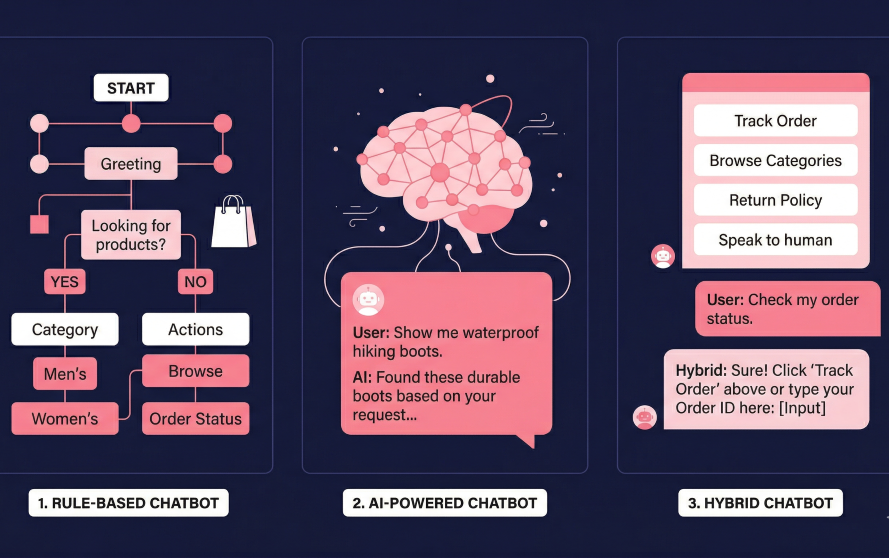
Not all chatbots work the same way. Understanding the three main types helps you match the right tool to your actual use case rather than getting oversold on features you do not need.
Rule-Based Chatbots
These work on a decision tree structure. The customer clicks a button or picks from a menu, the bot follows the path, and the interaction reaches its end point. They are predictable, easy to set up, and consistent. They are also rigid. If a customer asks something outside the defined flow, the bot has nothing to offer.
Rule-based bots work well for very specific, high-volume repetitive queries where the question and answer are always the same. Think 'What are your store hours?' or 'Do you ship internationally?' They are not the right choice if your customer interactions are varied or if you want conversational depth.
AI-Powered Chatbots
AI-powered chatbots use natural language processing and machine learning to understand what a customer means, not just what they typed. They can handle follow-up questions, switch between topics mid-conversation, and generate responses from connected knowledge sources like your FAQ pages, product descriptions, and order data.
These chatbots learn from interactions over time and improve their accuracy. They handle a much wider range of queries without needing to be pre-programmed for each one, which makes them significantly more useful for stores with complex product lines or varied customer questions.
Hybrid Chatbots
Hybrid chatbots combine the structure of rule-based flows with the flexibility of AI. They use guided menus for predictable interactions and switch to natural language understanding when the conversation gets more complex. Most modern ecommerce chatbot platforms operate on a hybrid model by default, because it gives you the speed and predictability of rules for common queries while allowing the AI to handle the edges.
Why AI-Powered Chatbots Outperform Rule-Based Tools
AI has changed what is possible in ecommerce customer care in three meaningful ways.
Contextual Understanding
Earlier chatbots only worked when customers phrased things exactly right. AI-powered tools understand intent. A customer asking 'I want to send this back' means the same thing as 'how do I return this product' and the AI handles both identically. This dramatically increases the range of queries the chatbot can resolve without escalation.
Personalization at Scale
When a chatbot connects to your CRM and order management system, it can pull real customer data into every conversation. Instead of generic responses, the customer hears something like: 'Hi Sarah, I can see your order #4821 is currently in transit and expected Thursday.' That level of personalization, at scale, is what makes AI customer care genuinely valuable rather than just convenient. According to research from Deloitte, customers who receive high-quality omnichannel experiences are 3.6 times more likely to purchase additional products from the same company.
Proactive Engagement
Rather than waiting for customers to ask questions, AI-powered ecommerce chatbots can initiate conversations at the right moment. Exit-intent triggers catch shoppers about to leave the cart page. Post-purchase messages check on delivery satisfaction. Cart abandonment sequences follow up via WhatsApp or Messenger. The shift from reactive support to proactive engagement is one of the most significant ROI drivers in the ecommerce chatbot category.
What E-commerce Customer Care Chatbots Are Actually Used For
Before choosing a platform, it helps to be concrete about what you are trying to automate. These are the most common and high-impact use cases:
- WISMO queries (Where Is My Order?): Order tracking is typically the highest-volume query in any ecommerce support inbox. A chatbot connected to your courier can answer this instantly, 24 hours a day, without a single human touchpoint.
- Returns and refunds: The chatbot verifies eligibility, walks the customer through the return process, generates a prepaid label, and creates the return record in your platform, often in under a minute. For high-ticket or B2B orders, some teams also route the return authorization through a quick e-signature step, so there's a signed record of what was approved, not just a system log entry.
- Product discovery: AI chatbots ask qualifying questions about preference, budget, and use case, then provide AI product recommendation by recommending products from your catalog. This is particularly valuable for stores with wide SKU (Stock Keeping Unit) ranges where browsing alone is slow.
- Cart abandonment recovery: Proactive outreach via WhatsApp or Messenger catches shoppers before they go cold. A well-timed message with an answer to the question that held them back can convert that abandoned cart into a sale.
- Post-purchase support: Delivery updates, usage questions, how-to guides, and review requests can all be automated for the post-purchase window, reducing agent load and improving repeat purchase rates.
- Upselling and cross-selling: After a customer asks about a product, the chatbot can surface complementary items or bundle deals at the natural moment of interest.
If you're still weighing whether a chatbot fits your specific support setup, you might find this breakdown of AI chatbot best practices a helpful read before you start evaluating different platforms.
How to Choose the Right E-commerce Customer Care Chatbot
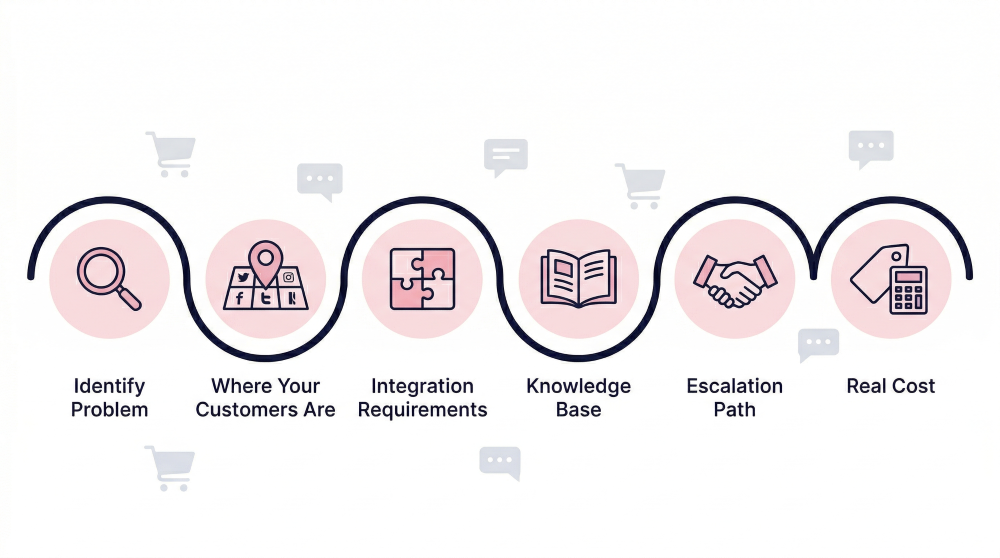
This is the part most buying guides rush past with a generic list of considerations. Here is a more useful framework for actually making the decision.
Step 1: Be Clear About Your Primary Problem
Are you trying to reduce ticket volume? Recover abandoned carts? Offer 24/7 support during hours your team is offline? Enable multi-channel conversations on WhatsApp and Instagram? The platform that is best at cart recovery is not necessarily the best at ticket deflection, and vice versa. Start with the one problem that costs you the most right now.
Step 2: Map Where Your Customers Actually Are
A chatbot embedded on your website only helps customers who are already on your website. If your customers are browsing your Instagram, messaging your WhatsApp number, or sliding into your DMs on Facebook, you need a platform that covers those channels natively, not as an add-on afterthought. This is a decision point that often gets overlooked until after a purchase, and it is expensive to fix.
Step 3: Assess Your Integration Requirements
Does the chatbot connect to your ecommerce platform (Shopify, WooCommerce, BigCommerce)? Can it pull live order data from your OMS? Does it sync with your CRM? What about your helpdesk? The difference between a chatbot that has access to real customer and order data versus one that can only reference your FAQ pages is significant. The former resolves queries completely. The latter often creates a second interaction when the customer still needs to contact a human.
Step 4: Evaluate Knowledge Base and Training Flexibility
How does the chatbot learn what to say? Some platforms connect to your existing help articles and URLs. Others require you to build a structured knowledge base within their system from scratch. Others use a hybrid approach. Think about how much content you already have and how much you are willing to maintain going forward. A chatbot that requires heavy manual upkeep tends to degrade over time as your policies and products evolve.
Step 5: Understand the Escalation Path
Even the best chatbot hits its limits. When it does, what happens? Does the conversation transfer to a human agent with full context from the chat? Or does the customer have to start over in a new channel? The escalation experience is often more important to customer satisfaction than the AI resolution rate, because the customers who need escalation are usually the ones with the most complex or emotionally loaded issues.
Step 6: Model the Real Cost
Look beyond the starting price. Per-resolution pricing can feel affordable at current volume and become very expensive during a promotional period. Per-seat pricing scales with your team size. Usage caps on lower plans can throttle your most valuable automated workflows. Calculate what the platform costs at 2x your current volume, not just at current volume. That is the number that actually matters for planning.
Already know what you need?
Heyy connects to your store in 15 minutes, no credit card required.
Features to Look for in an E-commerce Customer Care Chatbot
Omnichannel Coverage
Your chatbot should work across every channel where your customers reach you: website chat, WhatsApp, Instagram, Facebook Messenger, email. More importantly, it should maintain conversation context across those channels so a customer who starts on Instagram and follows up on your website does not have to repeat themselves. This kind of consistent, connected experience can play an important role in customer loyalty in ecommerce.
Native Ecommerce Integrations
Deep integration with Shopify, WooCommerce, or your platform of choice means the chatbot can access real order data, inventory status, customer history, and return eligibility in real time. Surface-level integrations that only pull product names from a catalog are significantly less valuable than two-way integrations that let the chatbot take actions like creating returns or updating addresses.
AI Knowledge Base Connectivity
The chatbot should connect to your existing documentation, policies, and FAQs rather than requiring you to rebuild your knowledge base inside a proprietary system. RAG-powered tools (Retrieval-Augmented Generation) pull answers from your approved sources and cite them, which prevents hallucination and keeps responses accurate.This overview on what customer messaging is covers how this works across different interaction types.
Human Handoff With Context
When the AI escalates, the human agent should receive the full conversation transcript, any customer account data the bot pulled, and the identified intent. Cold handoffs where agents start from scratch destroy the value of the automation and frustrate customers who already spent time explaining their issue.
Proactive Messaging and Triggers
Look for exit-intent triggers, idle cart alerts, and post-purchase follow-up automation. These outbound capabilities are what separate a reactive support tool from a proactive revenue driver. The ability to send a WhatsApp message to a cart abandoner at the right moment is fundamentally different from waiting for them to come back.
Analytics and Conversation Reporting
You should be able to see exactly which queries the chatbot is resolving, where conversations are dropping off, what escalation rate looks like, and where the knowledge gaps are. Those knowledge gaps can also point to broader content issues on the store, such as missing product details or unclear category pages. Fixing them can improve the customer journey beyond chat, especially when ecommerce teams work with SEO specialists or an ecommerce seo agency. Without this, you cannot improve. The platforms that publish their own resolution rate benchmarks are generally the ones with the analytics infrastructure to back it up.
Brand Customization
The chatbot's tone, name, avatar, and conversational style should be configurable to match your brand. A chatbot that sounds like generic enterprise software is a jarring experience on a DTC brand that spent years building a warm, human voice.
6 E-commerce Customer Care Chatbots Worth Evaluating
This is not a comprehensive comparison (Heyy has a dedicated roundup for that). But here are six platforms with meaningfully different approaches to e-commerce customer care, so you can see how the category breaks down in practice.
1. Gorgias
Best for: Shopify stores that want deep helpdesk and AI integration in one platform
.png)
Gorgias is widely regarded as the gold standard for Shopify-native customer support. The platform lets agents see order details, issue refunds, and update shipping information without leaving the conversation thread. Its AI layer, which handles routine queries automatically, achieves roughly a 60% automation rate on well-configured deployments. Where Gorgias excels is the depth of its Shopify integration: agents get complete purchase history, loyalty status, and subscription details directly in the chat panel.
The chatbot functionality in Gorgias is more of a support automation layer than a standalone customer service chatbot. It works best as part of a broader helpdesk workflow rather than as a plug-in-and-play chatbot for stores that just want automated conversations. Pricing is based on ticket volume, which means costs scale up during busy seasons like Black Friday and peak shipping periods.
Pricing: Starter from $10/month. See gorgias.com/pricing
2. Tidio
Best for: Growing ecommerce brands that want AI support without enterprise pricing
.png)
Tidio's AI engine, Lyro, achieves a published resolution rate of 67%, one of the higher independently documented benchmarks in the ecommerce chatbot category. Lyro is trained on customer support conversations specifically and connects to Shopify to surface real-time order data, so its responses go beyond static FAQ answers. The platform also includes a visual chatbot builder for setting up automated flows without code, which makes it accessible for teams without technical resources.
Tidio works well for stores that want a single tool handling both live chat and AI automation without a complex implementation project. Its limitation is depth of external integration: if your team uses a separate helpdesk like Zendesk or Freshdesk for ticket management, there will be some workflow friction. It is also less suited for social-first brands where most customer conversations happen on WhatsApp or Instagram rather than the website.
Pricing: Free plan available. Lyro AI from $32.50/month (billed annually). See tidio.com/pricing
3. Intercom Fin AI
Best for: SaaS-adjacent ecommerce and subscription commerce brands
.png)
Intercom Fin is one of the cleaner implementations of an AI knowledge base chatbot in the support category. It connects to your help articles, PDFs, and URLs, and uses the content to generate responses that always cite the source article. Fin achieves a published containment rate above 50% and handles multi-turn conversations with good accuracy. Its pay-per-resolution model at $0.99 per resolved conversation is appealing for teams with predictable volume.
Where Intercom shows its heritage is in the product-led, SaaS-shaped assumptions behind its design. For subscription ecommerce and D2C brands with complex post-purchase journeys, it works well. For high-SKU retailers where product discovery, sizing, and order management are the dominant query types, it is less native to the workflow than Gorgias or Tidio. Social channel support is available but typically requires an add-on.
Pricing: $0.99/resolution. Base plans from $39/seat/month. See intercom.com/pricing
4. Freshdesk Freddy AI
Best for: SMBs looking for solid helpdesk AI at a predictable price
.png)
Freshdesk is the practical, transparent alternative to enterprise platforms. Its Freddy AI customer-facing agent handles common queries using your knowledge base and achieves autonomous resolution rates of 30 to 45%, which is meaningful but lower than the category leaders. What Freddy does well is supplement agent workflows: the AI Copilot surfaces relevant articles and generates response drafts as tickets come in, so even escalated conversations get resolved faster.
For a team of 5 to 25 support agents that does not want enterprise-level complexity or pricing, Freshdesk delivers roughly 80% of what Zendesk offers at significantly lower cost. The 6-month free trial gives new accounts time to configure things properly before committing. The limitation worth knowing: Freshdesk's autonomous resolution rate is lower than competitors, so if automated resolution is the primary goal, you may hit the ceiling.
Pricing: Growth from $15/agent/month. AI Copilot add-on $29/agent/month. See freshdesk.com/pricing
5. Zendesk AI Agents
Best for: Enterprise ecommerce and multi-brand retailers with complex support workflows
.png)
Zendesk AI Agents sit on top of one of the most mature helpdesk ecosystems in the market. For enterprise retailers managing multiple brands, 50+ agents, and support across multiple countries and languages, Zendesk's depth of analytics, integrations, and AI tooling is genuinely hard to match. Its AI achieves 45 to 55% autonomous resolution in well-configured deployments and includes an AI Copilot layer for agents that surfaces relevant information and drafts responses in real time.
The honest consideration here is cost and setup complexity. Base plans start at $55 per agent per month, and the full AI feature set requires an add-on at roughly $50 per agent per month on top of that. For smaller stores or teams earlier in their growth, the economics are hard to justify before you are operating at meaningful scale. Zendesk is a long-term infrastructure investment, not a plug-in-and-play solution.
Pricing: From $55/agent/month. Advanced AI add-on approx. $50/agent/month. See zendesk.com/pricing
6. Heyy
Best for: Multi-channel brands and social commerce stores on WhatsApp, Instagram, and Facebook Messenger
.png)
Heyy takes a meaningfully different approach to the e-commerce customer care chatbot problem. Rather than starting with a helpdesk and adding chatbot functionality, Heyy's model centers on AI Employees: fully configurable virtual agents trained on your product and policy content and deployed simultaneously across WhatsApp, Instagram, Facebook Messenger, and website chat from one unified inbox. For brands where most customer conversations happen on social channels rather than a traditional help center, this matters more than it might seem.
Setting up Heyy takes roughly 15 minutes with no developer required. You connect your data sources, configure the AI agent's scope and tone, and it goes live. The unified inbox means your support team handles every channel from one place, so there is no switching between apps when an Instagram DM comes in alongside a website chat. This is particularly valuable for DTC brands, fashion and lifestyle stores, and any ecommerce business where WhatsApp and Instagram are primary customer touchpoints.
Heyy is a newer platform and does not yet have the same volume of third-party reviews as Zendesk or Gorgias. What it does have is a free forever plan, transparent tiered pricing, and a specific use case it handles exceptionally well: fast, no-code deployment of a multi-channel AI agent for brands whose customers are on social platforms. If you want a well-established enterprise helpdesk, look at Zendesk or Gorgias. If you want a social-first AI customer care setup you can have live by tomorrow, Heyy is a strong choice.
Pricing: Free forever / Hobby $49/mo / Pro $149/mo / Ultra $499/mo. See heyy.io/pricing
We’ve previously explored some of the best ecommerce chatbots, this guide dives even deeper, offering an in-depth analysis of additional options to help you find the perfect fit.
How to Integrate a Chatbot Into Your Ecommerce Operations
Choosing a platform is step one. Getting it to actually work takes a few more.
Connect It to Your Real Data
The difference between a chatbot that gives generic answers and one that genuinely resolves queries is data access. Connect your chatbot to your ecommerce platform (Shopify, WooCommerce), your OMS for order tracking, and your returns management system. The more real-time data the chatbot can access, the higher the resolution rate you will see.
Build and Maintain a Quality Knowledge Base
Your AI is only as good as the content you feed it. Before launch, document your most common questions and the accurate answers to each. Cover shipping policies, return policies, size guides, subscription terms, and any product-specific FAQs. After launch, check your analytics weekly for queries that resulted in escalations or low satisfaction scores, and update your knowledge base to cover those gaps.
Define What the Bot Handles and What It Does Not
Scope creep in chatbot configuration is a real problem. Be explicit about which query types the chatbot owns and which it hands to a human. Sensitive situations like billing disputes, complaints about damaged products, and emotionally charged conversations should be routed to a human agent quickly, with full context transferred. Trying to make the chatbot handle everything creates a frustrating experience for the customers who need it least.
Test Before You Go Live
Run through your 20 most common customer queries before launch. Test edge cases: misspellings, slang, incomplete sentences. Test the escalation flow by sending a query the bot should not handle. Make sure the handoff to a human agent works the way it should and that the context transfers correctly.
Monitor and Iterate
Set up a monthly review of your chatbot analytics. Look at resolution rate, escalation rate, customer satisfaction on automated conversations, and the specific queries that are falling through. A well-maintained chatbot improves over time. One that is configured and forgotten degrades as your products and policies change.
Ecommerce Chatbot Best Practices
- Match the bot's tone to your brand voice. If your brand is warm and casual, the chatbot should sound warm and casual. If it is professional and precise, same thing. Generic AI language sounds off-brand and erodes trust with customers who already know your brand voice.
- Be transparent about automation. Customers generally respond well to knowing they are chatting with an AI, especially if the AI is good at its job. Trying to pass the chatbot off as a human creates distrust when the customer eventually figures it out.
- Use proactive triggers strategically. Exit-intent messages work when they are timely and relevant. A pop-up that appears every time someone hovers near the navigation is annoying. One that appears after 30 seconds on the checkout page with a specific, helpful message is valuable.
- Do not make the chatbot the only option. Customers should always be able to reach a human when they need one. Making the chatbot the only visible option and burying the human contact route damages customer trust and increases frustration for the queries that genuinely need human judgment.
- Keep your knowledge base current. After a product launch, policy change, or pricing update, update the chatbot's connected content before the change goes live to customers. Outdated information from an AI agent is worse than no information because it causes customers to make decisions based on wrong data.
Measure what matters. Track first-contact resolution rate, automated resolution rate, escalation rate, CSAT on automated conversations, and cart recovery rate. These numbers tell you whether the chatbot is working. Open rates and message volume tell you very little about actual performance.
Mistakes to Avoid When Choosing an E-commerce Customer Care Chatbot
Choosing by Brand Name Rather Than Fit
The most well-known platform is not always the right one for your specific use case. An enterprise helpdesk designed for 100-agent teams creates unnecessary complexity and cost for a 3-person support operation. Match the platform to the scale and nature of your problem, not to what you have heard of.
Skipping the Integration Audit
A chatbot that cannot access your real order data, return system, or CRM can only answer static questions. Before signing up, confirm that the platform connects to the specific tools you use, not just 'major ecommerce platforms' in general. The depth of the integration often matters more than the platform's headline features.
Underinvesting in Knowledge Base Quality
Deploying an AI chatbot with a thin, vague, or outdated knowledge base is worse than not deploying one at all, because the chatbot will confidently give wrong answers. The investment in clean, current, specific documentation pays dividends immediately in chatbot accuracy.
Not Defining Clear Escalation Rules
Without clear rules about what the bot escalates, you end up with two failure modes: a bot that tries to handle everything (including sensitive situations where it should not) and a bot that escalates everything (defeating the purpose of automation). Define the escalation criteria before launch, not after the first complaint.
Ignoring the Channels Your Customers Are Actually On
If you deploy a website chatbot but your customers primarily reach you on WhatsApp and Instagram, the automation does not help the people who need it most. Channel selection is a strategic decision, not a technical afterthought. Start where your conversation volume is highest and expand from there.
Treating Setup as a One-Time Task
A chatbot configured in January and checked again in June will have drifted. Pricing changes, product launches, policy updates, and seasonal shifts all affect what the chatbot should say. Build a lightweight monthly review into your support operations from day one.
Ready to Start From Somewhere?
You do not need the most sophisticated chatbot on the market to see results. You need the right one for where your store is right now.
If your customers are asking the same questions every day, a chatbot handles that. If carts are going cold before checkout, proactive messaging recovers them. If your team is stretched thin across WhatsApp, Instagram, and your website, a unified AI agent pulls it all into one place. The gains are real, and they compound the earlier you start.
Heyy is built specifically for ecommerce brands that want to get a multi-channel AI customer care setup live without a long implementation project or an enterprise budget. The free forever plan gives you a working starting point with no time limit and no credit card required. From there, you scale when it makes sense to.
Take a look at Heyy's pricing and see which plan fits where you are today.
And if you are still comparing your options for Shopify specifically, then check out the Best Chatbot for Shopify and how the leading Shopify-native tools stack up against each other.
Frequently Asked Questions
What is the difference between a customer support chatbot and an AI agent?
A customer support chatbot handles conversations and answers questions. An AI agent can take actions: creating refunds, updating orders, initiating returns. The distinction matters for ecommerce teams that want automation beyond Q&A. Many platforms now use both terms loosely, so always verify what the tool actually does, not just what it is called.
Do I need a developer to set up an ecommerce chatbot?
It depends on the platform. Some enterprise tools require significant technical configuration. Others, like Heyy and Tidio, are designed for no-code setup and can be live in under 30 minutes. If you want deep custom integrations with proprietary systems, a developer will likely be involved regardless of platform.
How do I measure whether my ecommerce chatbot is working?
Track automated resolution rate (the percentage of conversations the chatbot closes without escalation), CSAT on automated conversations, escalation rate, and cart recovery rate if you are using proactive messaging. Also track which queries most frequently result in escalations: those are your knowledge base gaps and your next optimization priority.
Can an e-commerce chatbot handle conversations in multiple languages?
Most modern AI-powered platforms handle multilingual conversations reasonably well because they use large language models that understand many languages natively. The quality varies by language, so if you serve specific non-English markets, test the chatbot's accuracy in those languages before going live, not after.
Is a chatbot right for a small ecommerce store?
Yes, if you are answering the same 10 questions repeatedly, a chatbot will save you time immediately. Even free-tier tools like Heyy's forever plan or Tidio's free plan can handle a meaningful portion of routine queries for a small store. Start simple and expand as your volume grows.
More blog posts to read

Ready to Automate Support
Across Every Channel?
.svg)
.avif)