.svg)
How to Build a Lead Gen Bot That Qualifies, Captures, and Converts

Here is something most people do not realize until they look at the data. Your contact form is converting at 2 to 3%. Maybe 4% on a really good month. And that is not a copy problem or a design problem. That is just what forms do.
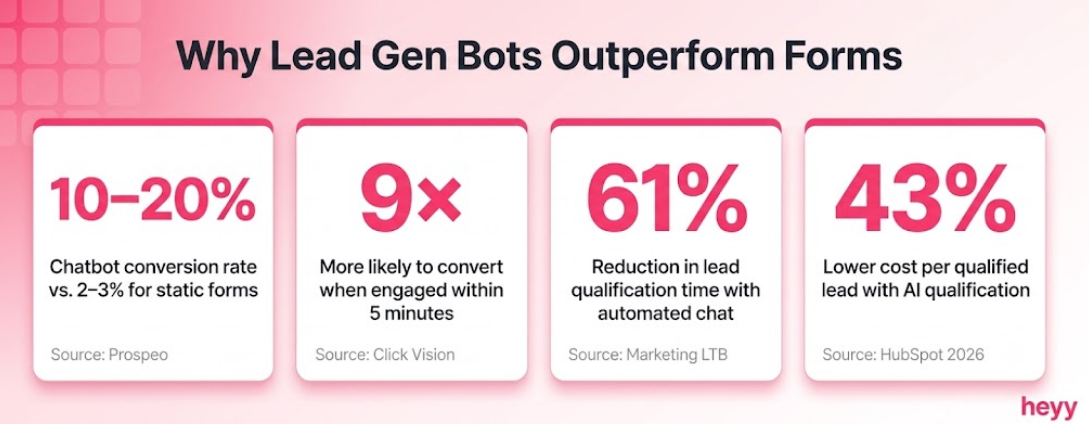
Meanwhile, businesses using lead generation chatbots are seeing conversion rates in the 10 to 20% range. Same traffic, same pages, different experience. Because a form sits there and waits. A lead gen bot actually starts a conversation.
Think about it from the visitor's side. They land on your pricing page. They have a question. They are not going to fill in a form and wait 24 hours for a reply, but if something opens up and says "what are you trying to figure out today?", they might just answer, and that one answer is the beginning of a qualified lead.
That is the whole idea. And it is not complicated to build. This guide walks through it in seven steps, starting from scratch.
What Is a Lead Generation Chatbot?
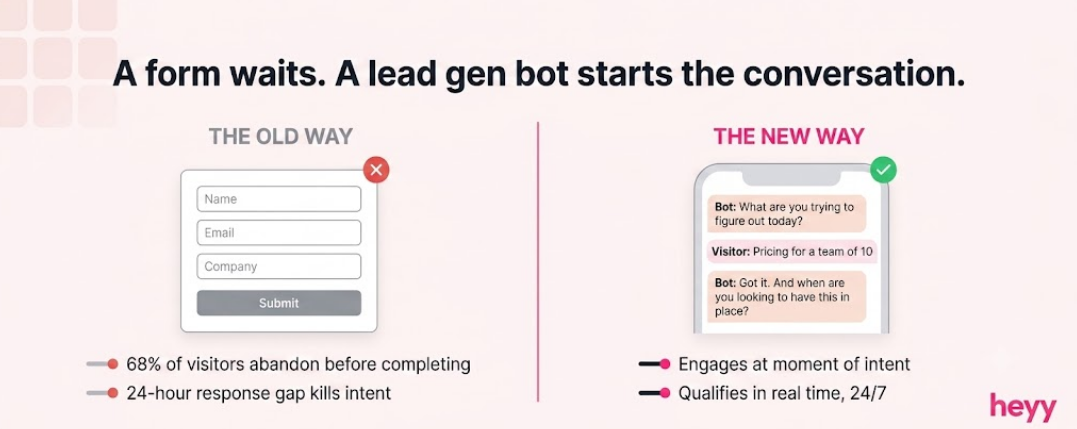
A lead generation chatbot is an automated conversation system deployed on your website, WhatsApp, Instagram, or other messaging channels that engages visitors, asks qualifying questions, captures contact information, and routes qualified prospects to your sales team. It replaces the static form with a conversation.
The key distinction from a basic FAQ chatbot: a lead generation chatbot asks questions, not just answers them. Its primary output is not a resolved support query. It is a structured qualification record: name, contact details, company, use case, budget, timeline, that lands in your CRM with enough context for a sales representative to start a meaningful conversation.
Conversational AI for lead generation works because conversation reduces friction. A prospect who types "I'm looking for help with X" into a chatbot gives you far more signal than the same prospect who bounces from a contact form. The bot captures that signal, qualifies in real time, and ensures someone follows up.
Why Lead Gen Bots Outperform Forms
The data on this is not subtle.
Engaging a lead within 5 minutes of initial contact makes them 9 times more likely to convert, per 2026 AI lead generation research from Click Vision. A form submission triggers a notification to a sales inbox. A chatbot starts the qualification conversation at the moment of highest intent, before the prospect loses interest or navigates away.
AI-powered chatbots reduce lead qualification time by 61% compared to manual qualification workflows, per Marketing LTB's 2026 chatbot statistics. 64% of businesses report that AI chatbots helped them generate more qualified leads than their previous methods, according to InBeat Agency research cited in Martal's 2026 lead generation benchmark data. AI-powered lead qualification chatbots reduce the average cost per qualified lead by 43%, from $198 to $113, per HubSpot's 2026 Lead Generation Benchmarking Report across 4,800 teams.
The mechanism is structural. Forms lose leads passively, 68% of form starters abandon before completing, per Prospeo's 2026 analysis. A lead generation chatbot engages before abandonment, handles the friction of form completion, and builds enough rapport that contact information feels like a natural part of the exchange rather than a toll to pay.
Step 1: Define What a Qualified Lead Looks Like
Before you write a single question, answer this: what is a qualified lead for your business?
Most companies skip this step and build a bot that collects contact information. That is a data capture tool. A lead generation chatbot collects structured qualification data, and the structure comes from your definition of qualified.
Write down three to five criteria that separate a prospect worth pursuing from one who is not ready. Common frameworks:
BANT (Budget, Authority, Need, Timeline) — the fastest framework for inbound lead qualification at volume. Adapted for conversation, not interrogation:
- Budget: "What are you currently spending to manage this?" (not "What's your budget?" — too blunt)
- Authority: "Are you the person who'd make this decision, or would you loop someone else in?"
- Need: "What's the main problem you're trying to solve?"
- Timeline: "When are you looking to have something in place?"
CHAMP (Challenge, Authority, Money, Prioritization) — leads with the prospect's challenge rather than their budget. Useful for consultative sales where opening with money feels premature.
Write your version of these questions now, before touching any platform. The platform is just the delivery mechanism. The qualification logic is the product. For a deeper look at how chatbots handle this qualification step, the how chatbots qualify leads guide covers the full step-by-step framework.
Step 2: Choose the Right Channel for Deployment
Where does your traffic come from? Where do your leads actually initiate contact?
Most automated lead capture setup guides default to website chat. Website chat is the right answer for many businesses, but not all of them. Picking the wrong channel means building a bot your prospects never encounter. For B2B teams that need to reach prospects beyond their existing website traffic, external lead generation partners can complement conversational lead capture with targeted outbound campaigns.
Website chat is the right channel if your traffic is primarily organic search, paid search, or direct, visitors who come to your site with intent. Deploy on high-intent pages: pricing, contact, product demos, and comparison pages. Not the homepage.
WhatsApp is the right channel if you serve markets where WhatsApp is a primary business communication channel (most of APAC, MENA, Latin America, much of Europe), if you run WhatsApp-destination ad campaigns, or if your existing customers already message you there. A WhatsApp-based lead generation chatbot reaches prospects in the channel they are already in rather than redirecting them to your website.
Instagram DMs are the right channel if your business drives meaningful traffic through Instagram content or ads. Click-to-DM campaigns convert at fundamentally different rates than click-to-website campaigns because the conversation starts in the same app where the prospect saw your content. The click-to-chat ads guide covers how to connect this traffic source to a qualification flow.
The platform question. For most non-technical teams, use the platform whose primary channel matches where your leads come from. Building your first lead gen bot on the same platform that handles your conversations eliminates the integration overhead that kills most early implementations.
Step 3: Design the Qualification Conversation
The conversation is not a form with a chatbot skin. It is a conversation.
Structure the exchange in three phases:
Phase 1: Open with value, not a data request
The single most common lead gen bot mistake: asking for name and email before giving the prospect any reason to trust you. Bots that lead with a data request see dramatically higher abandonment rates.
Open with acknowledgment and a question that surfaces their problem.
Example for a SaaS product:
"Hi. I'm here if you have questions about [product]. What's the main thing you're trying to figure out today?"
Example for a service business:
"Happy to help. Are you exploring options for yourself, or for a team?"
The opening question should feel like the first thing a competent sales representative would ask. Not "Can I get your email?"
Phase 2: Qualification questions (3 to 5, maximum)
With 56.2% of web traffic coming from mobile in 2026, long qualification flows lose people before they complete. Three to five questions is the ceiling. Each question should either qualify or disqualify.
A reliable B2B SaaS qualification sequence:
- What's the main problem you're trying to solve?
- How many people would be using this?
- Is this something you're looking to have in place in the next 30 days, or are you earlier in the research process?
- Who would need to be involved in making this decision?
Four questions. Everything you need to route a lead correctly. At question three, you know timeline. At question four, you know authority. Combined with question one and two, you have BANT without ever mentioning BANT.
Phase 3: Capture contact information with context
Contact information comes after the prospect has received value from the conversation, after their question has been acknowledged, after they have indicated intent. At this point, "Mind if I send you [specific resource / case study / pricing breakdown] by email?" is a natural continuation. Not a toll.
The contact capture question should reference the conversation: "Based on what you've shared, I can have someone reach out specifically about [their stated use case]. What's the best email?"
Step 4: Set Up Triggers and Timing
When the bot fires matters as much as what it says.
A bot that fires the moment someone lands on your page is an interruption. A bot that fires after they have spent time on a high-intent page is assistance.
Trigger configuration that works for most implementations:
Scroll-depth trigger: Fire after 40% scroll depth on product, pricing, or comparison pages. A visitor who has scrolled 40% through your pricing page has read your pricing. They are not browsing. They are evaluating.
Time-on-page trigger: Fire after 15 to 20 seconds on a pricing or contact page. Long enough to not be an interruption. Short enough to still be timely.
Exit-intent trigger: Fire when cursor movement suggests the visitor is about to leave. This is the last moment before abandonment, the equivalent of a sales representative saying "before you go."
Return visitor trigger: Fire with a different message for someone on their third visit. "You've been back a few times, is there something specific you're trying to figure out?" Context-aware triggers convert at meaningfully higher rates than generic ones.
On WhatsApp and Instagram: the trigger is the message itself. The prospect initiates contact. The qualification flow fires as the opening of that conversation rather than an interruption to browsing.
Step 5: Connect Your CRM and Configure Routing
A lead gen bot that does not push to a CRM is a lead gen bot that loses leads.
The critical connection to make at setup, before launch: every qualified lead captured by the bot should appear in your CRM automatically, with structured fields that match your sales team's qualification criteria. Not a raw conversation transcript. Structured data: company, role, use case, timeline, contact details.
Route by qualification score, not by sequence:
Hot (ready now): Score-based routing to a sales representative with a meeting booking link. The bot should offer a calendar link at the end of the qualification flow for any lead that clears your qualification threshold.
Warm (interested but not ready): Enter into a nurture sequence inside your CRM. Tagged with the qualification data from the conversation so nurture content is relevant to their stated use case.
Cold (no clear fit or too early): Either gently handled by the bot with a useful resource and no promise of follow-up, or added to a low-frequency nurture list with a long-term re-engagement trigger.
For conversational AI for lead generation to produce sales results rather than just conversation data, the routing logic is where that outcome is determined. The chatbot funnel guide covers how this routing connects to the full marketing funnel.
Step 6: Test Before You Go Live
Most post-launch failures are problems that testing would have caught.
Run a minimum of one week of internal testing before public deployment. Test from multiple devices, particularly mobile. Send the bot every question your customers actually ask, including the ones that are off-script, hostile, or confused.
Specific things to test:
The off-script path. What happens when a visitor asks something your flow did not anticipate? A rule-based bot sends a generic fallback and loses the lead. An AI-powered bot handles the unexpected question and returns to qualification. Know which yours does before launch.
The abandonment path. What happens when someone starts the conversation and stops responding mid-flow? Does the bot time out gracefully? Does it send a follow-up? Does the partial conversation still push to your CRM?
The mobile experience. Send the flow to yourself on a phone. Read every message as a mobile user. Is any individual message too long? Does the conversation require scrolling to read each reply? Mobile users drop off from long bot messages faster than desktop users.
The CRM output. After a test conversation, check your CRM. Did the data land in the right fields? Is it structured correctly? Is the lead routed to the right owner? The CRM connection is the most common place where implementation fails silently.
Step 7: Measure and Optimize for 90 Days
Most teams reach full optimization at 60 to 90 days, not at launch.
The metrics that tell you whether your lead generation chatbot is working:
Engagement rate: What percentage of visitors who see the bot open it? Below 15% suggests the trigger timing or opening message is not compelling. Above 40% on a high-intent page is strong.
Qualification rate: What percentage of conversations produce a qualified lead? Below 20% usually indicates the targeting is too broad (firing on low-intent pages) or the questions are not filtering effectively. Above 50% is excellent.
Contact capture rate: Of the leads who complete qualification, what percentage provide contact information? Below 60% suggests the contact request is too early or too abrupt.
Handoff-to-close rate: What percentage of leads routed to sales actually convert? This is where you measure whether the bot is producing genuinely qualified leads or just collecting contacts.
The 30/60/90 optimization cadence:
Day 30: Review every conversation where the prospect dropped off. Where in the flow did they stop? The drop-off point is the bottleneck. Fix one thing.
Day 60: Review the qualification rate. Are the leads being routed to sales closing at a rate comparable to other lead sources? If not, the qualification criteria need tightening.
Day 90: Review the full economics. Cost of the platform, cost of human follow-up time, revenue attributed to bot-generated leads. SMBs typically reach positive ROI within 2 to 4 months of proper implementation, per Capterra research cited by GreetNow. If you have not by day 90, the problem is usually training quality or channel coverage.
The Three Mistakes That Kill Lead Gen Bots in the First 30 Days
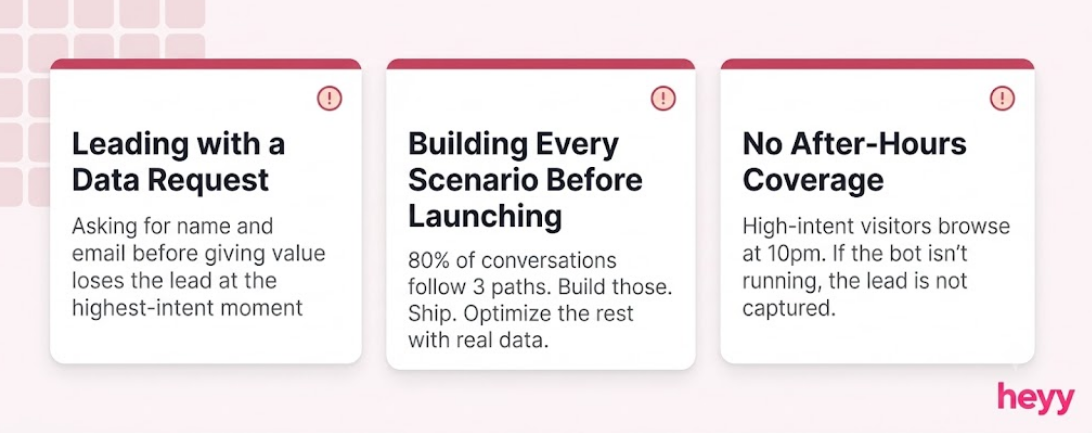
Asking for contact information before demonstrating value: The bot fires, the first message is "What's your name and email?" and the prospect clicks away. Every chatbot interaction that leads with a data request before a value statement loses the lead at the highest-intent moment. Sequence: value, qualification, contact.
Building for every scenario and launching nothing: Teams spend six weeks mapping every possible conversation branch and never launch. The 80/20 rule applies to lead gen bots: 80% of your conversations follow the same three or four paths. Build those. Launch. Optimize the edge cases after you have real data.
Ignoring after-hours volume: 63% of B2B companies now use chatbots for lead qualification, per Marketing LTB. The primary reason is not cost saving, it is after-hours coverage. A meaningful portion of high-intent prospects visit pricing pages at 10pm on a Tuesday. If your bot is not running, you are not capturing them. The automated lead capture setup should be live 24/7 from day one.
A lead gen bot that works is not a technology decision. It is a qualification logic decision, a channel decision, and a handoff design decision. The platform you use matters far less than the questions you ask, the triggers you set, and what happens to a lead the moment they convert.
For businesses where WhatsApp and Instagram generate meaningful inbound alongside the website, Heyy runs a lead generation chatbot across all three simultaneously, one AI trained on your product and qualification criteria, one inbox where your team sees every lead regardless of which channel it came from. Start free and qualify your first lead today.

Contact us to discuss any idea or project in your mind?
.svg)
.avif)
FAQs
What is a lead gen bot?
A lead gen bot is an automated conversational system deployed on a website, WhatsApp, Instagram, or other messaging channel that engages visitors with qualifying questions, collects contact information, and routes qualified prospects to a sales team. It replaces the static contact form with a real-time conversation that qualifies and captures at the moment of highest intent. Unlike FAQ bots that answer questions, a lead generation chatbot asks them. The top 10 chatbots for lead generation guide covers the best platforms for building one.
How long does it take to build a lead gen bot?
A basic lead gen bot can be live in under an hour on most modern platforms: define your qualification questions, configure your triggers, connect your CRM, and deploy. A well-tested, properly integrated bot typically takes one to two weeks to build and test before launch. Enterprise implementations with multiple CRM integrations, complex routing logic, and multi-channel deployment take longer. Most teams do not need the complex version to start seeing results.
What questions should a lead generation chatbot ask?
Three to five questions maximum. The specific questions depend on your qualification criteria, but a B2B baseline: what problem are they trying to solve, how large is their team, what is their timeline, and who makes the decision. Avoid asking for budget directly in the opening exchange — adapt BANT by starting with the prospect's challenge (the N in BANT) rather than their budget (the B). The conversational AI for lead generation guide in your platform's documentation typically includes question templates organized by industry.
How do I connect a lead gen bot to my CRM?
Most modern lead generation chatbot platforms include native integrations with HubSpot, Salesforce, and Pipedrive. Configure the CRM connection before launch, not after. Map each qualifying question to a CRM field so leads arrive as structured data, not as conversation transcripts. Set up automated workflows in your CRM that trigger based on the lead's qualification score: hot leads get an immediate sales notification, warm leads enter a nurture sequence, cold leads are tagged for long-term re-engagement. For connecting social channel conversations to your CRM, the chatbot funnel guide covers the full integration path.
What channel should I deploy my lead gen bot on?
Match the channel to where your leads actually come from. If your traffic is primarily organic or paid search, website chat on your pricing and contact pages. If your business runs Instagram or Facebook ad campaigns, click-to-DM automation on Instagram or Facebook Messenger. If you serve markets where WhatsApp is the dominant business messaging channel (most of APAC, MENA, Latin America), WhatsApp. Do not build for the channel that seems obvious — build for the channel where your actual high-intent prospects already are.
How do I measure whether my lead gen bot is working?
Track four numbers: engagement rate (what percentage of target visitors open the bot), qualification rate (what percentage of conversations produce a qualified lead), contact capture rate (what percentage of qualified conversations collect contact information), and handoff-to-close rate (what percentage of bot-routed leads convert to customers). The most important of the four is handoff-to-close rate. A high engagement rate with a low close rate means the bot is generating volume but not quality.
More blog posts to read
Ready to Automate Support
Across Every Channel?