.svg)
The Complete Guide to Instagram DM Automation

I've set up Instagram DM automation for businesses across e-commerce, services, coaching, and hospitality, and the thing that surprises people most is not how much it does. It is how simple it is once you understand the four trigger types and the one rule that determines whether your account stays healthy or gets restricted.
Most guides skip the rule. I am going to start with the results, then the setup, then the rule, so you understand exactly what you are building before you build it.
Here is the short version of why this matters: Instagram DM messages achieve open rates of approximately 90%, compared to roughly 20% for email, according to LeadResponse's 2026 Instagram DM statistics analysis. 150 million Instagram users have a conversation with a business account every month, per Meta. Most of those businesses are responding manually, hours later, after the intent has cooled. The ones running automation are responding in seconds and converting at rates that their manual competition cannot match.
Let me show you exactly how to do it.
What Is Instagram DM Automation?
Instagram DM automation is the practice of sending automatic, relevant DM replies when someone engages with your Instagram account: by messaging you, commenting on a post, or replying to a Story. The goal is to respond faster, qualify prospects more consistently, and stay in front of high-intent contacts while they are still engaged.
It is not mass DM blasting to accounts who never asked to hear from you. Good Instagram DM automation is built around user-initiated triggers, clear compliance with Meta's messaging policies, and a clean handoff to a human when the conversation requires one. Messaging automation handles replies and lead capture after a user initiates a conversation. Products that also need audience and content intelligence can use social media data infrastructure to access normalized public profiles, posts, comments and engagement across multiple platforms, while creator-authorized connections provide verified reach, impressions and audience demographics.
Automated Instagram messages fall into two broad categories. Reactive automation fires in response to something a follower does: comments a keyword, sends a DM, replies to a Story. Proactive automation fires based on a schedule or an event: a welcome message when someone follows, a re-engagement message 72 hours after an initial interaction. Reactive automation performs significantly better. I will cover why in the section on best practices.
The Four Types of Instagram DM Automation
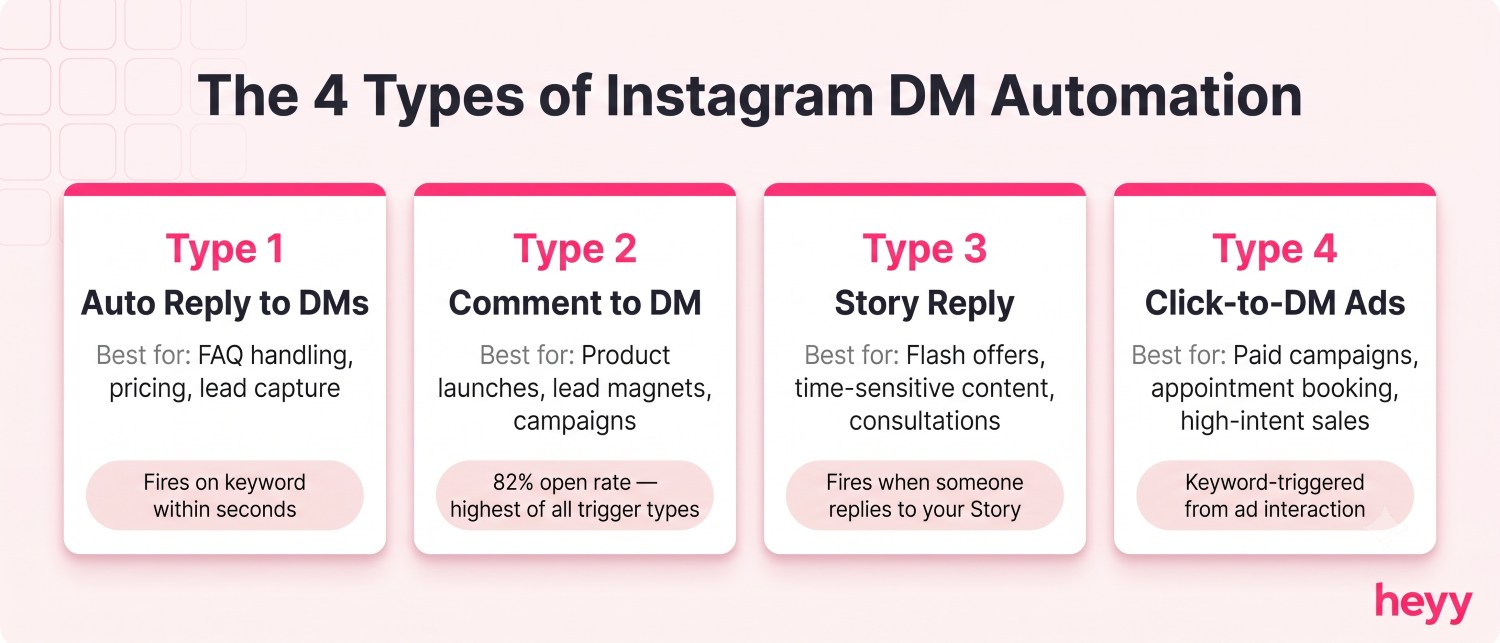
Understanding which trigger type to use is the most important decision in building an automated Instagram DM setup. Each one serves a different intent and produces different results.
1. Auto Reply to Direct Messages (Keyword-Triggered)
Someone messages your account with a specific word: "pricing," "info," "link", and an automated reply fires immediately. This is the most straightforward form of Instagram DM automation and the easiest to set up.
Where it works well: Product inquiries, FAQ handling, pricing requests, lead capture from profile visitors.
The setup: Define the keywords. Write a reply that delivers value immediately. Include a qualifying question so the next message surfaces intent.
Example: A follower messages "pricing." The auto reply fires: "Happy to share pricing. Quick question first: are you looking for this for a team or just for yourself?" That one question turns a pricing inquiry into a qualification conversation.
2. Instagram Comment to DM Automation
Someone comments a specific keyword on your post or Reel and automatically receives a DM. This is the highest-performing trigger type I have used and the one I set up for nearly every campaign because the intent signal is so clear. Someone who stops scrolling, reads your post, and takes action by typing a word in the comments is a warm lead. Comment-triggered auto DMs consistently outperform follow triggers by 2 to 3 times on both open rate and conversion, per 2026 auto DM benchmark data from Communipass.
Where it works well: Product launches, lead magnet distribution, event registrations, course launches, giveaways.
The setup: Post a Reel or feed post with a clear call to action in the caption: "Comment GUIDE and I'll send you the link." When a follower comments that keyword, they receive a DM within seconds with the promised resource and a follow-up question.
The funnel math: One 2026 campaign tracked by Communipass showed 847 comments triggering 698 DM opens (82.4% open rate), 412 replies (59% reply rate), and 64 sales at $197 each — $12,608 from a single post. That is a campaign that ran on automation with no manual DM involvement after setup.
3. Story Reply Automation
Someone replies to or reacts to your Instagram Story and receives an automated DM. Story reply automation works because a Story reply is a direct signal of engagement with a specific piece of content, the follower chose to respond to something they saw from you in the last 24 hours.
Where it works well: Flash sales, time-sensitive offers, consultation requests, product launches tied to Story content.
The setup: Post a Story with a question sticker, poll, or direct CTA. Configure an automation that fires when someone replies to it. Use the content of the Story as context in the DM reply so the message feels continuous, not generic.
4. Click-to-DM Ad Automation (Keyword-Triggered Instagram DM)
Someone clicks a paid Instagram ad that opens a DM conversation rather than landing on a website. The opening message from the user often contains a keyword or phrase tied to the ad, which triggers your automated qualification flow.
This is where keyword-triggered Instagram DM automation connects directly to your ad spend. The click-to-chat ads guide covers the full setup for connecting paid traffic to automated DM qualification flows.
Where it works well: Lead generation campaigns, service businesses, appointment booking, high-consideration product sales.
Why it converts: A user who clicks a "Send Message" ad and lands in a DM conversation is at peak interest. The automated reply arriving in seconds keeps that interest alive. A website redirect would have required a page load, a form, and a wait, three opportunities for the intent to cool.
Why Instagram DM Automation Converts
I want to give you the numbers before the setup, because they are the reason any of this is worth your time.
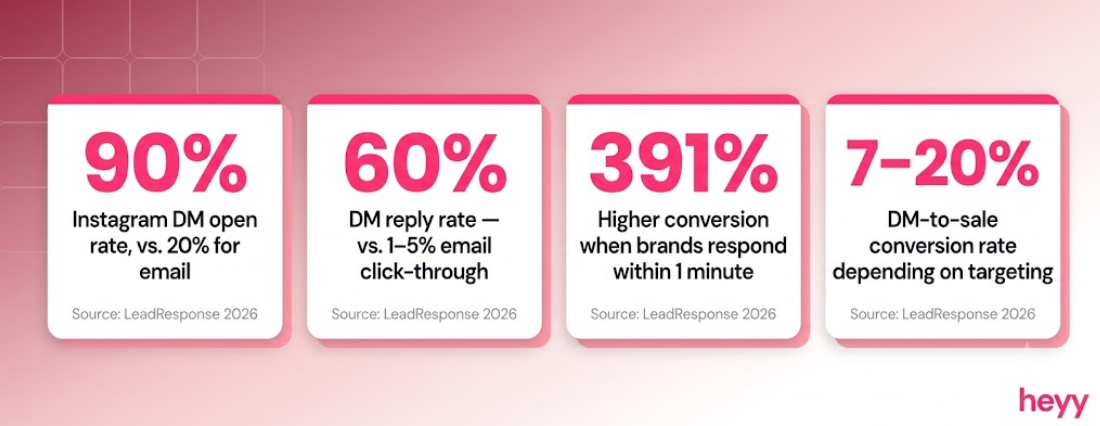
Instagram DM open rates sit at approximately 90%, compared to email's roughly 20%. Reply rates reach up to 60%, most email marketers would consider a 5% click-through rate strong. 72% of consumers say they are more likely to make a purchase from a brand that offers a messaging channel. Brands that respond within one minute see 391% higher conversion rates than those waiting 30+ minutes, per LeadResponse 2026 data cited by Inspire to Thrive.
That last number is the practical argument for automation. No human team responds within one minute consistently. An automated reply fires in seconds regardless of time zone, day of week, or how many conversations are coming in simultaneously.
The DM-to-sale conversion rate on Instagram ranges from 7% to 20% depending on audience size and targeting precision. When leads go through three or more meaningful message exchanges before being asked to take a next step, that conversion rate rises to 25-30%. That is what a well-designed automated qualification sequence produces, not just a faster reply, but a better-quality conversation by the time it reaches a human.
How to Set Up Auto Reply Instagram DM
This applies to keyword-triggered replies to incoming DMs. It is the foundational flow that every other automation type builds on.
Step 1: Connect a Business or Creator account.
Instagram DM automation through Meta's official API requires either an Instagram Business account or a Creator account. Personal accounts cannot connect to API-based automation tools. If you are running a business and have a personal account, convert it in Instagram settings before proceeding.
Step 2: Choose your automation platform and connect via OAuth.
Connect your Instagram account through the platform's official OAuth flow, this is the process where you authorize the tool to access your Instagram account via Meta's API without sharing your password. Any tool that asks for your Instagram password directly is not using the official API and carries significant account risk.
Step 3: Define your keywords.
List every word or phrase your followers commonly send that you want to trigger an automated response. For most businesses, this is a combination of product names, FAQ keywords ("price," "cost," "how much"), and campaign-specific keywords you include in your content CTAs.
Step 4: Write the auto reply.
DMs under 50 words generate response rates of 30 to 40%. DMs over 150 words drop to 8 to 15%, per Communipass's 2026 auto DM statistics. Short, direct, and conversational outperforms detailed and formal by a significant margin. Write the reply as if you are texting a warm acquaintance, not drafting an email to a stranger.
Include three things in the auto reply:
- Acknowledgment of what they asked about
- Immediate value (the link, the resource, the pricing information)
- A single qualifying question that opens the conversation
Step 5: Connect to your CRM.
Every contact who triggers an automation flow should appear in your CRM with the keyword they used, the post or trigger that drove the interaction, and any qualification data they provide.
Step 6: Test from a secondary account.
Before going live, send the trigger keyword to your account from a secondary Instagram account you control. Check: did the reply fire? Does it arrive in seconds? Does the message sound like a human wrote it? Does it push correctly to your CRM? Fix what needs fixing before you run the flow publicly.
How to Set Up Instagram Comment to DM Automation
Instagram comment to DM automation has a slightly different setup path because the trigger is a comment on a post, not a direct message.
Step 1: Create the content first.
The post or Reel needs to exist before you can attach a keyword trigger to it. Write a caption that includes a specific keyword CTA: "Comment PRICING and I'll send you the details" or "Drop GUIDE in the comments for the free resource." The keyword should be one word, memorable, and clearly tied to the value you are offering.
Step 2: Attach a comment trigger to the post.
In your automation platform, create a new trigger and select "Comment on Post." Specify the keyword and select the post. The trigger will now listen for that keyword appearing in comments on that specific post.
Step 3: Write the DM that fires on comment detection.
The DM should reference the comment specifically. Not "here's your resource" — "I saw your comment on the pricing post, here's exactly what you're looking for." That specificity is what makes automated Instagram messages feel like a real response rather than a bot reply.
Step 4: Handle the follow-up window.
Meta allows automated follow-up messages within the 24-hour messaging window — the 24 hours after the last message from the follower. Within that window, you can send a second qualifying message if they do not reply to the first. After 24 hours without a response, the messaging window closes and you cannot send an unsolicited follow-up. I will cover this in detail in the rules section.
Step 5: Monitor and iterate.
In the first week after going live with a comment trigger, check the conversion rate at each stage: comments → DM opens → replies → qualified leads → sales. The drop-off point tells you what to fix. High opens but low replies usually means the first message is too long or too salesy. High replies but low qualification usually means the qualifying question is not specific enough.
What Meta Actually Allows: The Rules You Need to Know
This section saves accounts. I have seen brands build sophisticated automation setups and get their messaging restricted within days because they did not understand the rules. The rules are not complicated, but they are specific.
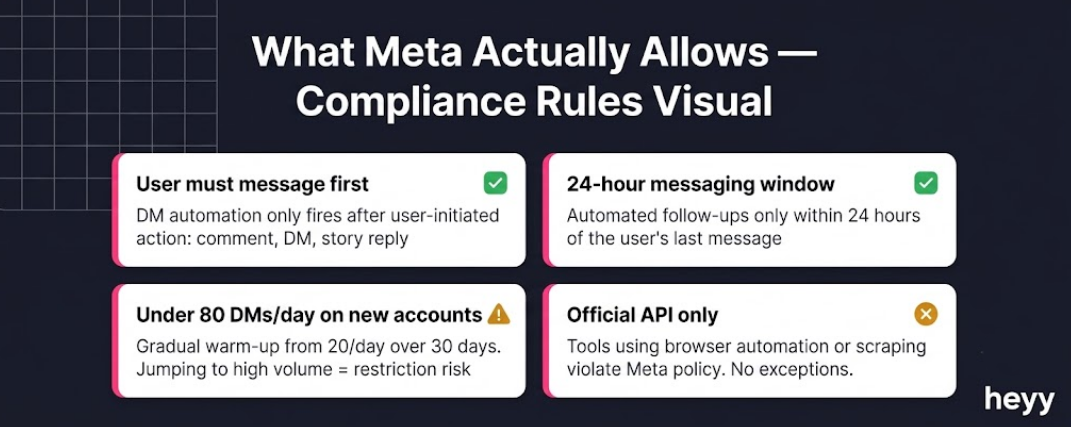
The 24-hour messaging window: When a user messages your account, Instagram opens a 24-hour window during which you can send automated or manual follow-up messages. When that 24 hours passes without a new message from the user, the window closes. You cannot send messages to that user again until they message you first. This is Meta's core protection against spam, and it applies to all automated messaging.
Comment-to-DM is an entry point, not a full channel: When someone comments a keyword and receives your automated DM, that comment-to-DM message is the beginning of a conversation. It is not an open channel. The follow-up rules (24-hour window) apply immediately after that first automated message.
The safe daily volume ceiling: Accounts using official API-compliant tools can send up to 250 to 300 DMs per day, but the safe operating range for new setups is under 80 per day with a gradual warm-up from 20 per day over 30 days. Jumping to high volumes immediately carries a significant restriction risk.
No unsolicited cold DMs: Automated DMs to users who have not engaged with your account first are not permitted. Every automated flow needs to start from a user action: a comment, a DM, a story reply, a click-to-DM ad click. Outreach to users who did not initiate contact is a violation.
You must use the official Meta Graph API: Any tool that uses browser automation or screen scraping rather than the official API is operating outside Meta's policies. If the tool asks for your password rather than an OAuth authorization, it is not using the official API. Account restriction or termination is the eventual outcome.
What Actually Works: Practices I Have Tested
Use one keyword per campaign, not a list: When a post CTA says "Comment INFO, PRICING, LINK, or GUIDE," the follower has to think about which keyword to use. Thinking reduces action. One specific keyword per post converts better. If you need to capture multiple intents, create multiple posts.
Start every automated message with the recipient's name. DMs that include the recipient's first name achieve response rates 22% higher than identical messages without name personalization, per Communipass's 2026 benchmarks. Most API-based platforms support dynamic name insertion. Use it.
End every message with one question, not one paragraph: The goal of automated Instagram messages is not to close a sale in the first message. It is to open a conversation. One question. One next step. Everything else slows the exchange down.
Keep the Reel-to-DM sequence tight: The highest-performing comment to DM flows I have run follow the same pattern: a Reel with a single keyword CTA, a DM that delivers the promised value immediately, and a qualifying question in the same message. Three steps. No friction between the comment and the resource.
For customer support: connect DMs to a unified inbox. When Instagram DMs are one of multiple channels your team handles — alongside WhatsApp, Facebook Messenger, and website chat — keeping them in separate apps creates exactly the fragmented experience that loses customers. The chatbot funnel guide covers how to connect Instagram DM automation to a broader messaging funnel.
What Does Not Work: Mistakes I See Every Time
Leading with a pitch in the first automated message: I have seen this kill otherwise well-built flows consistently. The first automated DM should deliver what the follower asked for. Not a pitch, not a "learn more," not a product link they did not request. Deliver the value first. The pitch is Message 2 or 3, after they have replied.
Building too many keyword flows at once: I always recommend one flow. Build it, test it, iterate on it, and get it working before adding more. Teams that build ten comment-to-DM flows simultaneously at launch have no idea which one is working, why, or what to fix.
Ignoring the replies: Automation handles the first touch. When a follower replies with a real question, a human needs to respond. The best Instagram DM strategies blend automation with personal follow-up. The biggest drop-off point in most flows I have audited is unanswered replies; a follower engaged, got the first automated message, replied, and heard nothing back.
Treating DMs like email campaigns: Email campaigns go to everyone on a list. Instagram DM automation should be triggered by real intent signals from people who have already demonstrated engagement. The moment you start thinking about automated Instagram messages as a broadcast channel rather than a conversation channel, performance drops and restriction risk rises.
The businesses that are winning on Instagram right now are not necessarily the ones with the best content. They are the ones whose DM infrastructure turns follower engagement into conversations at the moment of highest intent. Comment automation, keyword replies, story triggers, these are not complex systems. They are a handful of well-designed flows that run every time someone engages, including at 11pm on a Sunday when nobody on your team is online.
For businesses managing Instagram DMs alongside WhatsApp, Facebook Messenger, and website chat, Heyy puts all four in one inbox with AI trained on your products, policies, and brand voice. Every automated Instagram message, every keyword-triggered DM, every story reply, visible to your team in one place with full conversation history. Start free and set up your first Instagram DM automation today.
FAQs
What is the difference between an auto reply and an automated sequence?
An auto reply is a single message that fires in response to a trigger. An automated sequence is a series of messages connected by timing and conditions: Message 1 fires when the trigger activates, Message 2 fires if the person replies, Message 3 fires if they click a link. For most businesses starting out, a single well-written auto reply converts better than a complex sequence because there are fewer points where the automation can feel unnatural. Sequences become valuable when you have conversion data showing specifically where people drop off in the single-message flow.
Can I automate DMs to accounts who follow me but have never messaged me?
Not through Meta's official API. The messaging window only opens when a user reaches out to you first: through a comment, a direct message, a story reply, or a click-to-DM ad. Sending automated messages to accounts who have not initiated contact is a Meta policy violation and risks account action. Some tools claim to offer this capability, but they are not using the official API, and the risk to your account is significant.
Does Instagram DM automation affect my account's organic reach?
There is no documented evidence from Meta that using official API-based DM automation directly affects feed or Reel reach. What does affect reach is engagement quality. Comment-to-DM automation drives real comments on posts, which is a genuine engagement signal. The comment activity, the DM exchanges, and the resulting follower conversations all send positive signals. The concern about reach suppression applies to tools that use fake engagement or automation not connected to real user actions, not to API-compliant comment and DM triggers.
How do I handle conversations in languages I don't speak?
Multi-language keyword detection is available in most major API-based platforms. You can set the same trigger keyword in multiple languages or configure separate flows for different language communities in your audience. For AI-powered flows that respond to open-ended questions rather than specific keywords, modern language models handle most major languages accurately enough for customer-facing responses. The more important design decision is having a human handoff path for complex questions in any language.
What happens if someone reports my automated DM as spam?
If a user reports a DM as spam, Meta reviews the message and the context. Messages that arrive as part of comment-to-DM or keyword-triggered flows, where the user initiated the interaction, are unlikely to be classified as spam. Messages that appear unsolicited, are sent at high frequency, or come from tools using non-API methods carry significantly higher report risk. The practical protection: only automate messages to users who have actively triggered them, keep the messaging window rules, and make every automated message feel like a natural response to what the person actually did.
Should I move Instagram leads to WhatsApp after the initial DM conversation?
For ongoing customer relationships, yes. The 24-hour messaging window on Instagram means you cannot maintain an unlimited back-and-forth. WhatsApp has more flexible messaging rules for opted-in contacts and significantly higher deliverability for outgoing messages. Once a lead has qualified through an Instagram DM flow and opted in to further communication, moving the ongoing relationship to WhatsApp extends the conversation beyond the Instagram messaging window constraints.
More blog posts to read


Ready to Automate Support
Across Every Channel?
.svg)
.avif)