.svg)
Why Your Scaling Brand Needs a Unified Customer Messaging Platform

I get it. When you’re just starting out, jumping between separate tabs for email, live chat, and Instagram DMs doesn't seem like a big deal. Your team is small, and everyone generally knows who is handling what.
But as you grow, that system eventually hits a breaking point.
Maybe a message gets missed, or two different agents accidentally reply to the same customer with different answers. Worst of all, someone falls through the cracks entirely. Suddenly, those loyal customers who used to rave about your service start quietly moving on to someone else.
The Zendesk CX Trends 2026 Report found that 74% of customers find it frustrating to have to repeat their story to different agents and 88% now expect faster response times than they did just a year ago. Meanwhile, the Salesforce State of Connected Customer Report shows that customers now use an average of nine different channels when communicating with a business.
Think about that: nine different places to check, one team trying to keep up, and a bunch of tools that don't talk to each other.
That's the math that breaks brands.
If you're still toggling between five dashboards to piece together a customer's history, your team isn't just slow, they're fighting your growth every day.
What Is a Customer Messaging Platform, Really?

Before going further, it helps to get clear on what we're actually talking about.
A customer messaging platform is a platform/tool where every customer conversation: email, live chat, WhatsApp, Instagram DMs, Facebook Messenger, SMS flows into one unified workspace. It means every agent on your team is looking at the exact same history. No asking the customer to repeat themselves, and no losing the thread of the conversation.
It's fundamentally different from a basic helpdesk or ticketing tool. A proper platform doesn't just store conversations, it actively routes them, automates responses, and uses AI to handle what it can before escalating to a human. If you're confused about the difference, customer messaging as a concept is worth understanding before checking out any platform.
And if you're wondering whether AI actually belongs inside that platform, it does, and how AI handles customer service today looks nothing like the dead-end bots most people experienced a few years ago.
The Business Case for a Unified Inbox
Here's what actually changes when you unify your inbox:
1. Response times drop. When agents aren't switching between platforms to find conversations, they can actually respond. The Zendesk CX Trends 2026 Report shows that 83% of customers expect an immediate response when they reach out. That's only possible when your team isn't hunting across five tabs to find the message.
2. Context follows the customer. When a customer switches from WhatsApp to email mid-conversation, the agent picking it up already has the full thread. No "can you explain the issue again?", which, per Zendesk's research, 74% of customers find actively frustrating. Using a professional email service also helps businesses keep customer communications secure and consistent across the team.
3. Reporting gets honest. If your conversation data is split across six platforms, your metrics lie. A unified inbox gives you one real source of data: first response time, resolution rates, CSAT, channel volume, all in one dashboard.
Where Conversational AI Fits In
The reality of a growing support team is that your agents spend most of their day on the same 20 questions. Order tracking. Password resets. Refund policies. Return windows. Business hours. These are important to the customer asking but they don't need an agent to answer them.
A good conversational AI platform catches these before they reach your team, handles them completely, and creates a ticket only when a human actually needs to be involved.
So, this is all about freeing them to handle the conversations that matter: angry customers, difficult issues, high-value accounts.
For eCommerce brands especially, this is a game-changer, eCommerce chatbots sitting inside your messaging platform can handle product questions, track orders, process returns, and recover abandoned carts, all in the same WhatsApp thread a customer started at midnight.
What Makes a Good Automated Messaging System
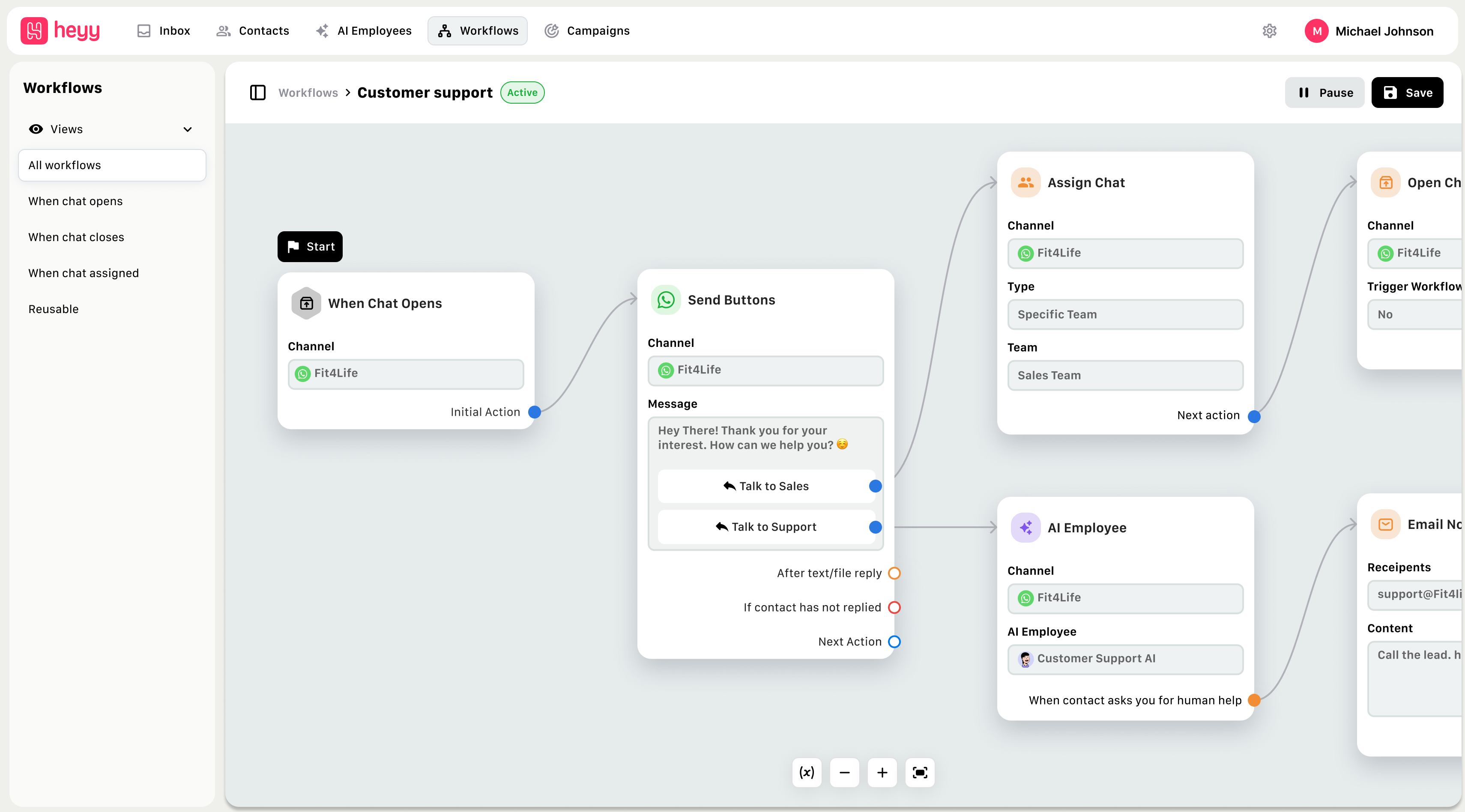
Not all automated messaging systems are equal. Here's what makes a good automated messaging system:
- It deflects tickets before they're created. The whole point of automation is that customers get answers without a ticket ever reaching your team. If your platform is just auto-routing conversations to agents, it's not actually automating anything.
- It knows when to hand off. Bad automation tries to handle everything. Good automation recognizes when a customer is frustrated, when the issue is complex, and when an agent needs to step in, and it does that handoff smoothly, with full context already loaded for the agent.
- It works across every channel. Email, WhatsApp, Instagram, Facebook Messenger, live chat, SMS. The automation should work the same way regardless of where the customer reaches out. If it only works on your website chat, it's not a real solution.
- It integrates with your stack. Your platform needs to talk to your CRM, your order management system, your helpdesk. Without that, automation creates more problems than it solves, like a bot that can't actually check order status because it's not connected to your Shopify.
- It gets smarter over time. The best platforms learn from every conversation. They identify new patterns, flag questions the bot can't answer, and make it easy for you to improve responses based on real data.
Who Needs This (And Who Doesn't…Yet)
Let me be honest here.
If you're a solo founder handling 15 messages a day, you don't need a full customer messaging platform yet. A shared Gmail inbox works fine.
But if you're past that point, if you have more than three people touching customer conversations, more than two channels to manage, or a backlog that doesn't clear by end of day, you need this now.
Some practical signals:
- You've found duplicate replies sent to the same customer
- You regularly discover messages that were missed entirely
- Agents ask customers to repeat information that's already been shared on another channel
- Your Monday morning backlog is the result of weekend conversations piling up
- You have no idea what your actual first response time is
Any one of these is a sign. All of them together mean you're already losing customers you could have kept.
If you're earlier in that journey, it's worth looking at AI chatbots built for smaller teams first, several of them grow into full messaging platforms, so you're not starting over when you scale.
What to Look For in a Platform
Here's a quick framework for evaluating your options:
True omnichannel support. Email, live chat, WhatsApp, Instagram, Facebook, SMS, all in one place. If your agents still have to switch tools for any channel, it's not actually unified.
Customer context in every conversation. Every agent who touches a thread should see the full history; past tickets, previous channels, open issues, without having to dig.
AI that deflects, not just routes. Routing conversations to agents faster isn't AI. The platform should resolve the repetitive stuff completely, end-to-end.
SLA management and alerts. You need to know when a conversation is at risk of breaching your response time targets, before it happens, not after.
Integrations with your existing tools. CRM, eCommerce, helpdesk, project management, your platform should plug into what you already use, not replace everything.
Real analytics. Volume by channel, deflection rate, CSAT, resolution time, agent workload, all in one view.
In summary, growing your brand is hard enough. Don't let your communication stack be the thing that slows you down.
See how Heyy.io brings every customer conversation into one place, and start your free trial today.
Frequently Asked Questions
Q: What's the difference between a customer messaging platform and a regular helpdesk?
A: A helpdesk manages tickets after they're created, it's reactive. A customer messaging platform brings conversations from every channel into a unified workspace before they become tickets, uses AI to resolve what it can automatically, and gives agents full context when escalation is needed.
Q: How quickly can a unified inbox actually improve response times?
A: Most teams see meaningful improvement within the first week. When agents stop switching between platforms and have full context on every conversation, the time spent per ticket drops significantly.
Q: Do I need a developer to set up a customer messaging platform?
A: With modern platforms like Heyy.io, no. You can connect your channels, configure your AI automations, and go live without writing a single line of code. Most setups take a few hours, not weeks.
Q: Can one platform really manage WhatsApp, Instagram, email, and live chat simultaneously?
A: Yes, that's the whole point. A proper customer messaging platform pulls every channel into one inbox. Your team works from one place, the AI handles what it can across all channels, and your customers get a consistent experience regardless of where they reach out.
More blog posts to read

Ready to Automate Support
Across Every Channel?
.svg)
.avif)