.svg)
WhatsApp Abandoned Cart Recovery: How It Works and How to Set It Up


Most ecommerce brands are running abandoned cart email sequences. Three messages. 1-hour delay, 24-hour delay, 72-hour delay. A discount on message three. They have been doing this for four years and calling it a strategy.
Email for cart recovery is not a strategy. It is a fallback that most stores have never questioned.
Here is what the data actually shows. The global cart abandonment rate is 70.19%, based on Baymard Institute's analysis of 50 studies. That is 7 out of every 10 shoppers who add something to your cart and leave without paying. Baymard estimates $260 billion in abandoned revenue is recoverable in the US and EU alone. The email channel recovers a portion of that. WhatsApp recovers significantly more. The only question is why most stores have not made the switch yet.
What Is WhatsApp Abandoned Cart Recovery?
WhatsApp abandoned cart recovery is an automated messaging flow that sends WhatsApp abandoned cart reminders to shoppers who leave items in their cart without buying. The messages are sent through the WhatsApp Business API, which requires official Meta approval and opt-in consent from the customer.
This is not a broadcast campaign. It is a triggered, personalized message sequence that fires based on a specific customer action. When the abandonment event fires in your ecommerce platform, the WhatsApp automation layer receives it and sends the first message within the window you configure. Most setups use a 1-hour delay for the first message, then 24 hours for the second, then 48 to 72 hours for the third.
The key difference from email: WhatsApp messages arrive in the same inbox where the customer messages friends and family. They are read. Email arrives in a promotional tab that most people open once a week if that. For context on how customer messaging channels compare, that guide covers the full channel landscape.
The Numbers That Made Me Switch
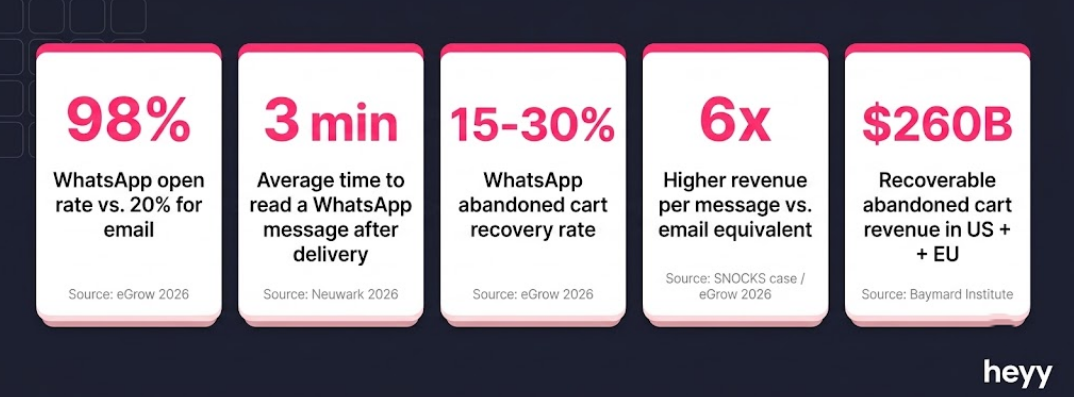
I am going to give you five numbers. After these five, you will not need a case study to make the argument
- WhatsApp messages achieve a 98% open rate. Email averages 20 to 25%. That is a 4x advantage before you write a single word of copy.
- WhatsApp abandoned cart recovery achieves 15 to 30% recovery rates. Email achieves 3 to 5% on Klaviyo benchmarks, per Mailmend's 2026 cart abandonment analysis. WhatsApp recovers 3 to 10 times more carts from the same audience.
- WhatsApp messages are read within 3 minutes of delivery on average. Email is read in hours, if at all. The first 60 minutes after abandonment is when purchase intent is highest. WhatsApp catches shoppers in that window. Email usually does not.
- Revenue per message on WhatsApp is 6 times higher than email for ecommerce brands that have run both channels simultaneously. The SNOCKS case, a German D2C underwear brand, is the clearest documented example: their WhatsApp channel delivered 6x the revenue per message compared to their email equivalent on an identical audience.
- A 3-message email sequence generates 6.5x more revenue than a single email, per Klaviyo data. The sequence logic applies identically to WhatsApp, where the engagement gap is even larger.
This is not a marginal improvement. It is a different league. For the full picture on WhatsApp as a marketing channel, that guide covers the revenue data beyond cart recovery.
The 3-Message Sequence
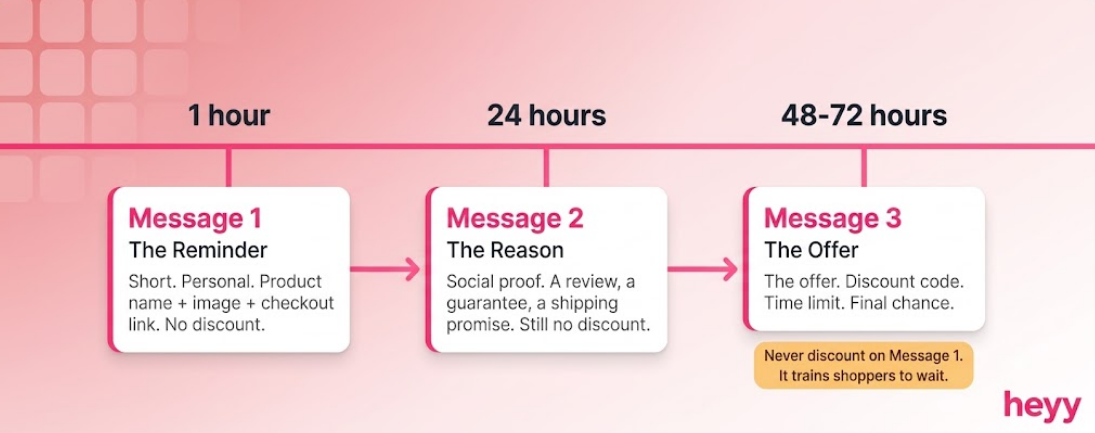
This is the sequence I use. It is not clever or complicated. It works because the timing and the tone are calibrated to where the customer actually is, not where you wish they were.
- Message 1: 1 hour after abandonment.
The customer is still warm. They abandoned because something stopped them. It was a question, a distraction, a hesitation about size or color. The job of Message 1 is to show up before that hesitation calcifies into a decision to buy elsewhere.
Keep it short. Do not discount. Do not plead. Just remind them what they left, make it personal, and give them a single tap back to checkout.
- Message 2: 24 hours after abandonment.
If they did not convert from Message 1, you have two possibilities: they forgot, or they are still undecided. Message 2 addresses both. Add social proof (reviews, a customer quote, a bestseller badge) or a buying reason they may not have considered (free returns, fast shipping, a guarantee). Still no discount.
- Message 3: 48 to 72 hours after abandonment.
This is your discount message. Not before. The reason is behavioral: if you discount on Message 1, you train every shopper who sees your ads to abandon on purpose and wait for the discount. Message 3 is for shoppers who have had two opportunities to return at full price and have not. Give them the offer now. Make it time-limited. Mean it.
Three messages. That is the whole sequence. Every brand that tells me their eight-message flow is underperforming needs to hear this: more messages do not improve recovery. They improve opt-out rates.
WhatsApp Cart Recovery Message Templates
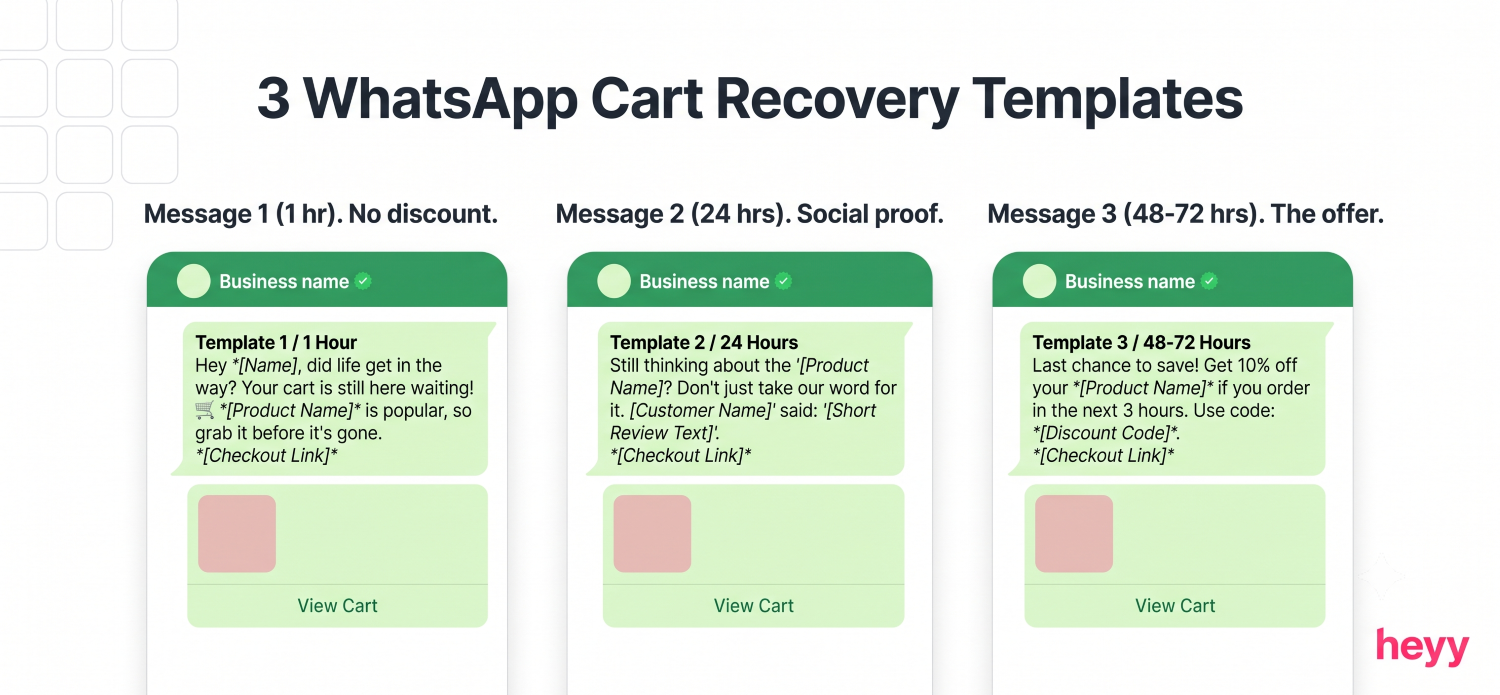
These are the WhatsApp cart recovery message templates that work. Not placeholder copy. Write the actual customer name and product name in the brackets, and send these. If you want to recover abandoned carts on Shopify using WhatsApp, these are the exact formats to start with.
- Template 1: Message 1 (1-hour reminder, no discount)
Hi [First Name], you left something behind.
[Product Name] is still waiting in your cart. Here's your link to pick up where you left off:
[Checkout Link]
Any questions? Just reply here.
What this does right: it is under 50 words, personal, and ends with an open door for objections. The reply invitation is not a formality. Shoppers who have a question about size, shipping, or returns will use it. Answer those replies manually. They convert at high rates.
- Template 2: Message 2 (24-hour social proof)
Hey [First Name], just checking in on your [Product Name].
Our customers love it. Here is what [Name of Reviewer] said:
"[One-line review]"
Your cart is still saved: [Checkout Link]
What this does right: it introduces a buying reason without feeling pushy. The review is doing the selling. You are just delivering it. If you do not have strong reviews on the specific product, swap the social proof for a shipping or returns guarantee.
- Template 3: Message 3 (48-to-72-hour incentive)
Hi [First Name], your [Product Name] is about to sell out.
Use [DISCOUNT CODE] at checkout for [10]% off. This expires in 24 hours.
[Checkout Link]
What this does right: urgency on two fronts (stock and time). The discount is specific, the deadline is real, and the message is under 40 words. Do not explain the discount. Do not justify it. Just offer it and link.
A note on tone across all three: write like you texted this yourself. The moment a WhatsApp cart recovery message reads like a promotional email with line breaks, it loses. WhatsApp is a personal channel. Treat it as one.
How to Recover Abandoned Carts on Shopify Using WhatsApp
This is the technical setup. Most Shopify merchants can go from zero to first message in under two hours.
Step 1: Get WhatsApp Business API access.
You need a WhatsApp Business API account. This is not the free WhatsApp Business app. It is the API-level access that allows automated messages. Apply through a Meta Business Solution Provider (BSP) or through a platform like Heyy that manages the API connection for you. Approval typically takes 24 to 72 hours.
Step 2: Build your opt-in flow.
WhatsApp requires explicit consent before you can send marketing messages. Add a WhatsApp opt-in checkbox to your Shopify checkout: "Get order updates and offers on WhatsApp." This is where you build the audience you can recover from. The opt-in rate for checkout-embedded consent typically runs 15 to 30% of buyers in markets where WhatsApp is dominant. If you are in India, Brazil, the Middle East, or Southern Europe, expect the upper range. See the click-to-chat ads guide for how to expand that opt-in list further through paid traffic.
Step 3: Configure the Shopify abandoned cart trigger.
In your automation platform, create a trigger that fires on the "checkout abandoned" Shopify event. Set the delay to 1 hour. This is not negotiable. Past 4 hours, recovery rates drop significantly. The first of your WhatsApp abandoned cart reminders needs to arrive while intent is still live. For a broader overview of automated messaging flow setup, that guide covers the trigger logic in more depth.
Step 4: Load your approved message templates.
WhatsApp requires pre-approved message templates for the first message in a conversation. Submit your template text to Meta for review. Approval typically takes 24 to 48 hours. Write the template to match the examples above: personal, product-specific, under 60 words, with a single clear call to action.
Step 5: Connect to your CRM and set suppression logic.
The most important configuration step after the triggers: suppression. The moment a cart converts, the remaining sequence must stop. A shopper who completes their purchase should never receive Message 2 or Message 3. Build this suppression into the flow on day one. Nothing damages trust faster than a recovery message arriving after a customer has already bought.
Step 6: Test with a real transaction.
Before going live, run a test with your own details. Add a product to your Shopify store, start checkout with a real phone number on your opt-in list, and abandon. Confirm the message fires at the right time, the product name and image render correctly, the checkout link works, and the conversion suppression logic fires when you complete the purchase.
What Not to Do
I have audited a lot of these flows. The same five mistakes appear every time.
- Discounting on Message 1: The single most common and most damaging mistake. When you discount on the first message, you tell every shopper that the strategy is to wait. Over time, your abandonment rate rises as shoppers learn to hold for the offer. Save the discount for Message 3, and only offer it if the previous two messages did not convert.
- Sending image-less messages: WhatsApp supports product images, and recovery messages without them convert significantly worse than those with them. The product image is the visual re-engagement. It reminds the shopper what specifically they wanted. Include it in every template.
- Sending more than three messages: Three is the ceiling. The sequence after three messages is no longer recovery. It is harassment. Opt-out rates rise sharply past the third message, and the customers who opt out take themselves off every future WhatsApp flow you run.
- Ignoring replies: This is the one that costs the most. WhatsApp is a two-way channel. Shoppers who reply with "is this available in medium?" or "does this ship to Australia?" are telling you they are ready to buy with one objection standing in the way. Every unanswered reply is a sale you gave back.
- Building the flow before building the opt-in list: A 15% recovery rate on 50 contacts is 7 carts recovered. A 10% recovery rate on 2,000 contacts is 200 carts recovered. The opt-in list is the asset. Build it first. Invest in it. The recovery flow is only as powerful as the audience it can reach. For a step-by-step approach to building a lead capture flow, that guide covers opt-in collection alongside qualification.
Your email sequence is recovering 3 to 5% of your abandoned carts. WhatsApp recovers 15 to 30%. The difference between those two numbers is not a marginal improvement in a metric. It is the cost of the channel you have not deployed yet.
For Shopify stores managing WhatsApp alongside Instagram and website chat, Heyy connects the WhatsApp Business API to your Shopify catalog, automates the full 3-message recovery sequence, and routes replies to your team inbox so nothing goes unanswered. Start free and run your first recovery flow today.
FAQs
Do I need the WhatsApp Business API to run abandoned cart recovery, or does the free WhatsApp Business app work?
You need the API. The free WhatsApp Business app cannot send automated messages triggered by platform events. It also cannot handle the volume that a real cart recovery program generates. The API route requires going through an approved BSP or a platform that manages API access for you. The approval process takes 1 to 3 days. Most Shopify-integrated platforms handle this without you touching Meta's developer console directly.
How do I collect WhatsApp opt-ins from customers who have already made purchases?
The cleanest method is a post-purchase WhatsApp opt-in in your order confirmation email: a one-click opt-in link that opens WhatsApp and sends a confirmation message to your business number. You can also add a WhatsApp opt-in to your returns portal and loyalty program pages. Each of these touchpoints captures an existing customer at a moment of high engagement. The opt-in rate for post-purchase email-to-WhatsApp campaigns typically runs 5 to 12%.
What is a realistic recovery rate to expect in the first 30 days?
Expect 8 to 15% in the first 30 days, assuming a 3-message sequence, a 1-hour first delay, product images in every template, and an engaged opt-in list. Higher recovery rates (20 to 30%) typically appear after 60 to 90 days as you refine template copy, tighten timing, and build more opt-ins from higher-intent traffic. The brands that see sub-5% recovery in the first month are almost always sending the first message too late or discounting in Message 1.
What happens if a customer replies to the automated message and asks a question I did not anticipate?
This is the best possible outcome. A reply means the shopper is engaged and close to buying. The question is what stands between them and conversion. Set up keyword-based auto replies for your most common objections (shipping time, sizing, returns, availability) and route everything else to a human or an AI agent. The chatbot funnel guide covers how to build this routing layer.
Can I run WhatsApp abandoned cart reminders and email recovery at the same time?
Yes, and you should. The highest-performing recovery programs use WhatsApp as the primary channel and email as the fallback. WhatsApp captures shoppers with high intent in the first 60 minutes. Email catches the remainder over the following days. Run both, suppress when either channel converts, and track the two separately so you know what each one is recovering. If you are starting from zero, build the WhatsApp layer first.
How does WhatsApp cart recovery interact with GDPR or consumer messaging regulations?
WhatsApp's opt-in requirement is the built-in compliance mechanism. You cannot message a customer on WhatsApp unless they have explicitly consented, which means your messaging list is opt-in by definition. For EU-based stores, document the opt-in event (timestamp, method of consent, channel) in your records. Include a clear opt-out mechanism in every message, "Reply STOP to unsubscribe" is sufficient. For double opt-in in the EU market, add a WhatsApp confirmation step after checkout opt-in, where the customer sends a keyword to confirm consent. This is stricter than required but significantly reduces legal exposure.
More blog posts to read


Ready to Automate Support
Across Every Channel?
.svg)
.avif)