
What Is AI Live Chat? How It Works and When to Use It

In a June 2026 Invoca survey of US consumers, 56% said they expect a business to respond within an hour of filling in a form on its website where only 36% said businesses actually do. And 79% said they’d switch to a competitor that responds faster.
That gap is where AI live chat comes in. Instead of a visitor waiting for someone on your team to be free, the chat answers straight away, using information you’ve given it about your business. When a question needs a person, it passes the conversation to your team.
But “AI chat” covers a lot of things, from scripted bots that frustrate everyone to tools that can genuinely hold a conversation. So what does AI live chat actually do, and is it right for your business?
What is AI live chat?
AI live chat is a chat window on your website where the replies come from AI rather than, or alongside, a person on your team. A visitor types a question in their own words, and the AI reads it, works out what they’re asking, and writes a reply using information about your business.
The key difference from older chatbots is that nobody has to script every answer in advance. You give the AI your website, help articles, pricing, and policies, and it uses them to answer questions you never wrote down word for word. If someone asks “Can I return these if they don’t fit?”, it can find your returns policy and explain it, even though you never set up a reply for that exact sentence.
It’s still live chat in the sense that matters to your visitors: they get an answer in real time, in the same chat window, without filling in a form or waiting for an email. And when the AI can’t help, or the visitor asks for a person, the conversation moves to someone on your team.
How AI live chat works
From the visitor’s side, it feels like a normal chat. Behind the scenes, a few things happen in the seconds between their message and the reply. Here’s what that looks like when a shopper messages an online furniture store asking, “Do you deliver to Leeds, and how long does it take?”
- It reads the whole message. The AI understands that this is two questions, one about where the store delivers and one about how long delivery takes. The visitor doesn’t need to use the right keywords or pick from a menu.
- It looks for the answer in your information. It searches what you’ve given it, such as your delivery page, FAQs, and policies, for the parts that answer the question. This is what keeps its replies about your business rather than general guesses.
- It writes a reply in your tone. It answers both questions in one message, the way you’ve told it to sound: friendly, formal, short, or detailed.
- It takes an action, if you’ve set one up. Some AI live chat tools can do more than answer. They can save the visitor’s details, add a label, start an automation, or look something up in another system, like an order status.
- It decides whether a person should take over. If the visitor asks for a person, gets frustrated, or asks something the AI isn’t allowed to handle, it passes the chat to your team with the whole conversation attached.
The second step matters most. AI live chat is only as good as the information you give it. If your delivery page is out of date, the AI will give out-of-date answers, so it’s worth checking your content before you switch it on.
AI live chat vs live chat vs rule-based chatbots
That reliance on your own information is also what separates AI live chat from the two things people usually confuse it with: a live chat answered by your team, and the older rule-based chatbot that follows a script.
In practice, AI live chat isn’t a replacement for live chat with your team. It’s the same chat window with AI answering first. Your team still handles the conversations that need them, but they’re no longer the only way a visitor gets a reply. If you’ve used a chatbot that left you clicking “none of these” over and over, that’s the rule-based kind, and it’s a big part of why people are wary of AI chat in general.
What AI live chat can handle
So where does AI chat actually earn its place? Mostly on the questions your team answers again and again, and on the conversations that arrive when nobody’s free. Here’s what that looks like for a few different businesses.
Online stores. A shopper asks whether a jacket runs small, whether it comes in navy, or how long returns take. These are quick questions, but an unanswered one is often a lost sale. AI chat can answer from your product pages and policies while the shopper is still deciding.
Software companies. A visitor on your pricing page wants to know if the cheaper plan includes a feature they need, or whether you integrate with a tool they already use. AI chat can answer, then ask a couple of questions to see if they’re a good fit for a demo. Our guide to qualifying leads in live chat covers how to do that well.
Agencies and service businesses. Someone wants to know what a project typically costs, how long it takes, or whether you work with businesses like theirs. AI chat can explain your services, share the right case study, and collect their details for a follow-up.
Education and courses. A prospective student asks about start dates, entry requirements, or payment plans, often in the evening after work. AI chat can answer from your course information and point them to the right application page.
Support teams. Customers ask how to reset a password, change a booking, or update their billing details. AI chat can walk them through the steps from your help articles, which leaves your team free for problems that need a closer look.
What these have in common is that the answer already exists somewhere in your business. AI live chat is good at finding it and explaining it quickly. It’s less suited to conversations where the answer depends on judgment, which is where the next section comes in.
When to use AI live chat, and when a person is still better
AI live chat isn’t the right answer for every conversation, and your customers know it. In the same Invoca survey, 59% said they’d choose a person over AI when both were equally available. That doesn’t mean they don’t want AI. It means they want it for the right things, and a person when it counts.
AI live chat is usually a good fit if:
- Your team answers the same questions every day. Delivery times, pricing, opening hours, and “how do I…” questions are where AI saves the most time.
- Chats arrive when nobody can answer. Evenings, weekends, busy periods, or time zones your team doesn’t cover.
- Visitors leave before anyone replies. If chats regularly sit unanswered for more than a few minutes, you’re likely losing some of those people.
- Your answers already exist in writing. A good website, help centre, or FAQ gives the AI something reliable to work from.
Keep a person in the conversation when:
- The visitor is upset. A complaint or a problem with an order needs empathy and the authority to fix it.
- The decision is big. Someone weighing a large purchase or a long contract often wants to talk it through with a person.
- The answer depends on judgment. Refunds outside your policy, custom pricing, or anything with legal or medical weight.
- The visitor asks for one. This should always be an option, and it should be easy.
There’s one more thing to get right: be upfront that it’s AI. The same survey found that 63% of people can’t reliably tell whether they’re talking to AI or a person, and 83% said it matters that AI identifies itself. Giving your AI a name is fine, but don’t let visitors think they’re talking to someone on your team.
How to get AI live chat right
Knowing where AI fits is half of it. The other half is setting it up so visitors actually trust the answers. These five habits make the biggest difference:
- Tidy up your information first. Before you switch anything on, check that your pricing, delivery details, and policies are current and written down. The AI answers from what you give it, so gaps and old pages turn into wrong answers.
- Tell it what not to do. Decide which topics it should never answer, such as discounts it isn’t allowed to offer or medical advice, and what it should say instead.
- Plan the handoff before you need it. Decide when a chat should go to a person, who picks it up, and what the visitor sees if your team is offline. Our guide to chatbot-to-human handoff covers the details.
- Test it with real questions. Pull a dozen questions from recent chats or emails, including awkward ones, and see how it answers. Adjust before real visitors see it.
- Read the conversations every week. You’ll spot questions it couldn’t answer and places where visitors gave up. Each one tells you what to add to your content or rules.
A good greeting helps too. A chat that opens with something relevant to the page gets more replies than a generic “How can I help?”, and our live chat greeting examples have plenty to start from.
How to setup AI live chat with Heyy
Everything in this guide, from answering in your own words to knowing when to step aside, is what we built Heyy’s AI Employees to do. Rather than a bot that only answers FAQs, an AI Employee is set up like a new member of your team: you tell it who it is, what it knows, what it’s allowed to do, and when to bring in a person.
Here’s how each part of AI live chat works in Heyy, using the furniture store example from earlier.
Give it an identity. When you hire an AI Employee, you give it a name, your brand name, a tone, and an answer length. You also choose a role: Support for questions and tickets, Sales for qualifying leads and booking demos, or General for a mix of both. You can even pick an “AI Employee” avatar instead of a human one, which makes it clear to visitors that they’re chatting with AI.
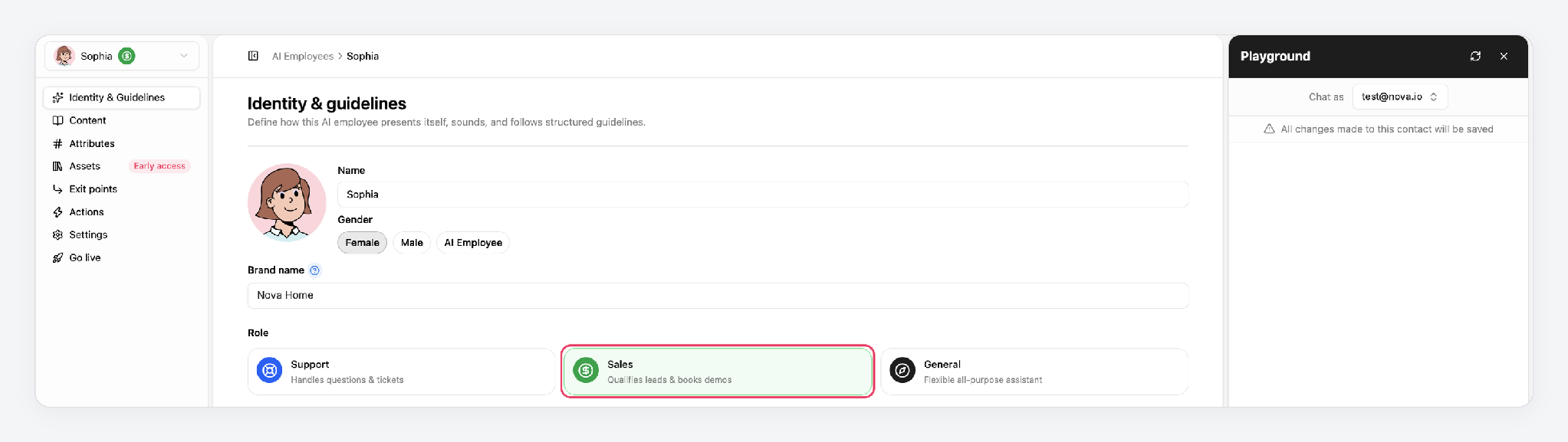
Teach it about your business. In the Content tab, you add the information it answers from: links to your website, documents like price lists or brochures, plain text, and question-and-answer pairs. For the furniture store, that means the delivery page, the returns policy, and the product catalogue. This is the information it searches before every reply.
Write its guidelines. Guidelines are short instructions in plain English, grouped into four areas:
- Identity & style: how it sounds. For example, “Always reply in the language the customer writes in.”
- Conversation flow & objectives: what it’s trying to achieve, such as answering a question and then offering to book a showroom visit.
- Boundaries: what it must never do, like offering discounts or promising delivery dates you can’t guarantee.
- Other: anything else specific to how your business works, like seasonal opening hours.
Heyy comes with templates for common guidelines, so you’re not starting from a blank page.
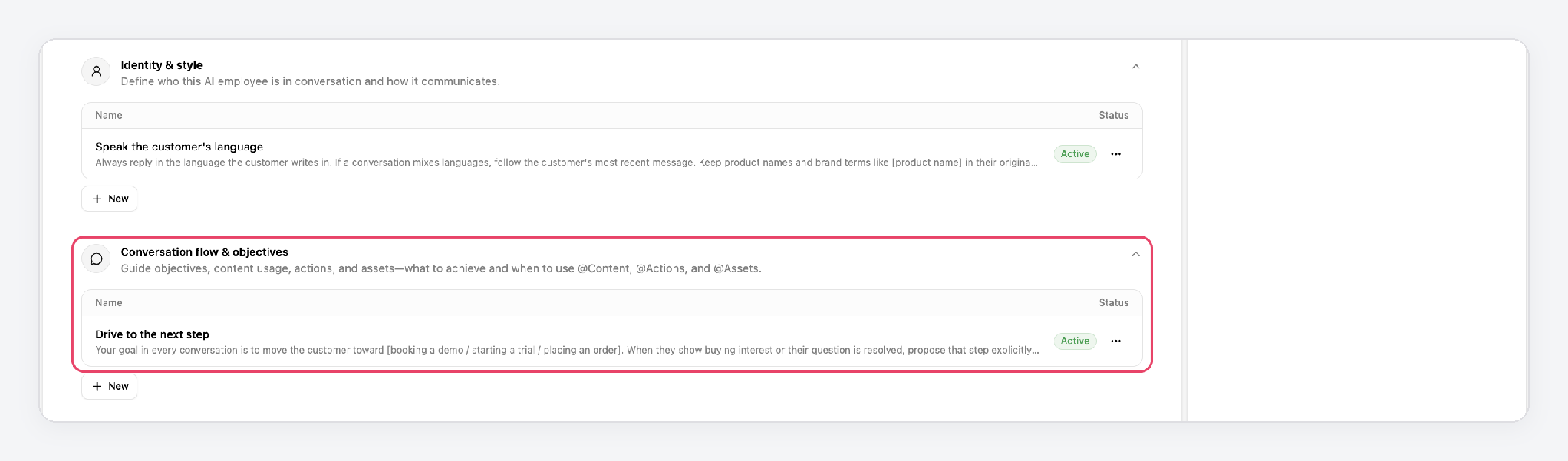
Let it remember and act. In the Attributes tab, you choose which contact details it can read and update, such as a customer’s name, email, or postcode. In Actions, you can let it trigger an automation in Heyy or call another system through an API, for example to look up an order.
Decide when your team takes over. In Exit points, you set the moments a conversation should go to a person: when a customer asks for one, when they’re unhappy, or when the AI can’t help. Whoever picks it up sees the whole conversation, so the customer doesn’t have to repeat themselves.
Test it before anyone else sees it. The Playground lets you chat with your AI Employee as a test contact. Ask it the questions your customers ask, including the awkward ones, and adjust its content and guidelines until the answers are right. Nothing you send in the Playground reaches a real customer.
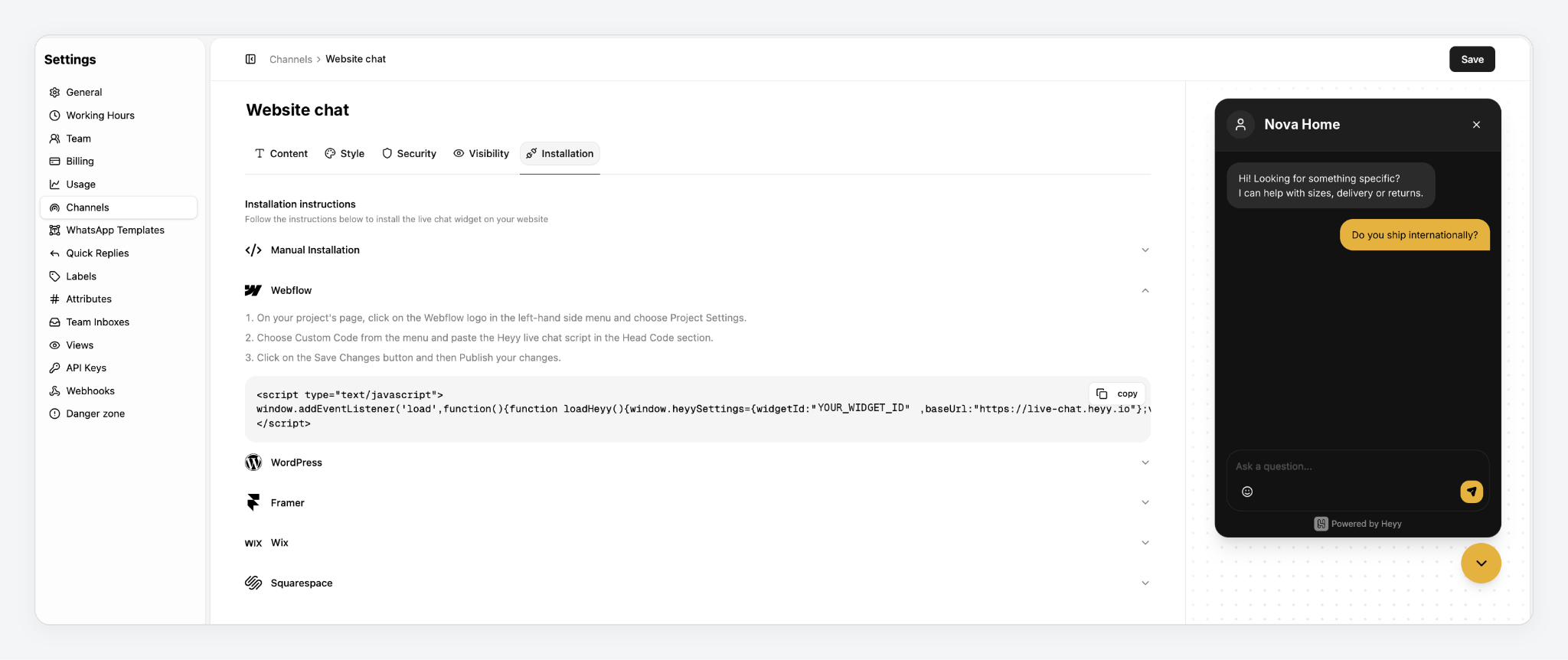
Put it on your website. Add your website live chat from Settings → Channels. The Installation tab has steps for WordPress, Wix, Squarespace, Webflow, and Framer. Then create an automation that sends new chats to your AI Employee, choose which exit points are active, and publish. From then on, every visitor who starts a chat gets an answer straight away.
The same AI Employee can also answer on WhatsApp, Instagram, Facebook Messenger, and SMS. Customers get the same answers wherever they message you, and your team sees every conversation in one shared inbox.
FAQs
1. Is AI live chat the same as a chatbot?
Not quite. A rule-based chatbot follows a script you build, so it only handles the questions you planned for. AI live chat understands questions in the visitor’s own words and answers from your information, then hands the chat to a person when needed.
2. Will AI live chat replace my support team?
No. It takes on the repetitive questions and the chats that arrive when your team is busy or offline. Your team still handles complaints, complex questions, and anything that needs judgment.
3. Can AI live chat give wrong answers?
Yes, if the information it works from is wrong or missing. Keep your content up to date, set clear limits on what it can answer, and review conversations regularly to catch gaps.
4. Should I tell visitors they’re chatting with AI?
Yes. Most people want to know, and being upfront builds trust. You can still give your AI a friendly name.
5. How long does it take to set up AI live chat?
Adding the chat to your site is quick. Most of the setup time goes into adding your content, writing a few rules, and testing it with real questions before you go live.
6. Does AI live chat work on mobile?
Yes. The chat works on mobile browsers the same way it does on desktop. Some tools, including Heyy, also let the same AI answer on messaging apps like WhatsApp and Instagram.
More blog posts to read

Ready to Automate Support
Across Every Channel?

