.svg)
Chatbot to Human Handoff: How to Do It Without Losing the Customer


You’ve probably seen it happen. A customer asks your chatbot the same question three times, and then they type “HUMAN” in all caps. The bot didn’t let them down because it couldn’t answer. Where it let them down was not knowing when to stop trying.
Most people don’t mind chatting with a bot. In fact, 67.7% of consumers say they find a response from an AI chatbot helpful. What they mind is getting stuck with one. If they know they can reach a real person when they need to, they’re much happier to let the AI help.
So let’s talk about when your chatbot should hand off, what it should say, what to do when nobody’s around, and how to set it all up so no one has to repeat themselves.
What a good chatbot-to-human handoff looks like
The easiest way to see the difference is to put a good handoff and a bad one side by side. Here’s the same customer, with the same problem, messaging an online store about a broken order.
A bad handoff
Customer: My order arrived broken.
Bot: Sorry to hear that! You can find our returns policy here.
Customer: I don’t want a return, I want a replacement.
Bot: Sorry to hear that! You can find our returns policy here.
Customer: HUMAN PLEASE
Bot: I’m transferring you now.
(40 minutes later)
Agent: Hi! How can I help you today?
The customer has now explained their problem three times, waited 40 minutes, and is about to explain it a fourth time.
A good handoff
Customer: My order arrived broken.
Bot: I’m sorry, that’s not the experience we want you to have. Could you send me your order number and a photo of the damage?
Customer: #48213, photo attached.
Bot: Thank you. A replacement needs one of our team to approve it, so I’m passing you to them now with your order details and photo. They usually reply within 5 minutes.
Agent: Hi Sarah, I can see order #48213 and the photo of the cracked mug. I’ve sent a replacement today, and you don’t need to return the broken one.
In the good version, the bot knew it couldn’t approve a replacement, collected what the agent would need, told the customer what was happening and how long it would take, and handed over the full conversation. The agent never had to ask a single question.
4 ways chatbot handoff goes wrong (and how to fix each one)
Most bad handoffs fail in one of four predictable ways. Each one has a simple fix.
1. The dead end
The customer wants a person, and there’s no way to reach one. The bot keeps answering, or offers an email address that nobody checks.
The fix: always give customers a way to reach a person, and make sure the bot is trained when they ask for one, however they phrase it: “talk to someone,” “agent,” “real person,” or just “human.”
2. The loop
The bot keeps trying long after it should stop, repeating the same answer or asking the same question in different words.
The fix: set a limit. If the bot hasn’t solved the problem after two tries, it should hand off rather than try a third time.
3. The cold restart
The customer finally reaches a person, who asks them to explain everything again. It’s the most frustrating handoff failure of all, because the customer has already done the work.
The fix: make sure the full conversation goes with the customer, and have the bot collect what your team will need, like an order number, before it hands over. Then the agent’s first message should show they’ve read it.
4. The silent wait
The bot says “I’m connecting you to the team,” and then nothing happens. Nobody was told, or nobody’s working.
The fix: route handed-off chats to a specific person or team, alert them, and tell the customer honestly how long a reply will take. If nobody’s available, say so (more on that below).
When should a chatbot hand off to a human?
There’s no hard rule for this, but the signs are usually pretty clear. Some mean “hand it over now.” Others mean “give it one more go, then hand it over.” Here are the ones to watch for:
That last one is easy to miss. Handoffs aren’t just for when something goes wrong. When your AI finds a lead who’s ready to talk, getting them to your sales team fast is one of the best handoffs you can make.
If you’re ever unsure, hand off sooner rather than later. Nobody minds reaching a person one message early. Reaching one three messages too late is what drives people away.
What to say during the handoff (copy-paste templates)
The words matter as much as the timing. A good handoff message tells the customer three things: why they’re being passed on, that they won’t need to repeat themselves, and roughly how long they’ll wait. Adapt these to your own tone.
When the bot hands over during working hours. I’ll pass you to one of our team so they can sort this out for you. They’ll see everything we’ve talked about, so you won’t need to explain it again. Someone will usually reply within [5 minutes].
When the bot needs to collect details first. One of our team will need to help with this. So they can sort it out quickly, could you send me your [order number / email address / account name]?
When the customer asks for a person. Of course. I’m connecting you with the team now, and they’ll have our full conversation in front of them.
When nobody’s available. Our team is offline right now, but I’ve passed your message on, and they’ll reply first thing [tomorrow morning / when we open at 9 a.m.]. You’ll get the reply right here, so you don’t need to message again.
When the customer is still waiting. Thanks for your patience. Your message is with the team, and they’ll be with you as soon as they can. You don’t need to resend anything.
The agent’s first reply. Hi [name], I’ve read through your conversation, and I can see [the issue in a few words]. [What you’re doing about it.]
That last one is the most important. An agent who shows straight away that they’ve read the conversation turns a frustrating handoff into a good one.
What happens when nobody’s available?
This is where a lot of handoffs quietly fall apart. A chat gets handed over at 11 p.m., the bot says “connecting you now,” and the customer sits there waiting for a reply that won’t come until morning.
You don’t need a 24-hour team to avoid this. You just need to decide in advance what happens out of hours.
- Be honest about timing. Tell the customer the team is offline and when they’ll hear back. A clear time is far easier to accept than silence.
- Let the AI keep helping where it can. Many after-hours questions don’t need a person at all. Only the ones that genuinely do should wait for the team.
- Collect the details now. Ask for the order number, the issue, and the best way to reach them, so your team can reply properly first thing instead of starting with questions.
- Alert someone for urgent cases. If some handoffs can’t wait, like a payment problem or an angry VIP customer, send an alert to whoever’s on call.
- Close chats that go quiet. If the customer stops replying, close the chat or move it to a follow-up list after a set time, so your team starts the day with a clean inbox.
How to set up chatbot to human handoff in Heyy
In Heyy, your AI Employee answers customers on your website chat, WhatsApp, Instagram, and Facebook Messenger, and hands chats to your team when a person needs to step in. Setting up that handoff takes about five steps.
Before you start: you’ll need an AI Employee and at least one connected channel. If you haven’t set those up yet, start with Heyy’s guide to creating your first AI Employee. It walks you through hiring one, giving it your business information, and connecting it to real customers. Then come back here.
1. Create an exit point so the AI knows when to hand off
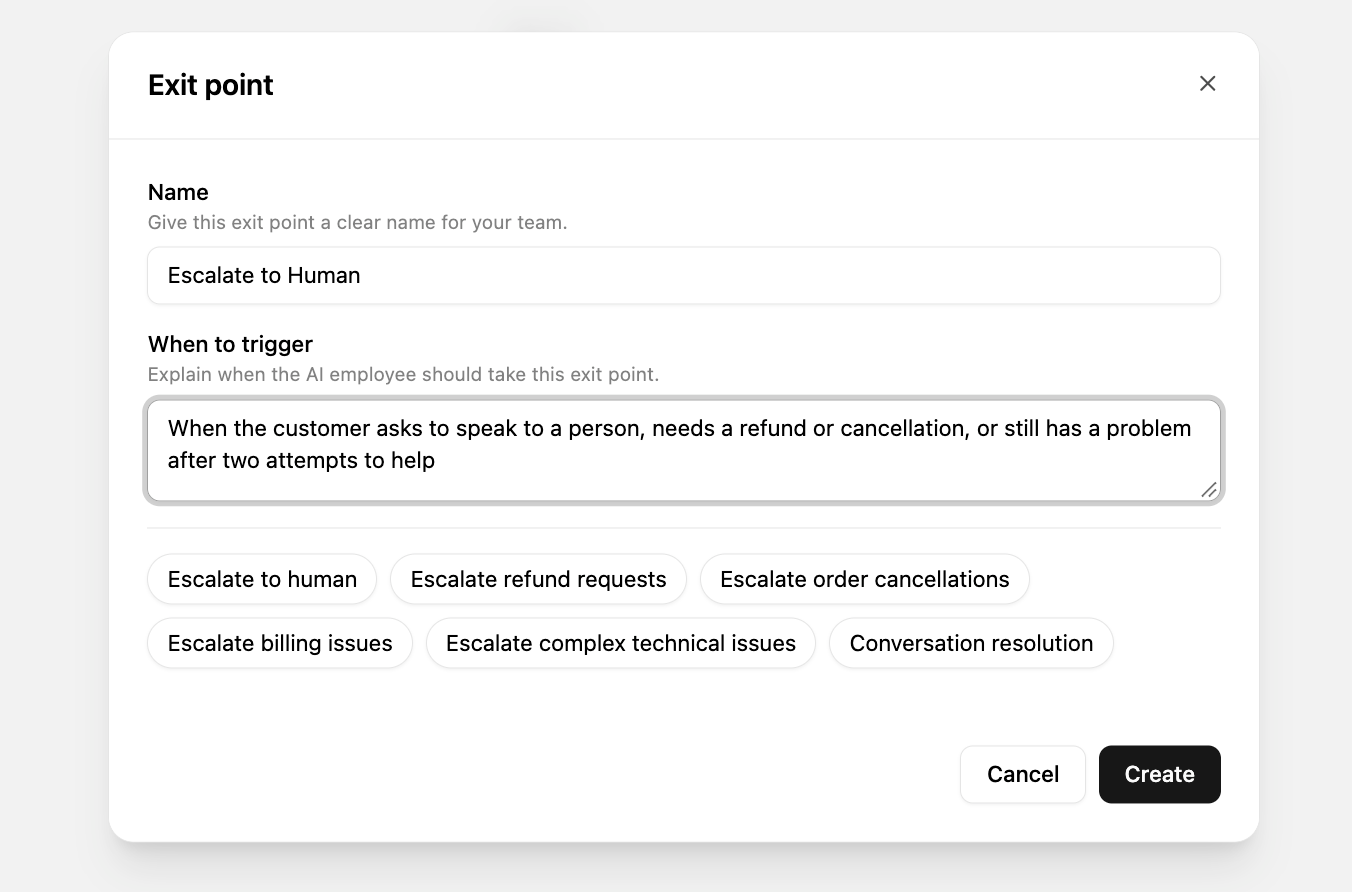
An exit point tells your AI Employee when a conversation should leave its hands.
- Go to AI Employees in the top navigation and open your employee.
- Open the Exit points tab and click New exit point.
- Name it Escalate to Human.
- In the prompt, describe in plain language when it should trigger. For example: “When the customer asks to speak to a person, needs a refund or cancellation, or still has a problem after two attempts to help.”
- Set the status to Active and click Save.
You can add more exit points for specific cases, like Refund Request or Escalate to Sales for ready-to-buy leads, and send each one to a different team later.
2. Add Boundaries so it hands off at the right moment
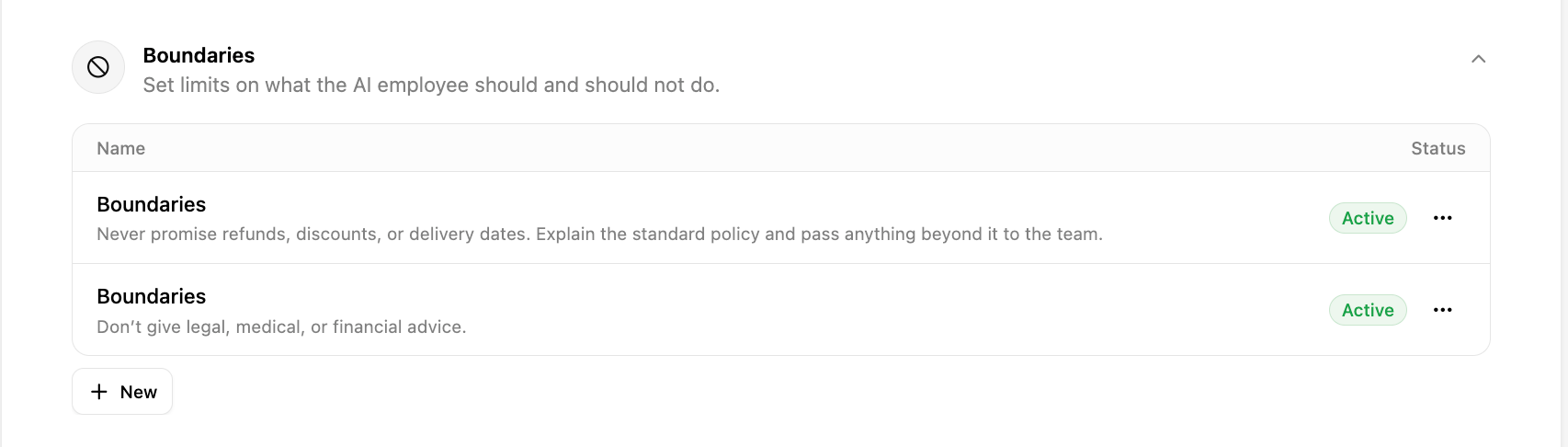
Boundaries are the rules your AI Employee won’t break. Use them to set how hard it should try before handing off, and what it should never do on its own.
- On the same employee, open the Identity & guidelines tab.
- Expand the Boundaries section and click New.
- Write the rule the way you’d explain it to a colleague, then click Optimize to tighten the wording. You can also browse the templates for ideas.
- Give it a title, set it to Active, and click Save.
Add one rule per boundary. For example:
- Try to solve the problem for up to two replies, then hand off.
- Never promise refunds, discounts, or delivery dates. Explain the standard policy and pass anything beyond it to the team.
- Don’t give legal, medical, or financial advice.
Use the same wording in your Boundaries as in your exit points, so the AI stops at exactly the moment you intend.
3. Route handed-off chats to your team
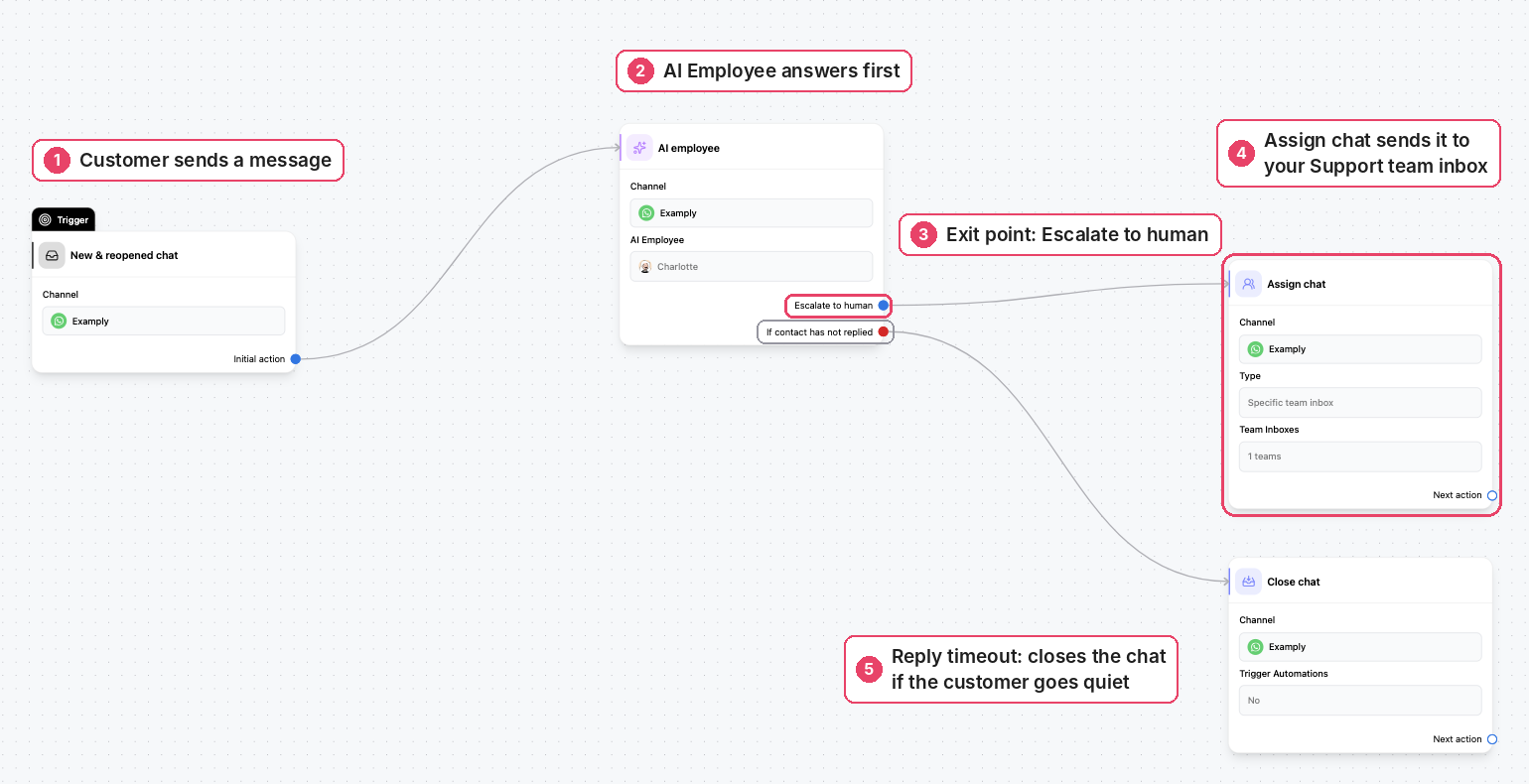
This step is where the handoff actually happens. You’ll connect your exit point to the team that should take over.
- If you haven’t already, create a team inbox for the people who’ll handle these chats, like Support or Sales, under Settings → Team Inboxes.
- Go to Automations and open the automation your AI Employee runs in, or click Create new automation.
- In the Trigger block, set it to New incoming message and choose your channel.
- From the Channel Menu on the right, add the AI Employee step and select your employee.
- In the AI Employee step, select Escalate to Human as an active exit point. This is the step people most often miss: an exit point does nothing in an automation until it’s selected there.
- Connect the Escalate to Human exit point to an Assign chat action, and choose the team inbox from step 1.
- Publish the automation.
Your teammate now picks up the chat in the shared inbox with the full conversation in front of them, so the customer never has to start again.
4. Make sure nothing gets stuck
Two small additions stop handed-off chats from going unanswered:
- Alert your team. After the Assign chat action, add an Email notification or WhatsApp notification. Each can go to up to five people, so the right teammates know a customer is waiting.
- Add a reply timeout. In the AI Employee step, set a reply timeout, for example 30 minutes, and connect it to what should happen next if the customer goes quiet, such as closing the chat or reassigning it.
5. Test it before going live
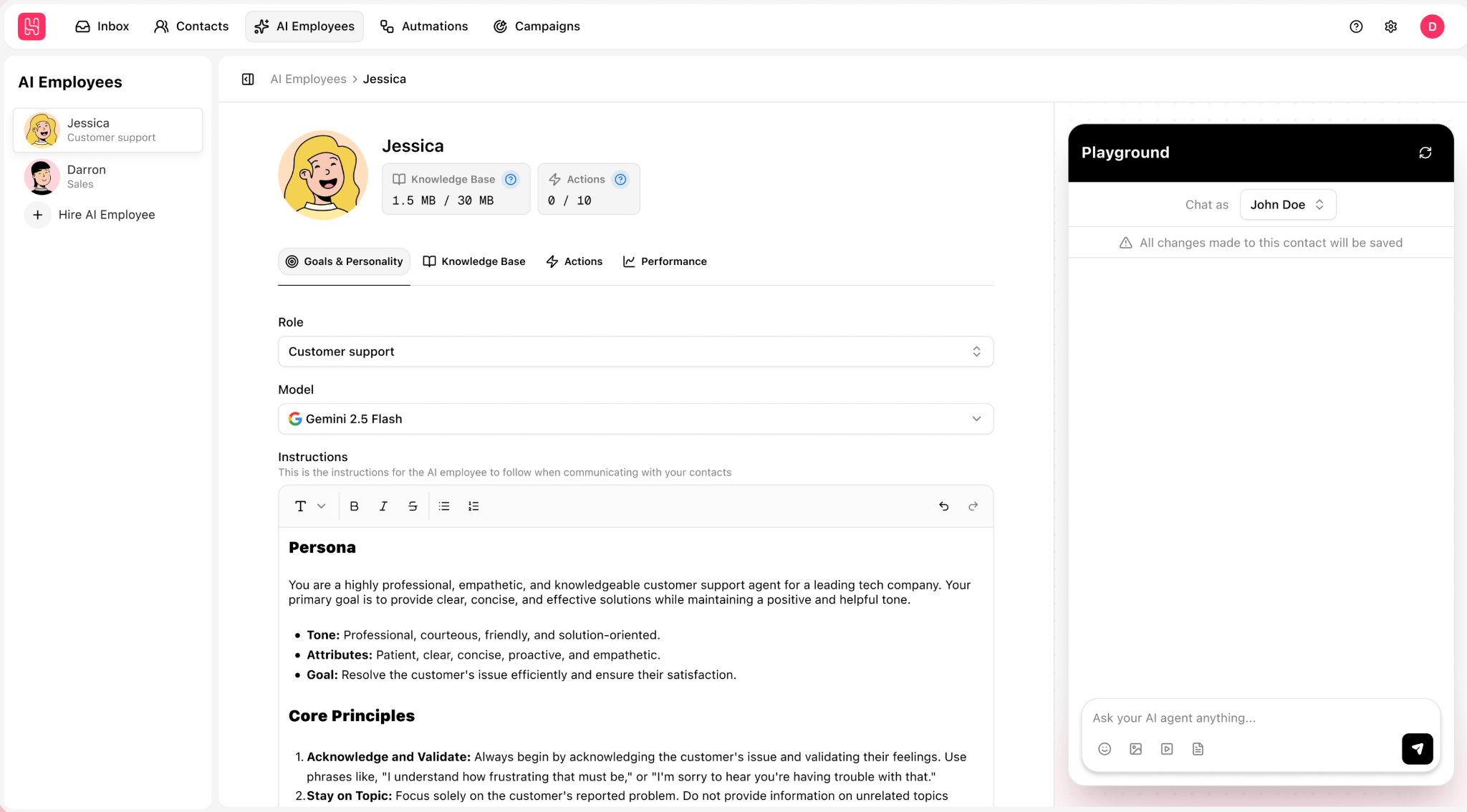
- Open your AI Employee and click Playground in the toolbar on the right.
- Select a test contact, then chat as if you were a customer.
- Try to break it: ask for a refund, get frustrated, type “I want a real person.”
- Check that the Escalate to Human exit point triggers at the right moment, and that the AI doesn’t keep trying after it should stop.
- Click Reset chat to start a fresh test.
When everything works, set your AI Employee live so it starts talking to real customers.
4 signs your chatbot handoff isn’t working
You don’t need a dashboard to spot a broken handoff. Read a handful of handed-off conversations each week and look for these four things:
- Customers repeating themselves. If agents are asking questions the bot already asked, the conversation or the details aren’t reaching them.
- Long waits after the handover. If handed-off chats sit for a long time before anyone replies, the routing or alerts need fixing, or the bot is promising times your team can’t meet.
- Chats that bounce back and forth. If a chat goes from the AI to a person and back again, your exit points and Boundaries may be pulling in different directions.
- Handoffs the AI could have handled. If agents keep answering simple questions the AI should know, add that information to what the AI learns from, so the next customer gets an instant answer.
The last one is the most useful. Every unnecessary handoff shows you a gap in what your AI knows. Fill those gaps, and your team spends more of its time on the conversations that really need a person.
Chatbot to human handoff FAQs
1. What is chatbot to human handoff?
It’s the moment a chatbot passes a conversation to a person, usually because the customer asked for one or the bot can’t solve the problem. A good handoff sends the full conversation with it, so the customer doesn’t have to start again.
2. When should a chatbot transfer to a human agent?
Straight away when the customer asks for a person, raises a complaint, or needs a refund, cancellation, or account change. Otherwise, hand off after two answers that didn’t help, or as soon as the customer shows frustration.
3. How do you hand off a chatbot conversation without losing context?
Make sure the full conversation goes to the agent, have the bot collect key details like an order number before it hands over, and have the agent open by showing they’ve read the conversation.
4. What should a chatbot say when transferring to a human?
Tell the customer why they’re being passed on, that they won’t need to repeat themselves, and roughly how long they’ll wait. For example: “I’ll pass you to our team. They’ll see everything we’ve talked about and usually reply within 15 minutes.”
5. What happens if no agent is available?
The bot should say so honestly, tell the customer when the team will reply, and collect the details your team needs. For urgent cases, alert whoever’s on call.
AI that knows when to step aside
The best chatbots aren’t the ones that answer everything. They’re the ones that answer what they can and know when to hand over. Get the handoff right, and customers will happily let your AI help, because they know a person is there when they need one.
With Heyy, your AI Employee answers customers on your website, WhatsApp, Instagram, and Messenger, day or night. When a person needs to step in, it hands the chat to the right teammate in your shared inbox, with the full conversation in front of them. Try Heyy free for 7 days and set up your first handoff today.
More blog posts to read


Ready to Automate Support
Across Every Channel?
.svg)
.avif)