
Live Chat for Lead Generation: How to Qualify Visitors in Chat

In a 2026 Gartner survey of 646 B2B buyers, 67% said they’d rather buy without talking to a sales rep. That doesn’t mean they don’t have questions. It means they want answers without booking a call to get them.
Live chat gives them that. But it also creates a new problem for you. Once chat is on your site, messages arrive from everyone: serious buyers, students doing research, existing customers with a support question, and people who’ll never be a fit. If your team treats every chat the same way, the good leads wait in line behind everyone else.
How do you qualify them? How do you tell who’s ready to buy, who needs more time, and who should be pointed somewhere else, all without the visitor feeling like they’re filling out a form?
Why chat is a better place to qualify leads than a form
A form can qualify leads too. You add a few dropdowns for company size, budget, and timeline, and you filter on the answers. The trouble is that every extra field is another reason to leave, and the visitor gets nothing back until someone replies hours or days later.
Chat works the other way round. The visitor asks their question first and gets an answer straight away. Once they’ve been helped, they’re far more willing to tell you about themselves, and you can ask in a way that feels like part of the conversation rather than a gate.
Chat can also change course based on what the visitor says. A form would ask a two-person team about procurement anyway, but in chat you’d skip that question. And if someone needs something running by next week, you can offer them a call straight away instead of working through the rest of your questions.
For a fuller comparison, including when a form is still the better choice, see our breakdown of live chat vs a contact form.
Start by deciding what “qualified” means for you
Adapting the conversation only works if you know what you’re listening for. So before you write any questions, agree with your sales team on what makes someone worth their time.
You may have heard of BANT: budget, authority, need, and timing which is a useful starting point, but you don’t need all four for every business. A clothing store doesn’t care who signs off on a purchase. A software company selling to large teams very much does, which is why to pick the two or three things that actually decide whether a deal happens.
Once you know what matters, you can sort every chat into one of three groups:
- Ready now. They fit, they have a clear need, and they want to move soon. Get them to a call or a demo while they’re still on your site.
- Not yet. They fit, but they’re early in their research. Capture their details, share something useful, and follow up later.
- Not a fit. They’re too small, in a market you don’t serve, or looking for something you don’t offer. Help them politely, and don’t book them in for a call.
What to ask visitors in chat
With those groups in mind, your questions only need to do one job: tell you which group a visitor belongs in. That usually takes three or four questions, not ten.
How you phrase them matters as much as what you ask. The same question can feel like a friendly follow-up or a gate the visitor has to get through:
The second version gives a reason for asking, which makes people more willing to answer. Here are example questions for a few common types of business. Use them as a starting point and change the wording to suit your brand.
SaaS and software
- “What made you start looking for a tool like this?”
- “How many people on your team would be using it?”
- “Are you hoping to have something set up this month, or later in the year?”
Agencies and service businesses
- “What kind of project are you thinking about?”
- “When would you ideally like it to start?”
- “Do you have a budget range in mind? It helps me suggest the right package.”
Real estate
- “Are you looking to buy, rent, or sell?”
- “Which areas are you interested in?”
- “When are you hoping to move?”
Education and courses
- “What are you hoping to learn or achieve?”
- “Are you looking for something full-time, part-time, or self-paced?”
- “When would you like to start?”
You’ll also want a way to follow up, so ask for a name and email or phone number. The best time to ask is when you’re offering something in return, like sending a quote, a brochure, or a booking link. Asking for contact details before you’ve helped is the fastest way to turn a chat back into a form.
How a qualifying conversation should flow
Good questions can still fall flat if they arrive in the wrong order. A qualifying chat works best when it follows the same rhythm a helpful salesperson would use in a shop:
- Open with something that fits the page. On a pricing page, “Not sure which plan fits? I can help you choose” invites a reply. “Hi! How can we help?” usually doesn’t. Our live chat greeting examples have plenty you can adapt.
- Answer their question first. If someone asks whether you integrate with their CRM, tell them. Qualifying before you’ve helped feels like being stopped at the door.
- Ask one qualifying question at a time. Wait for the answer, and use it to decide what to ask next. Skip anything they’ve already told you.
- Work out which group they’re in. By the third or fourth answer, you should know whether they’re ready now, not yet, or not a fit.
- Offer a clear next step. Every chat should end with somewhere to go, which we’ll cover in the next section.
Here’s what that looks like on a marketing agency’s website:
What to do with each lead once you’ve qualified them
That next step depends on which group the visitor falls into. The aim is simple: your sales team should spend its time on the people most likely to buy, and nobody should leave the chat empty-handed.
The detail people miss is passing on what was said. If a visitor tells the chat they’re a team of 20 with a launch next month, and your salesperson opens the call by asking the same questions, the visitor feels like they’re starting again. Save their answers to their contact record, and make sure whoever picks up the conversation can see the full chat. Our guide to chatbot-to-human handoff covers how to do this well.
Speed matters most for the “ready now” group. Someone who wants a demo this week is probably talking to your competitors too. If nobody on your team can reply quickly, a booking link they can use straight away is better than a promise that someone will be in touch.
Mistakes that cost you good leads
Even with the right questions and a clear next step, a few habits can quietly undo the work. These are the ones that come up most often:
- Asking too much. If a visitor answers five questions and still hasn’t been offered anything, they’ll leave. Three or four questions is usually enough to sort someone into a group.
- Treating every chat as a sales lead. Existing customers asking about an order, job seekers, and suppliers all use the same chat window. Ask early what they need, and send support questions to your support team rather than your sales queue.
- Leaving hot leads waiting. A visitor who says they’re ready to buy, then waits two hours for a reply, may not be ready by the time you answer. Decide who handles qualified leads, and what happens when they’re offline.
- Making “not a fit” feel like a rejection. Someone who isn’t right for you today might be next year, or might recommend you to someone who is. Thank them and help where you can.
- Never looking at the transcripts. Your chats show you which questions people answer happily and where they drop off. Read a handful every week and adjust your questions.
Qualifying leads in chat with Heyy
Most of those mistakes come down to one thing: there aren’t always enough people to answer every chat quickly and ask the right questions. That’s the work we built Heyy’s AI Employees to take on.
An AI Employee is an AI team member that chats with your customers. It answers questions using your own information, asks the questions you give it, saves what it learns, and passes the conversation to your team when a person is needed. Here’s how to set one up to qualify leads on your website.
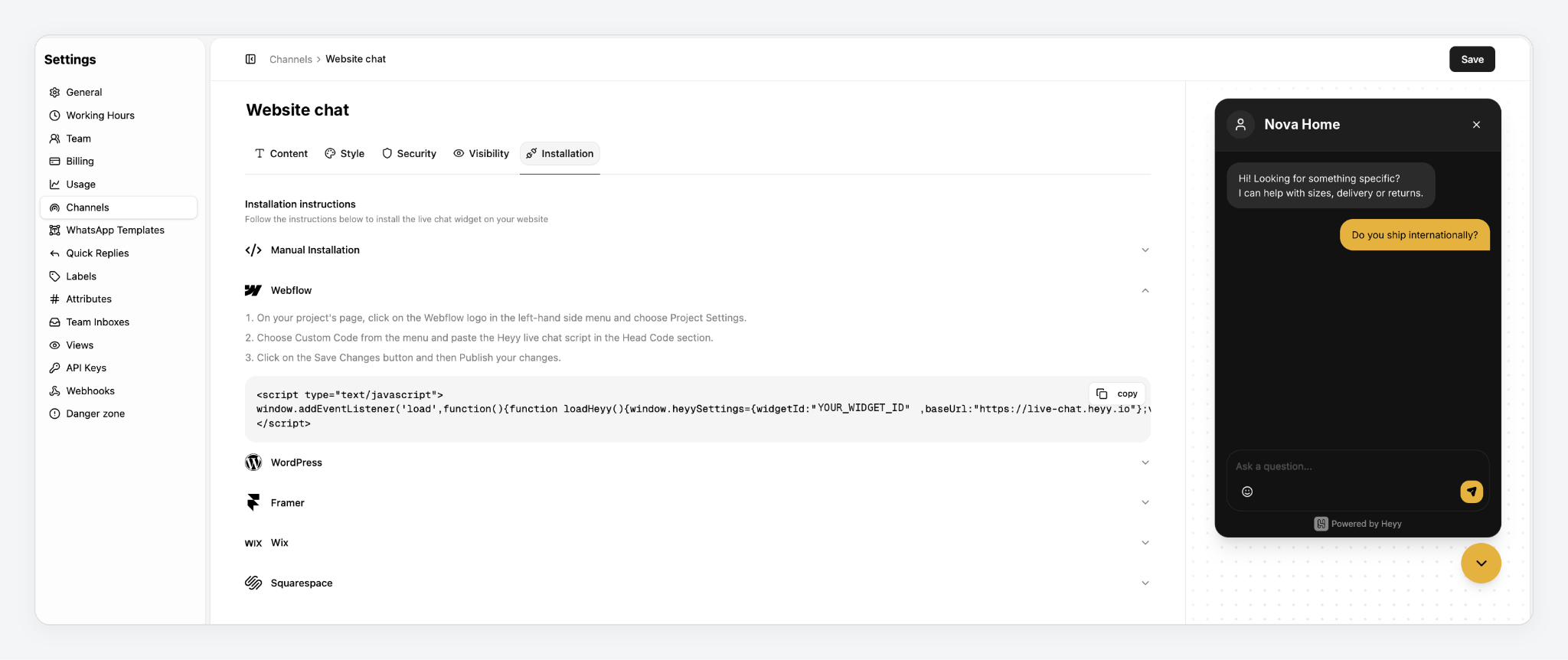
1. Connect your website live chat. Start your free 7-day trial, then go to Settings → Channels and set up your website live chat. The Installation tab shows you how to add it to your site, whether it runs on WordPress, Wix, Squarespace, Webflow, or Framer.
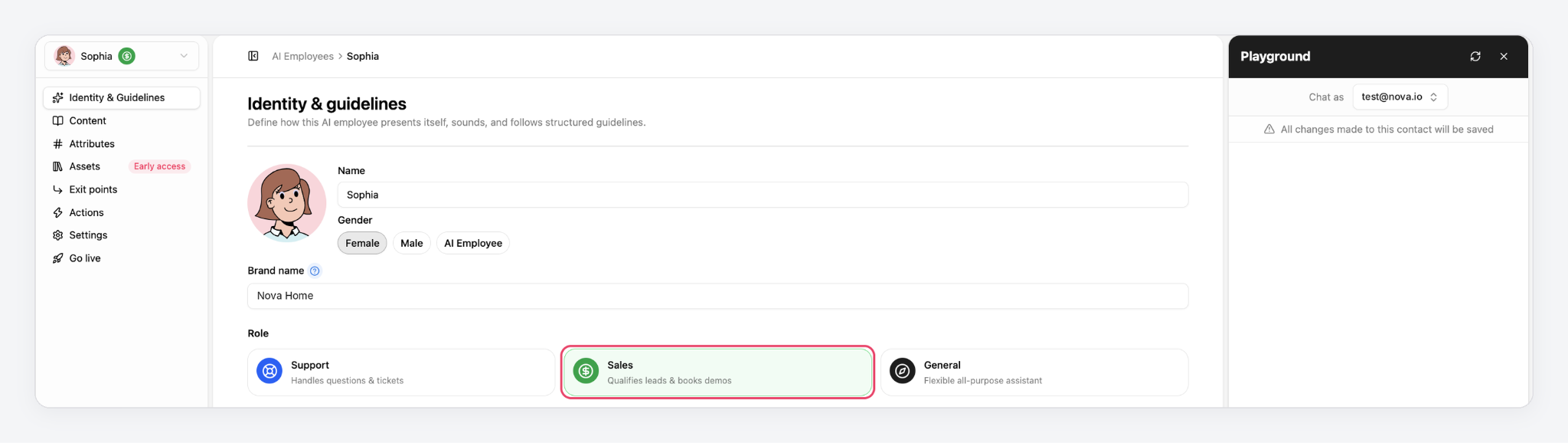
2. Hire your AI Employee. Go to AI Employees and hire your first one. Give it a name, your brand name, and a tone. Then choose the Sales role, which is set up for discovery questions, product fit, and scheduling.
3. Teach it about your business. In the Content tab, add your website, documents, and common questions and answers. This is what lets it answer the visitor’s question first, before it asks anything.
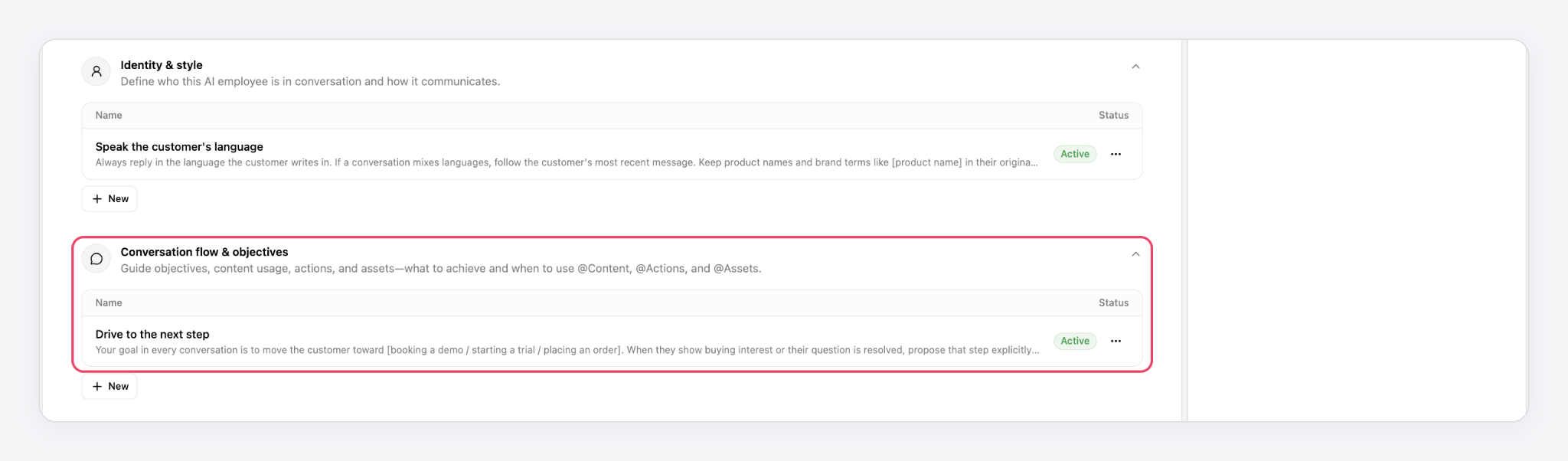
4. Give it your qualifying questions. In Identity & guidelines, open Conversation flow & objectives and start from the Qualify new leads template. Fill in the questions that matter to you, for example:
Before recommending a package, find out one question at a time: what kind of project they need, how many locations or brands it covers, and when they want to start. Skip anything they’ve already told you. If they want to start within two months, offer to book a call with our team.
Two more templates are worth adding. Collect contact details asks for a name, email, or phone number one at a time, without blocking help. Drive to the next step steers the conversation toward booking a demo, starting a trial, or placing an order.
5. Save the answers and decide when your team takes over. In the Attributes tab, pick the contact fields it can update, such as company size, timeline, or budget, so each visitor’s answers are saved to their contact record. Then, in Exit points, set when a conversation goes to a person, for example when a visitor is ready to buy or asks to speak to someone. Your team picks up the full conversation, so nobody asks the visitor the same questions twice.
6. Test it before going live. Open the Playground, choose a test contact, and chat with your AI Employee as if you were a visitor. Try a good lead, a “just browsing” visitor, and someone who isn’t a fit, and adjust your guidelines until each one gets the right next step.
7. Put it to work. Go to Automations and create a new automation. Set the trigger to new incoming messages on your live chat channel, add your AI Employee, select the exit points you want active, and publish. From then on, it answers and qualifies every visitor who starts a chat.
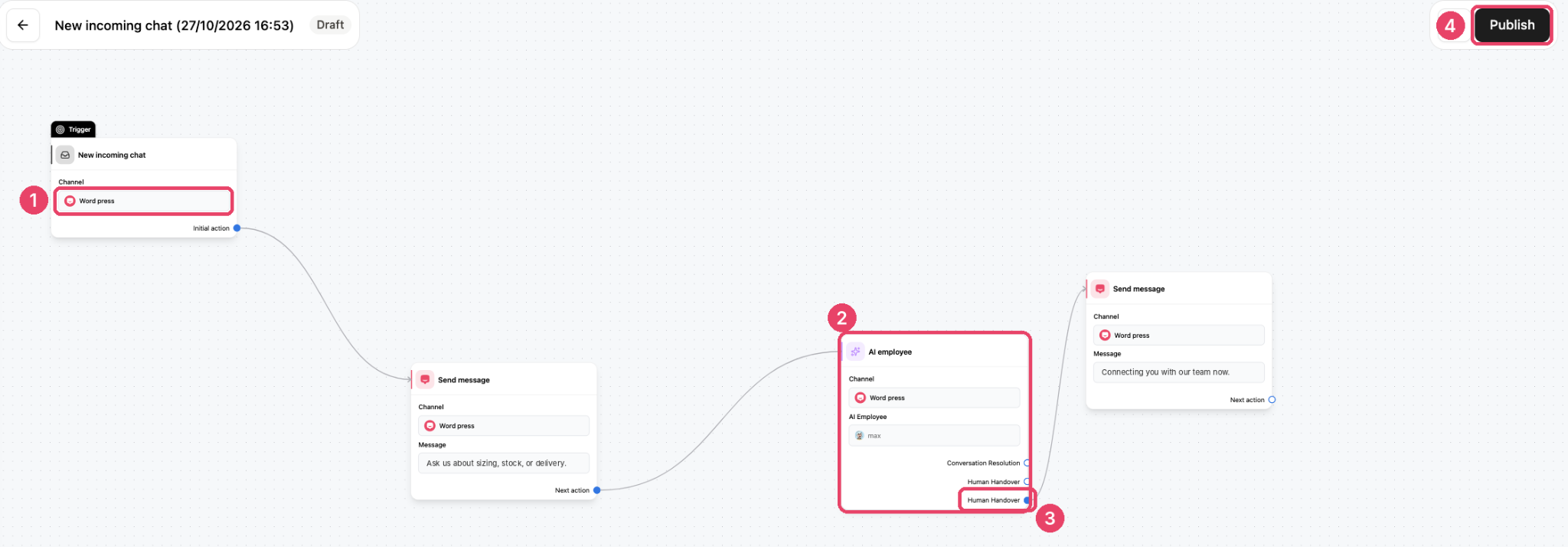
The same AI Employee can also work on WhatsApp, Instagram, Facebook Messenger, and SMS, so leads get the same quick answers wherever they message you first.
FAQs
1. How many questions should I ask to qualify a lead in chat?
Three or four is usually enough. Ask only what you need to decide the next step, and skip anything the visitor has already told you.
2. Should I qualify before or after answering the visitor’s question?
After. Answer their question first, then ask your qualifying questions as natural follow-ups. People share more once they’ve been helped.
3. Can a chatbot qualify leads, or do I need a person?
An AI chatbot or AI Employee can ask qualifying questions, save the answers, and offer a next step at any time of day. A person is still best for complex deals or when a visitor asks to speak to someone, so set up a clear handoff.
4. What’s the difference between lead generation and lead qualification?
Lead generation is getting a visitor’s contact details. Lead qualification is finding out whether they’re likely to buy, so your team knows who to focus on first.
5. What should I do with leads who aren’t ready to buy yet?
Get their contact details, send them something useful for where they are, and follow up closer to the timeline they mentioned.
6. How do I know if live chat is generating good leads?
Track how many chats become qualified leads, and how many of those turn into customers. The number of chats on its own doesn’t tell you much.
Turn more chats into the right conversations
Live chat brings you more conversations. Qualifying makes sure your team spends its time on the right ones. Decide what a good lead looks like, answer first, ask a few questions one at a time, and give every visitor a next step that fits where they are.
If you’d like that to happen on every chat, including the ones that arrive while your team is busy, try Heyy free for 7 days. Our AI Employee answers your visitors, asks your qualifying questions, and hands the best leads to your sales team with the whole conversation attached.
More blog posts to read

Ready to Automate Support
Across Every Channel?

