.svg)
What is Customer Service Automation And How To Set It Up

I'm going to be honest with you about something most customer service automation vendors won't say: automation alone doesn't solve your support problems.
I consulted for a mid-market SaaS company last year that spent $45,000 on a customer service automation platform. They deployed chatbots, automated ticketing, knowledge base integration, the works.
Six months later, their support costs hadn't dropped. Customer satisfaction actually decreased from 4.2 to 3.7.
What went wrong?
They automated bad processes. Their knowledge base was outdated. Their escalation paths were broken. Their agents weren't trained on the new system. They tried to automate everything instead of starting with high-impact, low-complexity tasks.
The automation amplified their existing problems at scale.
Here's the truth: customer service automation in 2026 is genuinely transformative when implemented correctly. Companies report 30-60% cost reductions, 50% faster resolution times, and CSAT improvements of 15-25%.
But getting there requires understanding what customer service automation actually is, which processes to automate (and which not to), how to choose the right tools, and most importantly, how to implement without destroying your customer experience.
This guide covers everything: definitions, technology components, step-by-step implementation, tool comparisons, cost breakdowns, and the decision framework that separates successful automation from expensive failures.
What Is Customer Service Automation?
In short, customer service automation is the strategic use of technology, like AI and self-service tools, to handle customer questions and tasks without needing a person.
The Breakdown
- The Tools: AI chatbots, automated workflows, and online help portals.
- The Goal: Faster support and fewer manual tasks.
- The Result: Solving customer issues automatically.
The key word is "strategic."
Customer service automation is about using technology to handle repetitive, high-volume tasks so human agents can focus on complex issues requiring judgment, empathy, and creativity.
What customer service automation handles:
- Tier-1 support: FAQs, password resets, order tracking, account information lookups, basic troubleshooting
- Workflow orchestration: Routing tickets to the right team, escalating based on priority, triggering follow-ups
- Self-service: Help centers, knowledge bases, community forums where customers solve problems independently
- Proactive support: Sending shipping delay notifications, payment failure alerts, renewal reminders before customers ask
- Agent assistance: Surfacing relevant knowledge articles, drafting responses, summarizing conversations
What it doesn't replace:
- Difficult troubleshooting requiring back-and-forth diagnosis
- Angry or frustrated customers needing emotional de-escalation
- Sales conversations requiring persuasion and relationship-building
- Edge cases and exceptions outside documented processes
Think of it like this: Automation handles the "known knowns" questions with documented answers and processes with clear steps. People handle the "unknown unknowns" and situations requiring nuance.
How Customer Service Automation Works
Understanding the components helps you evaluate platforms and plan implementation.
1. AI Chatbots and Virtual Assistants
What they do: Converse with customers in natural language, understand intent, retrieve answers from knowledge bases, and execute simple actions.
Technology: Built on large language models (LLMs) like GPT-4, Claude, or Gemini combined with natural language processing (NLP) to understand variations in phrasing.
Example:
- Customer: "Where's my package?"
- Bot: "Let me check. What's your order number?"
- Customer: "12345"
- Bot: Queries order management system "Your order shipped yesterday via FedEx. Tracking: [link]. Expected delivery: Thursday."
Modern capabilities:
- Understand context across multi-turn conversations
- Pull real-time data from integrated systems
- Escalate gracefully when confidence is low
- Support 50+ languages with real-time translation
Best platforms: Intercom Fin, Zendesk AI, Heyy.io, Tidio, ChatGPT-based solutions
2. Automated Ticketing and Workflow Engines
What they do: Automatically categorize incoming requests, route to appropriate teams, apply SLAs, and trigger workflows.
How it works:
Incoming ticket: "My credit card payment failed but I got charged"
Automated workflow:
- Categorization: AI reads ticket, tags as "Billing → Payment Issue"
- Priority: Detects "charged" keyword, sets priority: High
- Routing: Routes to Billing team based on category
- Data enrichment: Pulls customer account, recent transactions from CRM
- SLA applied: High priority = 4-hour response time
- Agent notification: Assigned agent gets ticket with full context
- Follow-up automation: If unresolved in 24 hours, escalate to manager
Benefits:
- Eliminates manual sorting
- Ensures tickets land with right specialist
- Reduces response time from hours to minutes
- Maintains SLA compliance automatically
Best platforms: Zendesk, Freshdesk, Help Scout, ServiceNow
3. Self-Service Portals and Knowledge Bases
What they do: Provide searchable help centers where customers find answers without contacting support.
Effective knowledge bases include:
- Comprehensive FAQ sections
- Step-by-step tutorials with screenshots/videos
- Troubleshooting guides
- Community forums
- AI-powered search that understands intent
Example: Customer searches: "can't log in"
Knowledge base AI:
- Shows articles on password reset, browser cache clearing, MFA troubleshooting
- Suggests related: account recovery, supported browsers
- Tracks: "46 people found this helpful"
Cost impact: Self-service resolution costs $0.50-2.37 per issue vs $2.70-5.60 for agent-assisted support (Lorikeet).
Deflection rates: Good knowledge bases deflect 30-50% of potential support contacts.
Best platforms: Zendesk Guide, Help Scout Docs, Notion, Document360
4. Proactive Outreach and Notifications
What it does: Messages customers before they have problems or questions.
Common proactive automation:
Payment failure prevention:
- Credit card expires in 7 days → Email + SMS reminder
- Payment fails → Immediate notification with update link
- After 24 hours, no update → Second reminder
- After 48 hours → Pause service warning
Shipping updates:
- Order confirmed → "Your order is being prepared"
- Shipped → Tracking link + estimated delivery
- Carrier delay detected → "Your delivery is delayed 1 day due to weather"
- Delivered → "Package delivered! Enjoy. Any issues? Reply here."
Usage monitoring:
- Approaching plan limits → "You've used 80% of API quota. Upgrade?"
- Subscription renewal → "Your annual plan renews in 7 days for $299"
Impact: SaaS company reduced involuntary churn by 18% with proactive payment reminders (see Cost Reduction guide).
Best platforms: Customer.io, Braze, Klaviyo for automated messaging; integrates with support platforms
5. Agent-Assist Tools (AI Co-Pilots)
What they do: Help human agents during live conversations by suggesting responses, surfacing knowledge articles, and automating note-taking.
During a customer conversation:
Agent receives ticket: "Product not working after update"
AI co-pilot:
- Suggests relevant KB articles: "Troubleshooting v2.5 Update Issues"
- Drafts response: "I'm sorry you're experiencing issues. Let's try these steps: [1, 2, 3]"
- Provides conversation summary: "Customer updated to v2.5, experiencing crash on launch, OS: Windows 11"
- Recommends next action: "If steps don't work, escalate to Engineering"
After conversation:
- Automatically logs notes to CRM
- Suggests follow-up tasks
- Updates ticket status
Productivity gain: Support teams using AI co-pilots handle 30% more tickets per day without quality decline (see Enterprise Chatbots guide).
Best platforms: Zendesk AI, Salesforce Einstein, Intercom, Microsoft Copilot for Service
6. Omnichannel Integration Platform
What it does: Unifies customer conversations from email, chat, phone, social media, WhatsApp, SMS into one system.
Why this matters:
Without unification:
- Customer emails Monday
- Follows up on Instagram Wednesday
- Calls Friday
- Three different agents, each starting from scratch
With omnichannel platform:
- All three interactions in one timeline
- Agent sees complete history
- No repeated questions
- Seamless handoffs between channels
Best platforms: Heyy.io (messaging-focused), Zendesk, Freshdesk, Front, RingCentral
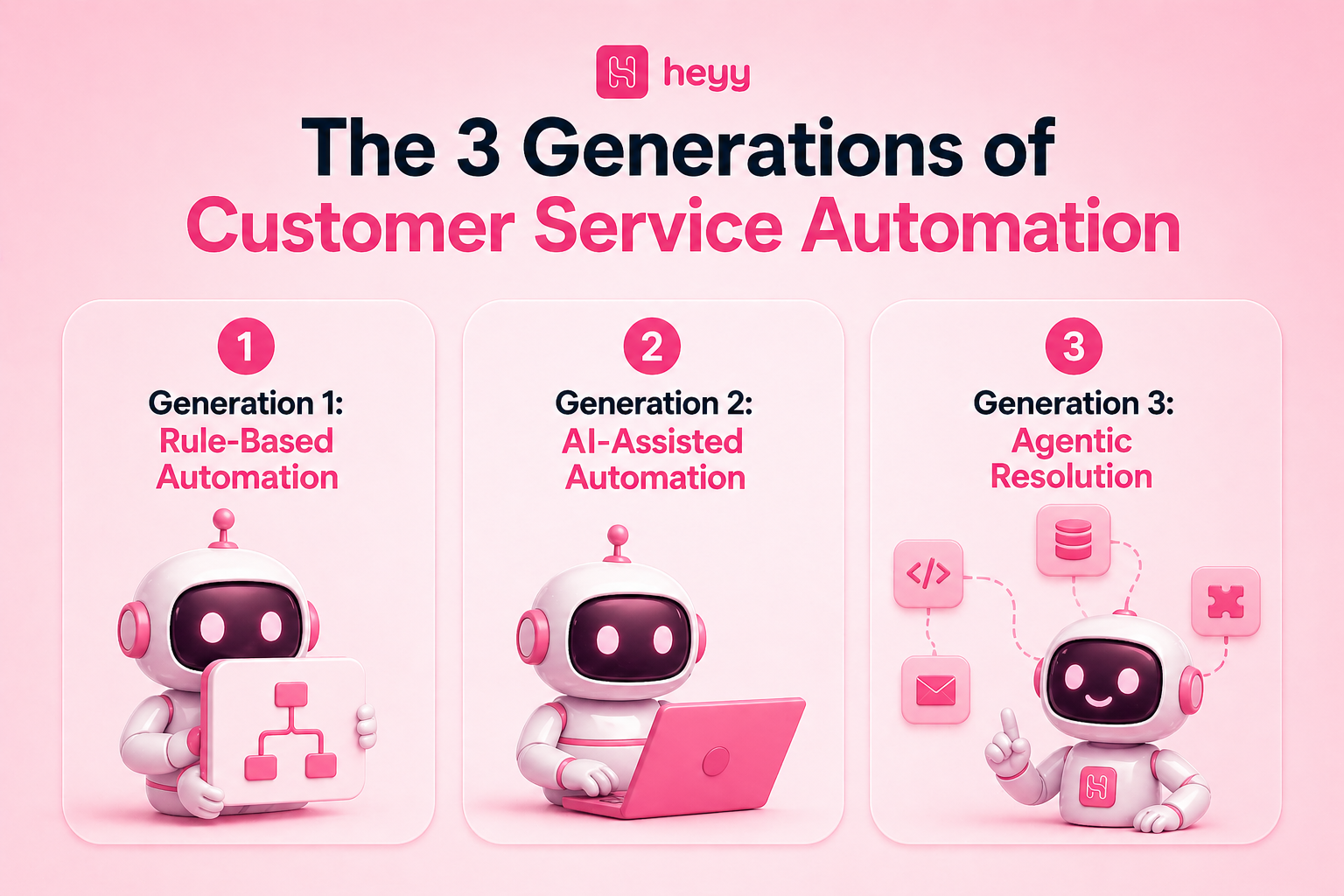
The 3 Generations of Customer Service Automation
Understanding where the technology is helps set realistic expectations.
Generation 1: Rule-Based Automation (2010-2020)
Technology: Decision trees, keyword matching, if-then logic
Example:
- User types "refund"
- Bot matches keyword → Sends canned response about refund policy
- Doesn't understand variations ("money back", "return my purchase")
Limitations:
- Rigid, breaks with unexpected phrasing
- No learning capability
- Frustrating user experience
Verdict: Outdated for customer-facing automation in 2026. Still useful for internal workflows with predictable inputs.
Generation 2: AI-Assisted Automation (2020-2024)
Technology: NLP, machine learning, co-pilot tools
Capabilities:
- Understands intent, not just keywords
- Suggests responses to agents
- Summarizes conversations
- Routes tickets intelligently
Limitation: Still requires human in the loop to execute actions
Example:
- Customer: "Payment didn't work"
- AI drafts response for agent
- Agent reviews, edits, sends
- Agent manually updates payment method
Verdict: Good middle ground. Increases agent productivity without full autonomy.
Generation 3: Agentic Resolution (2024-2026)
Technology: Large language models, agentic AI, API orchestration
Capabilities:
- Reads, reasons, and acts autonomously
- Connects to multiple systems
- Resolves issues end-to-end without human intervention
Example: Customer: "Payment failed but I got charged anyway"
Agentic AI:
- Reads complaint, understands: double-charge issue
- Queries payment gateway, confirms failed transaction
- Checks Jira for known checkout bugs
- Creates high-priority engineering ticket with error logs
- Emails customer: "We found the issue. Duplicate charge will be refunded within 3-5 business days. We've escalated to engineering."
No person touched the ticket.
Verdict: This is where the industry is heading. Platforms like DevRev, Intercom Fin, and enterprise solutions are implementing agentic capabilities.
7 Customer Service Processes You Should Automate (And 3 You Shouldn't)
Automate These
1. Order and Shipment Tracking
Why: High volume, zero complexity, customers just want tracking links.
Automation: Chatbot asks for order number or email, pulls tracking from e-commerce platform, provides status + delivery estimate.
Impact: 85-95% automation rate. E-commerce brands report this as #1 ROI automation.
2. Password Resets and Account Access
Why: Completely procedural. Verify identity, send reset link, done.
Automation: Bot verifies via email/phone, triggers password reset API, sends secure link.
Impact: SaaS companies handling 200 password resets/month save 20 hours/month of agent time.
3. FAQ and Policy Questions
Why: Same questions asked repeatedly. Documented answers exist.
Examples: Return policy, shipping costs, business hours, product availability, subscription cancellation process
Automation: Knowledge base + chatbot retrieves and presents answers.
Impact: 60-70% of support volume is answerable with existing documentation (see Use Cases guide).
4. Appointment Scheduling and Rescheduling
Why: Calendar integration makes this fully automatable.
Automation: Bot shows available slots, books appointment, sends confirmation, allows rescheduling.
Impact: Service businesses handling 200 bookings/month save 15 hours/month on phone scheduling.
5. Basic Troubleshooting
Why: Many technical issues resolve with simple steps (restart device, clear cache, update software).
Automation: Bot walks through level-1 troubleshooting flowchart.
Success rate: SaaS company's bot resolved 62% of "app not working" tickets with automated troubleshooting.
6. Returns and Exchanges
Why: Clear rules (30-day window, original packaging, etc.). Process is repeatable.
Automation: Bot verifies eligibility, generates return label, offers exchange as alternative.
Impact: Apparel retailer automated 78% of return requests. Offering exchanges first saved 31% of returns.
7. Subscription and Account Changes
Why: Plan upgrades, downgrades, cancellations follow defined workflows.
Automation: Bot processes change, applies prorated billing, confirms.
Retention tactic: SaaS bot offers 50% discount before processing cancellation, 28% accept instead of canceling.
Don't Automate These
1. Angry or Frustrated Customers
Why: Requires empathy, de-escalation, and judgment.
Example: Customer furious about delayed delivery threatening to leave negative review.
Solution: Immediate human escalation. Bot can detect frustration (keywords, caps lock, exclamation points) and route to senior agent.
2. Complex Multi-Step Troubleshooting
Why: Diagnosis requires back-and-forth, contextual understanding, and domain expertise.
Example: "Feature worked yesterday, broken today, only on certain accounts, error message unclear."
Solution: Human agent with technical knowledge. Automation can gather initial info but shouldn't attempt resolution.
3. Sales Conversations Requiring Persuasion
Why: Consultative sales needs relationship-building, objection handling, custom solutions.
Example: Enterprise buyer evaluating your product vs competitors, needs ROI justification, has specific integration requirements.
Solution: Human sales team. Automation can qualify leads and schedule demos but shouldn't try to close deals.
Step-by-Step: How to Implement Customer Service Automation
Phase 1: Audit Current State (Week 1-2)
Step 1: Analyze support volume by category
Pull last 3 months of tickets. Categorize by type:
- Order tracking: 18%
- Password resets: 12%
- Product questions: 15%
- Returns: 10%
- Billing: 8%
- Technical support: 22%
- Complaints: 7%
- Other: 8%
Step 2: Calculate cost per ticket
Formula: (Total support spend ÷ Total tickets resolved)
Example:
- 5 agents × $4,000/month salary = $20,000
- Handling 2,000 tickets/month
- Cost per ticket: $10
Step 3: Identify automation candidates
Look for:
- High volume (100+ per month)
- Low complexity (documented answer or clear process)
- High repetition (same question asked many times)
From example above, prioritize:
- Order tracking (18%, 360 tickets/month)
- Password resets (12%, 240 tickets/month)
- Product questions (15%, 300 tickets/month)
These three categories = 900 tickets/month = 45% of total volume
Phase 2: Define Success Metrics (Week 2)
Set specific, measurable goals:
Volume metrics:
- Target automation rate: 60% of tickets in chosen categories
- Expected ticket reduction: 540 tickets/month
Cost metrics:
- Current cost: 900 tickets × $10 = $9,000/month
- Target cost: 360 tickets × $10 (humans) + 540 × $1 (automation) = $4,140/month
- Target savings: $4,860/month
Quality metrics:
- Maintain CSAT: Current 4.1/5, target: 4.0/5+ (don't drop below)
- Resolution accuracy: 85%+ for automated tickets
Timeline:
- Month 1: 30% automation
- Month 3: 50% automation
- Month 6: 60% automation
Phase 3: Choose Your Tools (Week 3-5)
For most small to mid-sized businesses, you need:
1. Omnichannel platform (unified inbox)
- Heyy.io: $49-299/month (WhatsApp, Instagram, web chat, AI chatbot)
- Zendesk: $55-115/agent/month (full helpdesk)
- Freshdesk: $15-79/agent/month (budget-friendly)
2. Knowledge base
- Included with most helpdesk platforms
- Standalone: Notion, Document360
3. AI chatbot (if not included)
- Many platforms include basic bots
- Advanced: Intercom Fin, ChatGPT API integrations
Decision factors:
- Current tools: If using Zendesk, stay in ecosystem
- Channels: If WhatsApp/Instagram heavy, choose Heyy.io
- Budget: Freshdesk for cost-conscious
- Team size: Front for 10-50 agents needing collaboration
Run trials: Test top 2-3 platforms with real data before committing.
Phase 4: Build Knowledge Base (Week 6-8)
This is the foundation. Don't skip.
Step 1: Document top 30 support issues
For each issue, write:
- Clear question title (how customers actually ask it)
- Step-by-step answer with screenshots
- Common variations and edge cases
- Links to related articles
Example article structure:
Title: How to Track Your Order
Intro: Once your order ships, you'll receive an email with tracking information.
Steps:
- Check email for "Your Order Has Shipped" subject line
- Click the tracking link, or...
- Visit [website]/track and enter order number
- Tracking updates every 24 hours
Common issues:
- Tracking link not working? [solution]
- No tracking email? [solution]
Step 2: Optimize for search
- Use customer language, not internal jargon
- Include common misspellings as keywords
- Add descriptive meta descriptions
Step 3: Test with real customers
- Ask 5-10 customers to find answers in knowledge base
- Identify gaps and confusing articles
- Refine based on feedback
ROI: Companies with comprehensive knowledge bases deflect 30-50% of support contacts.
Phase 5: Configure Chatbot (Week 9-10)
Step 1: Upload knowledge base
Most platforms auto-train chatbots on help center articles. Upload your knowledge base content.
Step 2: Define conversation flows
For each automated use case, map the flow:
Example: Order Tracking
- Bot: "What can I help you with?"
- Customer: "Where's my order?"
- Bot: "I can help! What's your order number or email?"
- Customer: "john@email.com"
- Bot: Queries e-commerce platform
- Bot: "Found it! Order #12345 shipped yesterday via FedEx. [Tracking link]. Expected delivery: Thursday. Anything else?"
Step 3: Set escalation rules
Define when to escalate to people:
- Confidence threshold: If bot is <80% confident, escalate
- Frustration detection: Keywords like "frustrated," "terrible," "cancel"
- Request for human: Customer explicitly asks to talk to person
- Failed attempts: After 2-3 back-and-forth exchanges without resolution
Step 4: Configure integrations
Connect chatbot to:
- Order management system (Shopify, WooCommerce)
- CRM (Salesforce, HubSpot)
- Helpdesk (Zendesk, Freshdesk)
- Calendar (for appointment scheduling)
Phase 6: Test Thoroughly (Week 11-12)
Internal testing:
- Entire support team tests chatbot
- Try happy paths (normal questions)
- Try edge cases (weird phrasing, typos, complex scenarios)
- Document failures
Accuracy testing:
Create test set of 50 known questions:
- Bot should answer 40+ correctly (80%+)
- If below, retrain on failures
Load testing:
Simulate peak volume:
- Can system handle 100 simultaneous chats?
- Response time under load?
Fix the issues before launch.
Phase 7: Soft Launch (Week 13-14)
Don't launch to everyone at once.
Phase A: 10% of traffic
- Monitor closely first 48 hours
- Review all bot conversations
- Fix critical issues immediately
Phase B: 25% of traffic
- Week 2, expand if performance good
- Continue monitoring
Phase C: 50% of traffic
- Week 3-4
Phase D: 100% rollout
- Week 5-6 once confident
Announce to customers: "We've launched AI-powered support for faster answers! You'll now see instant responses to common questions, with the team’s support always available if needed."
Phase 8: Monitor and Optimize (Ongoing)
Weekly reviews:
- Automation rate: What % of target categories fully automated?
- Escalation rate: What % required human help?
- CSAT: Are customers satisfied with automated responses?
- Failed interactions: Which questions did bot struggle with?
Monthly optimization:
- Retrain bot on failed conversations
- Add new knowledge base articles for common questions
- Expand to new use cases once current ones performing well
Quarterly expansion:
- Started with 3 use cases (order tracking, password reset, FAQs)
- Quarter 2: Add returns, product info
- Quarter 3: Add appointment scheduling
- Quarter 4: Add proactive notifications
Continuous improvement mindset.
Customer Service Automation Tools: Top 10 Compared
1. Heyy.io
Heyy.io is generally best for businesses that handle most of their customer conversations through messaging channels: WhatsApp, Instagram, Facebook, and web chat, rather than traditional email ticketing. It's a natural fit for e-commerce brands and social-first businesses that need a unified inbox across all those channels without managing separate tools for each one.
The built-in AI chatbot trains on your own data, so it's answering questions in your voice from day one, and the Shopify and WooCommerce integrations mean order tracking and product queries get resolved automatically without any manual lookup. For small to mid-market teams that want serious automation without enterprise complexity or pricing, it sits in a practical sweet spot.
Key features: Unified inbox across all messaging channels, AI chatbot trained on your data, Shopify/WooCommerce integrations, team collaboration tools, multi-language support
Automation capabilities: Order tracking, FAQs, product recommendations, appointment scheduling
Pricing: $49–499/month
2. Zendesk

Zendesk is best for mid-market to enterprise companies that need a full helpdesk suite and have the team size and complexity to justify it. If you're managing support across email, chat, phone, social, and messaging simultaneously and need granular reporting, SLA management, and over a thousand integrations, Zendesk is built for exactly that operational scale. The AI-powered Answer Bot handles tier-1 deflection while the workflow automation takes care of routing, categorization, and escalation behind the scenes. It's a significant investment per agent, but for organizations where support is a core business function rather than a side operation, the depth of the platform pays for itself.
Key features: Full omnichannel support, AI-powered Answer Bot, advanced workflow automation, comprehensive reporting, 1,000+ integrations.
Automation capabilities: Ticket routing and categorization, knowledge base + AI search, agent assist tools, voice IVR automation
Pricing: $55–115/agent/month
3. Intercom
Intercom is recommended mostly for SaaS companies that support customers inside the product itself, not just through external channels. Its Fin AI Agent goes further than most chatbots, it handles tier-1 support autonomously end-to-end, not just suggesting answers but actually resolving conversations without a teammate in the loop.
The in-app messenger, proactive messaging, and product tours make it as much a customer success tool as a support tool, which is why it resonates with product-led growth companies. The pricing model is worth understanding upfront: you pay per seat plus $0.99 per AI-resolved conversation, so costs scale with volume rather than staying flat.
Key features: Fin AI Agent (autonomous resolution), in-app messenger, proactive messaging, product tours, help center
Automation capabilities: Fin handles tier-1 support autonomously, Answer Bot for instant responses, workflow automation, chatbot builder
Pricing: $39/seat/month + $0.99 per AI-resolved conversation
4. Freshdesk

Freshdesk is generally best for cost-conscious teams that want a full feature set without the enterprise price tag. It covers omnichannel ticketing, an AI chatbot through Freddy AI, knowledge base, team collaboration, and a healthy marketplace of integrations, all at a price point that makes it accessible to startups and growing businesses.
It's not as deep as Zendesk on reporting or customization, but for most small to mid-sized support operations, that depth isn't necessary. The free tier is genuinely functional, which makes it a low-risk starting point if you're building out automation for the first time.
Key features: Omnichannel ticketing, Freddy AI automation, knowledge base, team collaboration, marketplace integrations
Automation capabilities: AI chatbot, ticket routing, canned responses, SLA management
Pricing: Free tier available; paid from $15–79/agent/month
5. Help Scout
Help Scout is generally best for teams where email is the primary support channel and maintaining a personal, human tone in every interaction is a priority. It's built around a shared inbox that keeps conversations feeling like individual emails rather than support tickets, which works well for customer-focused brands that don't want their support to feel like it's coming from a faceless system.
The AI drafts and suggestions speed up agent response without taking over the conversation, and the flat pricing model, based on contacts rather than seats, makes it more predictable and often cheaper for larger teams. It's a considered choice, not a feature-maximalist one.
Key features: Shared inbox, knowledge base, AI features on all plans, customer profiles, collision detection
Automation capabilities: AI drafts and suggestions, workflows and automation, auto-replies, saved replies
Pricing: $50/month for 100 contacts (unlimited users)
6. Tidio

Tidio is majorly created for small e-commerce businesses running on Shopify or WooCommerce that want live chat and chatbot automation without the overhead of a full helpdesk platform.
Its Lyro AI handles common customer questions, cart abandonment triggers, and order status lookups in a way that's straightforward to set up and doesn't require a dedicated ops team to maintain.
The email marketing features mean you can handle both support and basic retention in one tool, which reduces the number of platforms a small team needs to manage. For stores doing moderate volume that aren't ready for a platform like Zendesk, it's a solid entry point.
Key features: Live chat + chatbot, Lyro AI, email marketing, visitor tracking, Shopify integration
Automation capabilities: AI chatbot (Lyro), cart abandonment automation, product recommendations, order status bot
Pricing: Free tier; paid from $29–59/month
7. Salesforce Service Cloud
Salesforce Service Cloud is generally best for large enterprises that are already running Salesforce CRM and need their support operations to be deeply integrated with sales, marketing, and customer data.
The Einstein AI layer handles case classification, next-best-action recommendations, and bot interactions in a way that pulls on everything Salesforce already knows about the customer, their purchase history, account status, open opportunities. That level of data integration is hard to replicate with a standalone support tool.
The pricing reflects the enterprise positioning, so it's not a practical choice for businesses not already in the Salesforce ecosystem, but for those that are, consolidating support inside it makes operational sense.
Key features: Einstein AI, omnichannel routing, case management, field service, deep CRM integration
Automation capabilities: Einstein Bots, AI case classification, next-best-action recommendations, workflow automation
Pricing: $75–300+/user/month
8. RingCentral
RingCentral is considered best for contact centers and enterprises where phone support is still a major channel alongside digital. Its AI-powered IVR and virtual agents handle call deflection and intelligent routing before a customer ever reaches a live agent, which reduces call volume significantly for businesses that still receive high inbound call loads.
The real-time agent coaching feature is particularly useful for larger teams, it surfaces information and suggested responses during live calls rather than after, which shortens handle time and reduces training ramp.
If your support operation is primarily digital, there are better-suited tools; if the phone is central to your customer experience, RingCentral has depth that most helpdesk platforms don't match.
Key features: AI-powered IVR, virtual agents, omnichannel contact center, call deflection, CRM integrations
Automation capabilities: Voice AI for phone support, intelligent routing, automatic callback, real-time agent coaching
Pricing: Custom enterprise pricing
9. Front
Front is generally best for B2B support and customer success teams where multiple people collaborate on the same customer relationship. Rather than treating every incoming message as an isolated ticket, Front keeps conversations in a shared inbox where teammates can leave internal comments, co-draft responses, and hand off threads without the customer ever seeing the coordination happening behind the scenes.
The rules engine handles routing and auto-assignment, and integrations with CRMs and automation tools mean it fits into a broader workflow without requiring a platform overhaul. For teams of 10–50 people managing relationship-heavy accounts, it's a more natural fit than a traditional ticketing system.
Key features: Shared inbox (email, chat, SMS, social), internal comments, shared drafts, analytics, workflow automation
Automation capabilities: Rules engine for routing, auto-assignment, canned responses, integrations with automation tools
Pricing: $25–105/seat/month
10. Crisp

Crisp is generally best for early-stage startups and small teams that need live chat, a basic chatbot, and a knowledge base without committing to a monthly bill before they've figured out their support volume.
The no-code chatbot builder makes it accessible without technical resources, and the free tier covers the fundamentals, shared inbox, live chat, basic automation, well enough to get started.
It's not a tool you'll scale into a 50-person support operation on, but for a team of two or three handling a few hundred conversations a month, it removes the barrier to having professional-looking customer support from day one.
Key features: Shared inbox, live chat, chatbot builder, knowledge base, CRM features
Automation capabilities: No-code chatbot builder, triggers and scenarios, auto-replies, visitor tracking
Pricing: Free tier; paid from $25/month per workspace
ROI Calculator: Customer Service Automation
Scenario: 5-person support team, 2,000 tickets/month
Before Automation
- Agent cost: 5 agents × $4,000/month = $20,000
- Tickets handled: 2,000/month
- Cost per ticket: $10
- CSAT: 4.0/5
After Automation (Realistic Scenario)
Automation targets:
- Order tracking: 300 tickets/month → 90% automated = 270 tickets
- Password resets: 200 tickets/month → 95% automated = 190 tickets
- FAQs: 400 tickets/month → 70% automated = 280 tickets
- Total automated: 740 tickets/month
New costs:
- Human-handled tickets: 1,260 × $10 = $12,600
- Bot-handled tickets: 740 × $1 = $740
- Platform cost: $200/month
- Total monthly cost: $13,540
Savings: $20,000 - $13,540 = $6,460/month ($77,520/year)
Additional benefits:
- 24/7 support availability
- Faster response times (seconds vs minutes)
- Agents focus on complex issues
- CSAT maintained or improved
Payback period: If implementation costs $10,000, payback in 1.5 months
Common Customer Service Automation Mistakes
Mistake 1: Automating Before Documenting
Problem: Deploying chatbot without comprehensive knowledge base. Bot has nothing to reference.
Result: 30-40% accuracy. Customers frustrated.
Fix: Spend 4-6 weeks building thorough knowledge base before launching automation.
Mistake 2: No Human Escalation Path
Problem: Bot can't help, conversation just ends or loops.
Result: Customers stuck, CSAT plummets.
Fix: Design graceful handoffs. "Let me connect you to someone who can help." Include conversation history in handoff.
Mistake 3: Trying to Automate Everything
Problem: Automating complex issues requiring judgment.
Result: Poor customer experience, low automation rates.
Fix: Start with 3-5 simple, high-volume use cases. Master those before expanding.
Mistake 4: Ignoring Analytics
Problem: Deploy and forget. Don't review what's working and what's failing.
Result: Missed optimization opportunities. Waste of investment.
Fix: Weekly reviews of automation rate, CSAT, failed conversations. Monthly retraining.
Mistake 5: Poor Change Management
Problem: Roll out automation without training team or informing customers.
Result: Low adoption, resistance from agents.
Fix: Train support team on new tools. Announce to customers. Gather feedback.
FAQs
Q: What is customer service automation?
A: Customer service automation uses AI chatbots, workflow engines, self-service portals, and integration platforms to handle customer inquiries with minimal human intervention. It automates repetitive tasks like order tracking, password resets, and FAQs so human agents can focus on complex issues.
Q: How much does customer service automation cost?
A: Entry-level platforms: $50-200/month (Tidio, Crisp). Mid-market: $500-2,000/month (Heyy.io, Freshdesk, Help Scout). Enterprise: $5,000-50,000+/month (Zendesk, Salesforce, RingCentral). Most businesses see ROI within 2-4 months.
Q: What percentage of support can be automated?
A: Well-implemented automation handles 50-70% of tier-1 support inquiries. Poor implementations see 20-30%. The difference comes from use case selection, knowledge base quality, and proper escalation paths.
Q: Will automation replace customer service agents?
A: No. Automation handles repetitive, high-volume tasks. Humans handle complex issues, angry customers, sales conversations, and edge cases. Most companies maintain headcount while increasing capacity and improving agent satisfaction.
Q: How long does implementation take?
A: Simple chatbot deployment: 2-4 weeks. Comprehensive automation (knowledge base, workflows, integrations): 8-12 weeks. Enterprise implementations: 3-6 months. Most ROI visible within first month of go-live.
Q: What's the difference between chatbots and customer service automation?
A: Chatbots are one component of customer service automation. Full automation includes chatbots, automated ticketing and routing, self-service portals, proactive notifications, agent-assist tools, and workflow orchestration. Chatbots alone aren't enough.
Q: How do I measure ROI of customer service automation?
A: Track: (1) Automation rate (% of tickets handled without humans), (2) Cost per ticket before vs after, (3) Agent time savings, (4) CSAT maintenance or improvement, (5) Ticket volume reduction. Calculate monthly savings minus platform costs.
In Conclusion…
- Start with 3-5 high-volume, low-complexity use cases
- Build comprehensive knowledge base before automation
- Design clear escalation paths to humans
- Monitor weekly and optimize monthly
- Expand gradually based on performance
Platform choice matters less than implementation quality. Heyy.io, Zendesk, Intercom, Freshdesk, they all work. Choose based on existing tools, channels, budget, and team size.
ROI is real when done right. Automation rates of 50-70%, cost reductions of 30-60%, faster response times, 24/7 availability, and higher agent satisfaction are achievable.
For businesses handling 500+ support inquiries monthly, customer service automation isn't optional in 2026. It's how you stay competitive.
The question isn't whether to implement automation. It's how to implement it successfully.
Ready to automate customer service across WhatsApp, Instagram, and web chat?
Try Heyy.io, a unified messaging platform with built-in AI automation, deep integrations, and team collaboration for free.
More blog posts to read

Ready to Automate Support
Across Every Channel?
.svg)
.avif)