.svg)
WhatsApp for Sales: How to Qualify and Close Leads in Chat

A lead taps your ad and messages you on WhatsApp: "Hi, how much is this?"
Three hours later, your team replies with the price. By then, the lead has asked two competitors, and one of them replied in two minutes, asked what they needed, and sent a link to book.
That's how most WhatsApp sales are lost. The product is fine, but WhatsApp is being run like a support inbox: wait for a question, answer it, move on. The businesses that sell well run it like a sales conversation. They reply fast, ask the right questions, and always offer a next step.
In 2026, that matters more. Businesses can now advertise inside WhatsApp, AI can qualify leads at any hour, and every message a business sends now costs money.
This guide walks you through a step-by-step sales process, covering where leads come from, what to ask, how to follow up within WhatsApp's rules, and where AI fits.
Why WhatsApp works for sales
WhatsApp has a few advantages over most sales channels.
It's a conversation, not a form. On a contact form, people fill in the fields you chose. On WhatsApp, they ask the question that's holding them back from buying: "Will it fit in a small kitchen?" "Can I pay in two instalments?" Answer that, and you're much closer to a sale.
The whole sale happens in one thread. People check WhatsApp all day, so a reply within minutes feels natural and keeps the conversation moving. You can send photos, brochures, voice notes, price lists, and links in the same chat. And once they've bought, that chat becomes the place for order updates, support, and their next purchase.
Where your WhatsApp leads come from
Before you can qualify a lead, they need a way to reach you. These are the main ways sales conversations start on WhatsApp in 2026.
Click-to-WhatsApp ads. These run on Facebook and Instagram, and tapping one opens a WhatsApp chat with your business. They have a useful bonus: messages sent within 72 hours of a conversation that starts from one of these ads aren't charged for delivery. Our click-to-chat ads guide covers the setup.
Ads in WhatsApp Status (new). Meta has been rolling out ads inside WhatsApp itself. They appear between people's Status updates in the Updates tab, never in personal chats, and tapping one opens a chat with your business.
Your website. A chat widget or WhatsApp button turns website visitors into conversations. See our guide to chat widgets for business websites.
Links and QR codes. Put a WhatsApp link on your packaging, flyers, email signature, and receipts.
Instagram. Many conversations start in Instagram DMs and move to WhatsApp once the lead is serious.
Forms with WhatsApp opt-in. If someone fills in a form and agrees to hear from you on WhatsApp, you can start the conversation with an approved message template.
The WhatsApp sales process, step by step
Every good WhatsApp sale follows roughly the same path. Here’s each stage, with an example from a furniture store selling made-to-order sofas.
1. Reply within minutes
The first few minutes after someone messages you are when they’re most interested. Reply quickly, even if it’s just to acknowledge the question and ask the first one of your own.
Lead: Hi, how much is the Oslo sofa?
You: Hi! The Oslo starts at $1,450 for the 3-seater. Quick question so I can point you to the right option: are you after a 2-seater, 3-seater, or corner sofa?
Notice what this reply does. It answers the question, then asks one of its own. A bare price with nothing after it ends the conversation.
2. Qualify
Qualifying means finding out whether this person is likely to buy, and what they need. In chat, that usually comes down to four things:
- Need: what they’re looking for, and why
- Timeline: when they need it
- Budget: what they’re expecting to spend
- Decision: whether anyone else is involved
Ask one question at a time. Four questions in one message feels like a form, and people skip half of them.
Lead: 3-seater, for a new flat.
You: Lovely. When are you moving in? Made-to-order takes about six weeks, so I want to make sure we can get it there in time.
If you’ll need their email or phone number for a quote or delivery, ask for it here. With usernames rolling out, some customers will message you without sharing their phone number.
3. Recommend and show proof
Once you know what they need, recommend one or two options, not your whole range, and show them. Send a photo, a short video, a fabric swatch guide, or a review from another customer.
You: For a new flat with a six-week window, I’d go for Oslo in our performance fabric. It’s easy to clean and comes in 12 colours. Here’s the colour guide (sends PDF), and a photo from a customer who bought the same one last month (sends image).
4. Handle objections
Most objections in chat are one of three things: price, timing, or “I need to think about it.” Have an honest reply ready for each.
- Price: explain what they get for it, or offer a smaller option. “The 2-seater is $1,150, and the fabric and frame are the same.”
- Timing: be specific. “If you order this week, it’ll arrive by the 14th.”
- “I need to think about it”: make it easy to come back. “No problem at all. Want me to hold your colour choice for a few days?”
5. Close
Make the next step obvious and easy. Depending on what you sell, that might be:
- a payment link sent in the chat
- a booking for a demo, viewing, or appointment
- a quote sent to their email
- a call for high-value or complicated deals
You: Shall I send a payment link for the deposit? Once it’s in, we’ll start building and send you updates here.
Offer the next step clearly, once. If they’re not ready, don’t keep pushing.
6. Follow up
Not everyone buys on the first day and following up is where many WhatsApp sales are won, and where many numbers are blocked. It has its own rules, so we cover it in the next section.
How to follow up without getting blocked
Following up on WhatsApp works differently from email, because WhatsApp has rules about when businesses can message people.
The 24-hour window. When a lead messages you, you can reply freely for 24 hours, and every new message from them resets the clock. Once 24 hours pass without a message from them, you can only reach them with a template message that Meta has approved. A sales follow-up template counts as a marketing message.
Every message costs money. Since October 1, 2026, Meta charges per delivered message, including replies inside the 24-hour window. So each follow-up should add something new, not just ask “any update?”
People can block you. Too many follow-ups, and leads block or report your number. That lowers your quality rating, which can limit how many people you can message.
With that in mind, here’s a sensible pattern for a lead who goes quiet:
- Within the 24-hour window: one gentle nudge that adds value. “I’ve just checked, and we have the grey fabric in stock if you’d like it before the 14th.”
- A few days later, with a template: one more message with a reason to come back, such as a reminder about stock, a delivery date, or an answer to a question they asked.
- Then stop. Leave the door open: “No pressure at all. Just message here whenever you’re ready.”
For the full rules on templates, opt-in, and costs, see our guide to sending automated WhatsApp messages without getting banned. If you want follow-ups to go out at a set time, our guide to scheduling WhatsApp messages covers the options.
Where AI fits in a WhatsApp sales process
The hardest part of WhatsApp sales isn’t knowing what to say, but saying it quickly, every time, including at 11 p.m. on a Sunday.
That’s where AI helps most. When trained on your products and prices can, an AI agent can:
- reply to every new lead within seconds, at any hour
- ask your qualification questions, one at a time
- send the right brochure, price list, or photo
- record what the lead told it
- hand the conversation to a salesperson once the lead is qualified
Your team then spends its time where people make the biggest difference: negotiating, handling complicated deals, and building relationships with your best customers.
Here’s what that handoff looks like:
Lead (10:52 p.m.): Do you do corporate packages for 40 people?
AI Employee: We do! Is this for a one-off event or ongoing training?
Lead: Quarterly training, starting in January.
AI Employee: Great. Roughly what budget are you working with per quarter? And what’s the best email for a proposal?
(The lead answers. The AI Employee tags them as qualified and assigns the chat to the sales team.)
Salesperson (9:05 a.m.): Morning, Daniel! I’ve read through your chat. I’ll send a proposal for 40 people this afternoon. Quick question: is in-person or online better for your team?
The salesperson starts the morning with a qualified lead and the whole conversation in front of them, instead of a “Hi, how much?” from the night before.
What about Meta’s own AI agent?
In June 2026, Meta launched Meta Business Agent, its own AI for answering customers on WhatsApp and Messenger. It’s free to get started, and for a small business handling everything from one phone, it’s a reasonable first step.
However, as your sales process grows, you’ll usually need more around the AI: a shared inbox where several salespeople can work leads, campaigns to follow up with opted-in customers, automations that assign leads to the right person, and conversations from Instagram and your website in the same place as WhatsApp. That’s the gap a platform like Heyy fills.
How to set up WhatsApp sales with Heyy
Heyy is an official Meta partner. Its AI Employees come with the rest of what a sales team needs: a shared inbox, Whatsapp automations, campaigns, a built-in Mini-CRM, with WhatsApp, Instagram, Messenger, and website chat in one place. Here’s how to set it up for sales.
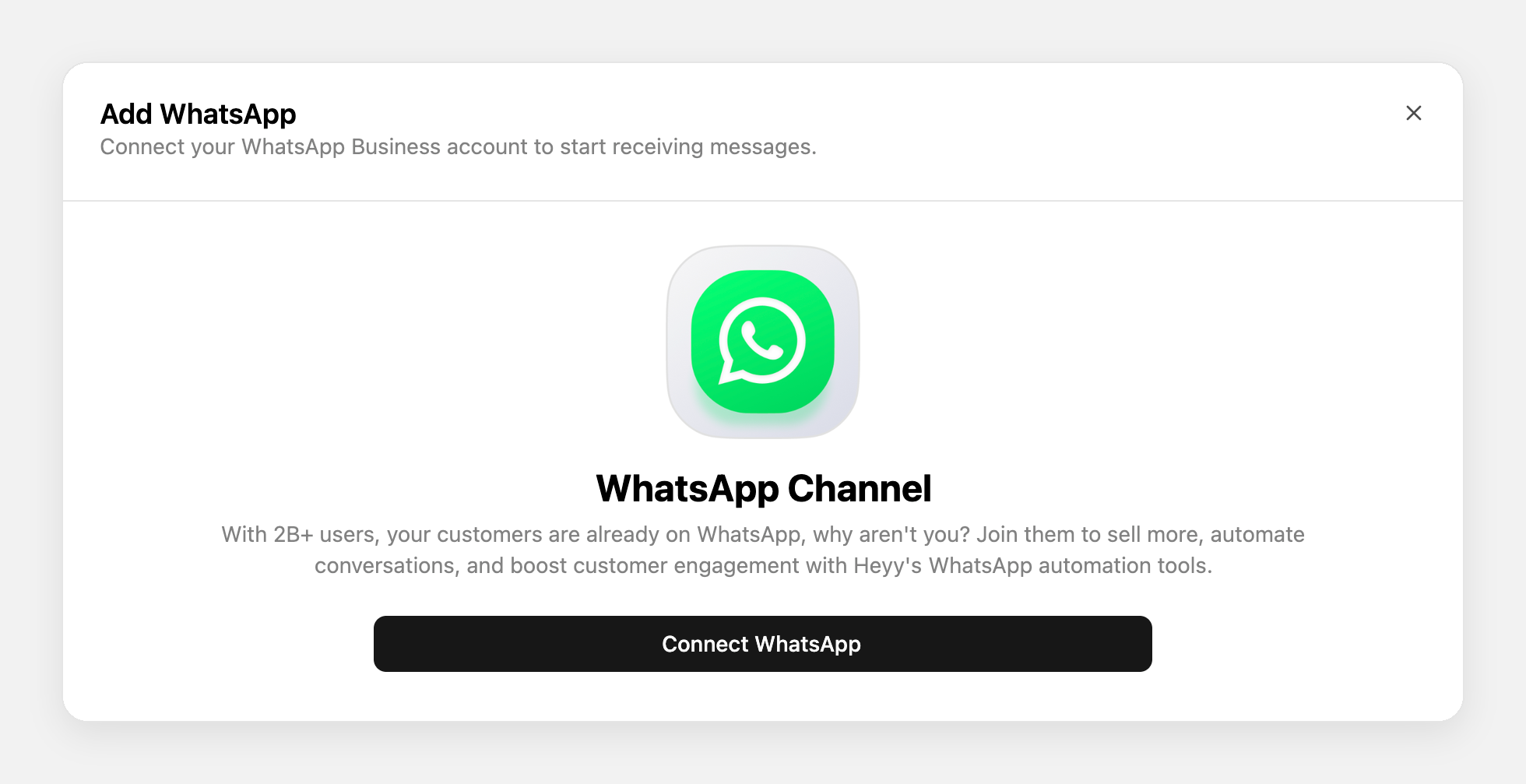
Step 1: Connect your WhatsApp number
Log in to Heyy, go to Settings → Channels → Add Channel, select WhatsApp, and click Connect Number. Choose Cloud API, which is recommended for most businesses, or Coexistence, which lets your team keep using the WhatsApp Business app on their phones.
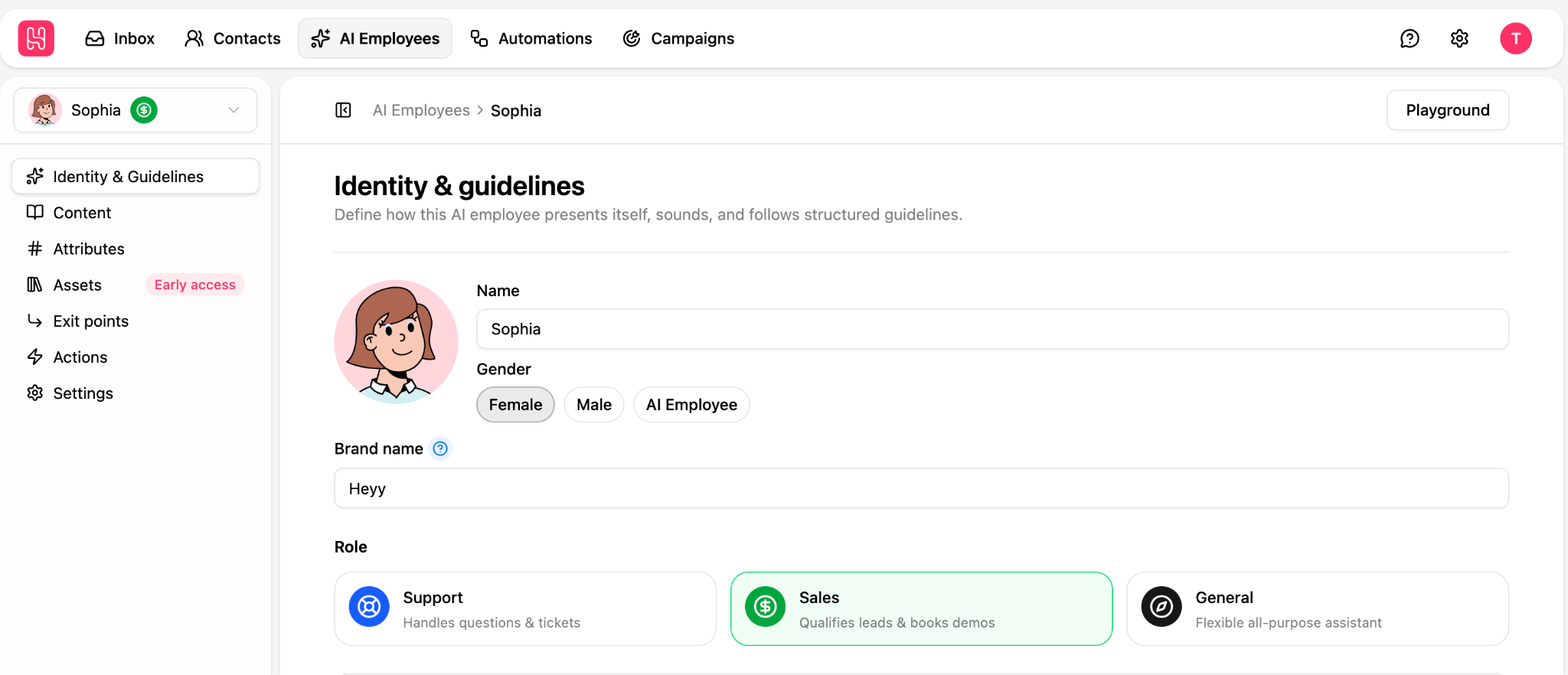
Step 2: Create a sales AI Employee
Give your AI Employee a name and a sales role, then set its tone and how long its answers should be. A property agency might choose warm and professional. A streetwear brand might go casual and brief.
Step 3: Give it your product knowledge
Add your website, price lists, product details, and answers to the questions leads ask most. Then add the files it can send in chat, like brochures, colour guides, case studies, or floor plans.
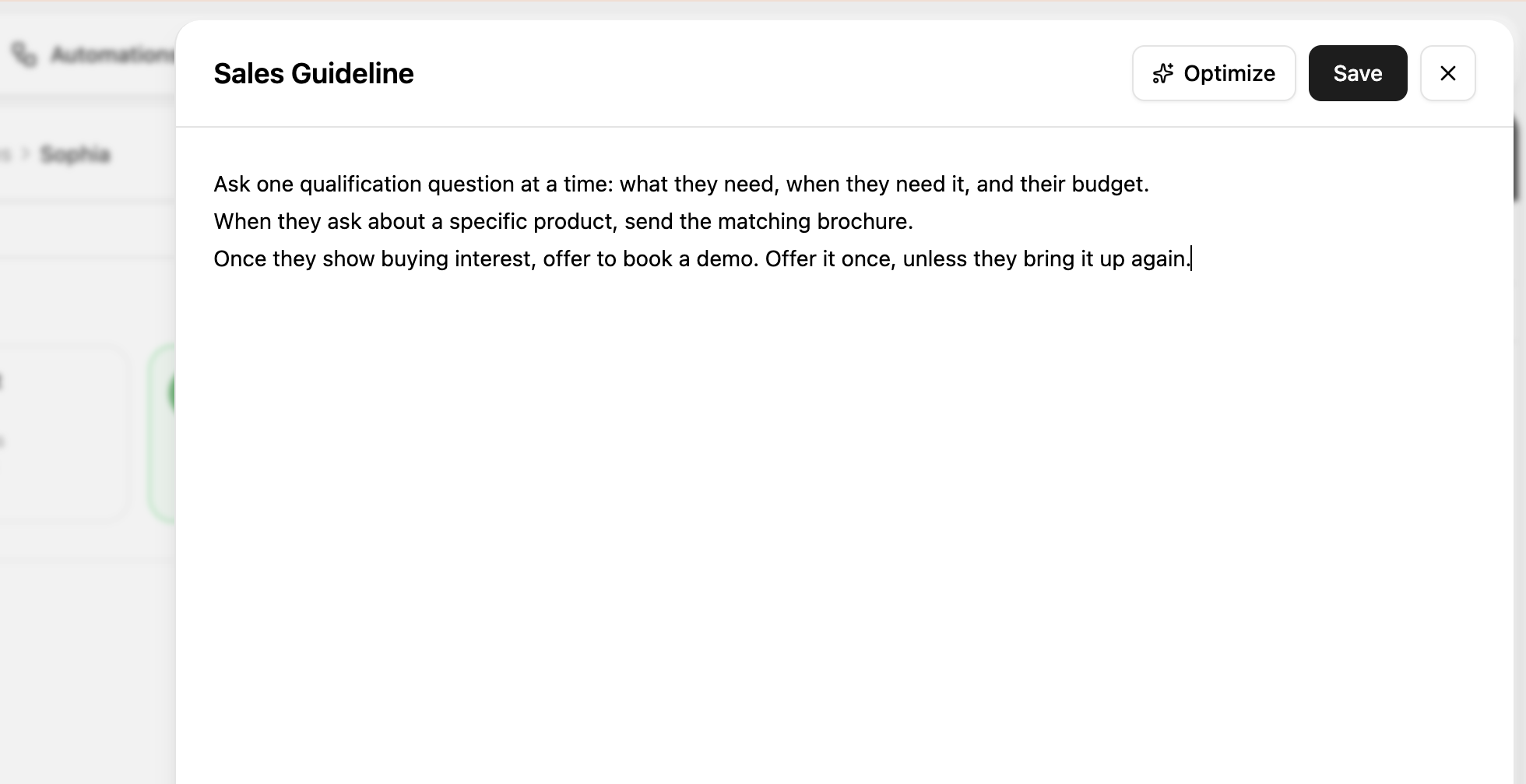
Step 4: Write your sales guidelines
Guidelines tell your AI Employee how to run each conversation. For sales, that’s where your qualification questions and next steps go. For example:
Step 5: Decide when to hand over to a person
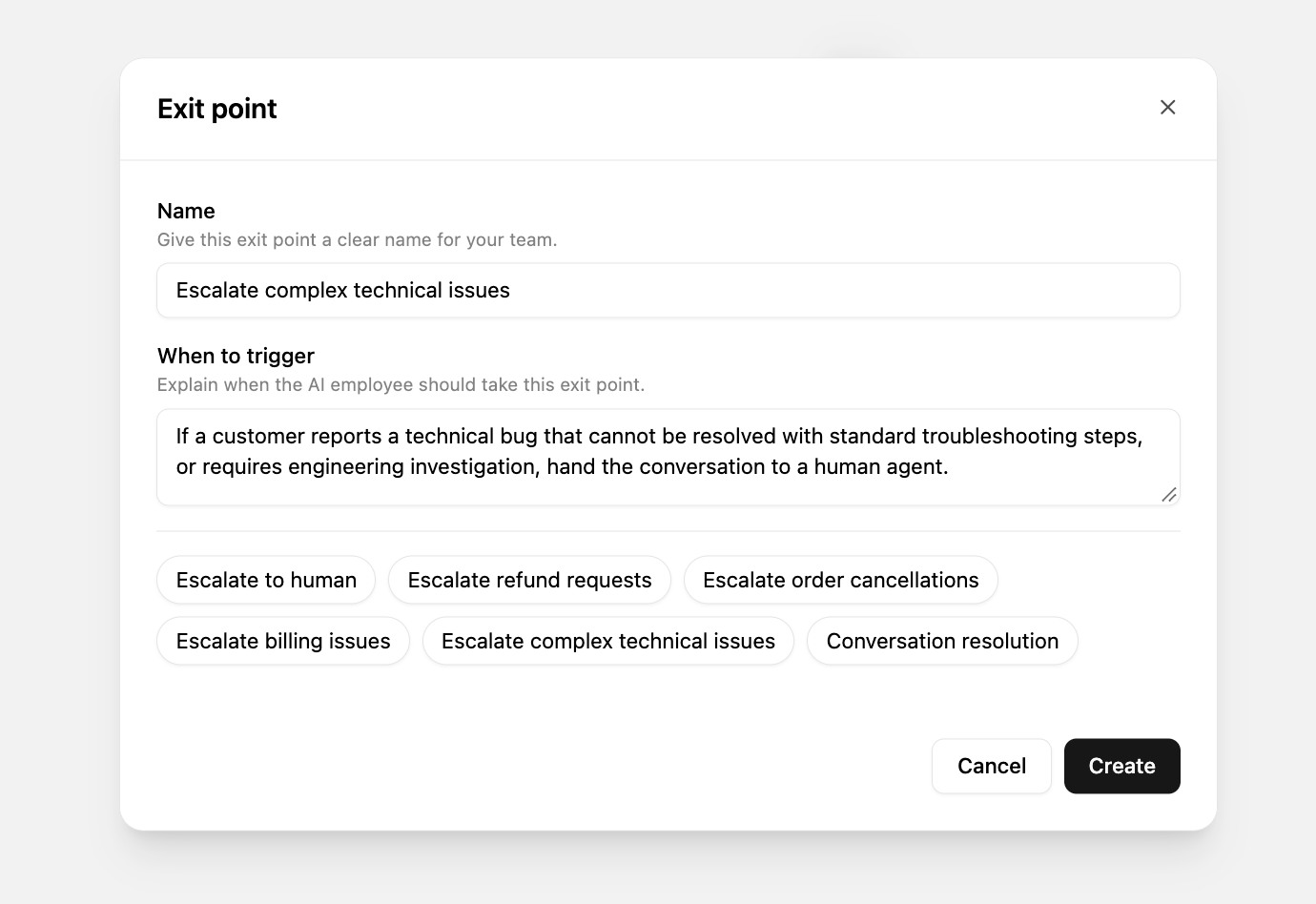
Exit points decide when the AI Employee passes a conversation to your team. For example: when a lead is qualified, asks for a custom quote, or wants to speak to someone. The salesperson sees the whole conversation, so the lead never has to repeat themselves.
Step 6: Route leads to the right salesperson
In Automations, build a flow that starts with a new incoming WhatsApp message, adds your AI Employee, and assigns qualified leads to the right person or team. Add a Contact Not Replied condition to reassign or close conversations when a lead goes quiet, so nothing sits forgotten in the inbox.
Step 7: Close and follow up
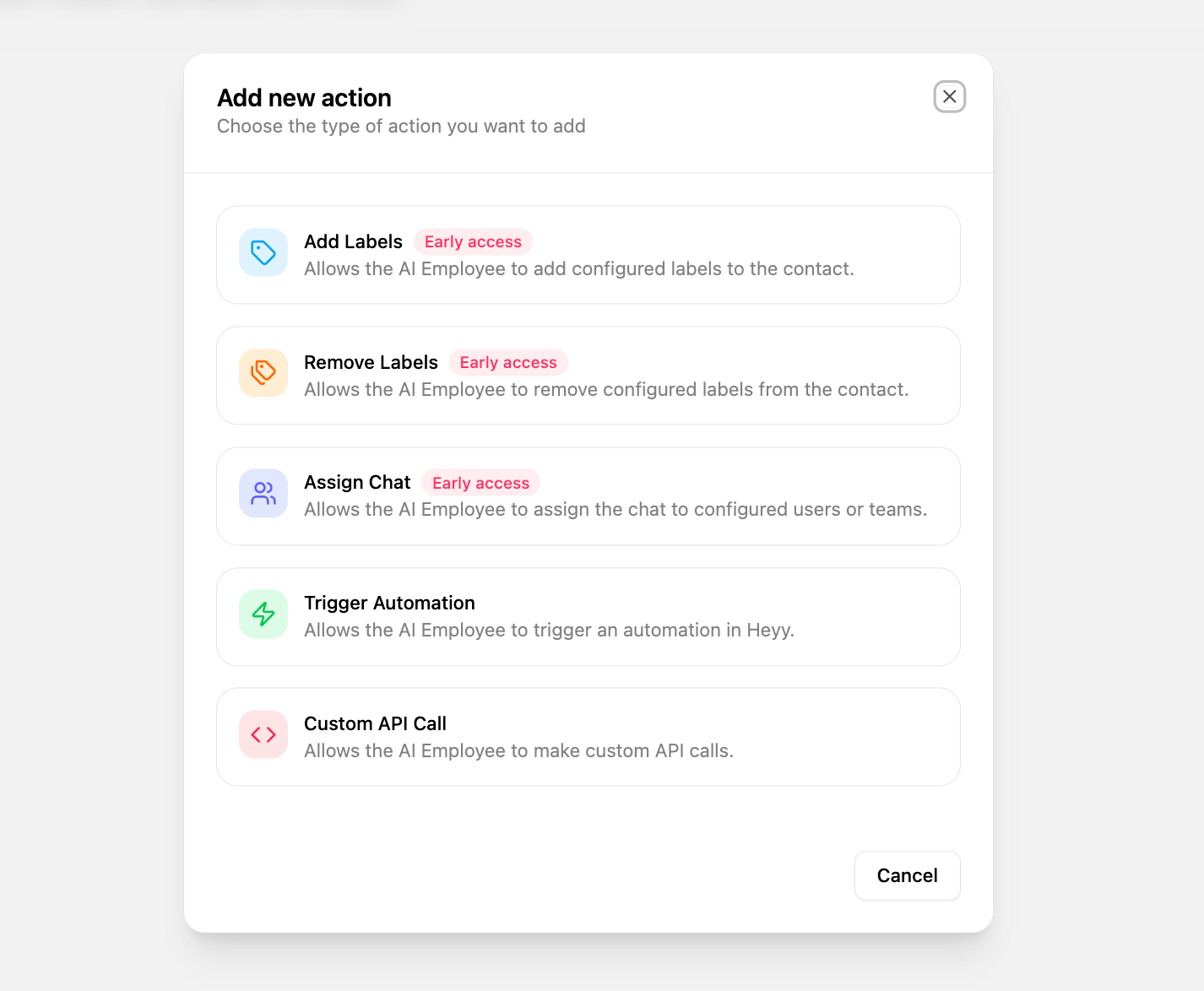
Use Actions to connect your AI Employee to the tools you already use. For example, you can send a payment link from your payment provider through the API, or notify your team when a high-value lead comes in. For leads who’ve gone quiet, send an approved template, or run a campaign to opted-in contacts.
What to measure
You don’t need a complicated dashboard. These five numbers tell you whether your WhatsApp sales process is working, and where it’s leaking.
First response time. How long a new lead waits for your first reply. If this is long, nothing else matters much.
Qualification rate. The share of new conversations that turn into qualified leads. A low rate usually means you’re attracting the wrong people, or your questions aren’t getting answered.
Chat-to-sale conversion. The share of qualified leads who buy. If this is low, look at your recommendations, objections, and how clearly you offer the next step.
Time to close. How long it takes from first message to sale. If it’s creeping up, leads may be waiting too long between replies.
Follow-up response rate. How many quiet leads reply to a follow-up. If almost nobody does, your follow-ups probably aren’t giving people a reason to come back.
Common WhatsApp sales mistakes to avoid
Getting the first reply wrong. Sending just a price ("$1,450," then silence) ends the conversation, and sending five questions at once reads like a form. Answer what they asked, then ask one question back.
Messaging people too much, or without permission. Three "just checking in" messages in a week is a fast way to get blocked, and messaging imported lists or people who never opted in breaks WhatsApp's rules. Both put your number at risk.
Leaving leads in a shared inbox nobody owns. If everyone can see a lead, it often means no one replies. Assign every qualified lead to a person. In Heyy, your AI Employee can do this for you, assigning each qualified chat to the right salesperson or team as soon as the lead is ready.
Waiting to reserve your username. Usernames are first come, first served. Reserve yours before someone else does.
WhatsApp for sales FAQs
1. Is WhatsApp good for sales?
Yes, especially for businesses where customers have questions before they buy. WhatsApp lets them ask those questions in a conversation, get answers quickly, and see photos or brochures in the same chat.
2. How do you qualify leads on WhatsApp?
Ask about their needs, timeline, budget, and who decides, one question at a time. Keep it conversational, and record the answers so your team knows who’s ready to buy.
3. Can businesses advertise on WhatsApp?
Yes. Businesses can run click-to-WhatsApp ads on Facebook and Instagram, and Meta has been rolling out ads inside WhatsApp’s Updates tab, between Status updates. Both open a chat with your business.
4. Can I send sales messages to people who haven’t messaged me?
Only if they’ve opted in to hear from your business, and only using an approved template message. Messaging people who haven’t agreed to hear from you breaks WhatsApp’s rules.
5. How often should I follow up on WhatsApp?
Usually once inside the 24-hour window, then once more with a template a few days later. After that, stop and leave the door open.
6. Can AI qualify leads on WhatsApp?
Yes. An AI agent can reply instantly, ask your qualification questions, send the right files, and hand qualified leads to a salesperson.
7. Can I take payments on WhatsApp?
It depends on your country. You can always send a payment link from your payment provider in the chat, and some countries also support paying inside WhatsApp.
8. Should I use the WhatsApp Business app or the API for sales?
The free app works for one person handling a few leads. Once several people are selling, or you want AI, automations, and follow-up campaigns, you’ll need the WhatsApp Business Platform (the API) through a provider like Heyy.
Turn more WhatsApp conversations into sales
Your leads are already on WhatsApp, asking the questions that decide whether they buy. Reply fast, qualify with care, follow up within the rules, and always make the next step easy.
With Heyy, an AI Employee replies to every lead in seconds, asks your qualification questions, and hands qualified leads to the right salesperson. Your team works from one shared inbox, with your Mini-CRM, campaigns, and automations built in.
Sources
- Meta, Introducing Meta Business Agent on WhatsApp (Conversations 2026)
- Meta, Business-scoped user IDs and usernames
- Meta, Pricing for non-template messages (October 1, 2026 pricing, 72-hour free entry point window)
More blog posts to read

Ready to Automate Support
Across Every Channel?
.svg)
.avif)